


markovesterinen
Participating Frequently
June 9, 2016

P: Can't read DNG files from Fuji X-E2 anymore

  • June 9, 2016
  • 75 replies
  • 2251 views

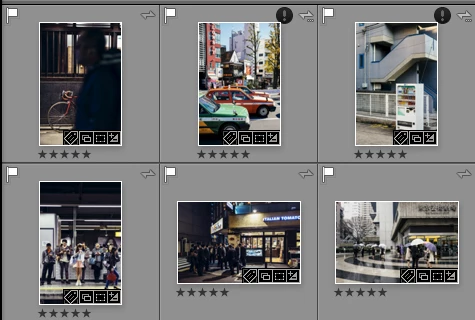
Just installed the new Lightroom CC 2015.6 / 6.6 update and i have a really strange issue. All my files are in DNG format. Everything works fine except the files from my Fuji X-E2. Lightroom and Photoshop can't read these anymore! The files get's a black exclamation mark next to them. See the screenshot. 
All files from the other Fuji X-series cameras works just fine. It's only X-E2 files that doesn't. 
The files work just fine with any other software and i tried them on a different computer which has the previous version of lightroom CC and there they work just fine!
Is there a way to make a roll-back to previous version?
This topic has been closed for replies.

75 replies

Known Participant
July 7, 2016
hello everyone...i came here from friendly links from other users. I have the same problem....I have tried to downgrade my app but I'm not able to do it, the only option in my cc interface is to uninstall....how can I go to an earlier version of camera raw? can someone help me? I'm in trouble on work stuff I have to deliver as soon as possible....

THANKS....and Please Adobe update this trouble!! As soon as it will be ok I will export everything into good jpgs.
Gabriele Lopez Photography
Victoria Bampton LR Queen
Community Expert
Community Expert
July 6, 2016
> Why can't they just implement this same ACR version in a LR 2015/6 > .6.1?

Ed, they will, but there's more testing that has to go into Lightroom as it's not just a plugin. (And unfortunately much of Adobe is closed for the holiday, which is delaying things slightly)
Victoria - The Lightroom Queen
wizmosis
Known Participant
July 6, 2016
Simon, thanks for replying and news on the update, and yes, I understand that bugs happen, but Adobe has been really lax in communicating with users, and warning people about the potential problems. Your reply is too little, too late. It took me 4 hours of unpaid time with tech support chat to solve the Bridge/dual monitor bug and the Camera Raw bug, and only by going back to previous versions, which is a lame solution. 

I couldn't read Fuji files for one client, and then I couldn't read NEF files for another, and then a third client called in a panic because she had upgraded and couldn't read her raw files. Total chaos, and the worst part is I've now lost several hours of client work because of your mistakes, not to mention credibility with the people who pay me to be an expert. I'm a freelancer. This is my livelyhood. That my earnings depend in large part on your company's products is suddenly very scary.

You need to communicate with users in more easy-to-access ways, not deep in forums for us nerds when there is a problem, and you need to do it much more quickly than you have. This should have been posted right on the upgrade page.

You may have market share now, but so did the Quark Company long ago. They weren't responsive to their user base, and suddenly something better came along and Quark was a ghost town. Adobe is huge, but it could happen. Treat your users with respect. Communicate well and often. Give us great tech support. Earn our loyalty. 
Just Shoot Me
Legend
July 5, 2016
Thanks BUT.
There is already a patch for Bridge and Photoshop that fixes this problem. ACR 9.6.1
Why can't they just implement this same ACR version in a LR 2015/6 > .6.1?
Inspiring
July 5, 2016
The Last lightroom update I downloaded broke Lightroom, meaning I could not import anything. No Nikon D700 raws, no Nikon d750 raw. I have no idea if they fixed it or not. When I called I was told to put on a older version. I don't know weather that bug was ever fixed. I would like to upgrade again but the problem is when I'm busy tracking down bugs becomes a real time suck. You would think they might say the bug fix is complete. This was a few months ago.
Adobe Employee
July 5, 2016
No conspiracy theory here. Accidents/bugs do happen during the development process despite the team's best effort to catch issues like this before the release. As I understand it, this Fuji X-E2 caught the team off guard because some unexpected variations of Fuji X-E2 firmware version stamps have thrown off the parsing code. The team has added unit tests to check the case for the future releases. 

The team is working to release a patch to address this issue and others.

Thank you for your patience.
Participating Frequently
July 2, 2016
I second Victoria. Unless you're fed up with Adobe products in general, I'd suggest contacting Adobe support again. Not a fun or a productive use of your time, though I would hope your recent experience and frustration would yield a better result with the next support person you contact. I'm too invested in LR & PS, with years of trouble-free use added to the equation, to think of ditching them now. I've had similarly frustrating issues with other major software--even important hardware--over the years to think this experience with Adobe is all that unique. That said, I do continue to be baffled by the official "silence" of a company like Adobe (or Apple, etc.) in the face of obvious bugs when it would go such a long way in retaining customer good will and loyalty to fess up and put minds at ease by (1) officially acknowledging the problem ("known issues"), (2) estimating when the problem will be fixed and how, and (3) providing detailed interim solutions (e.g., links to the roll-back solutions to this current issue). And--as in this case--when paying subscribers are being denied full value for their software subscriptions, a credit of some kind helps ease the pain. That you're being forced to jump through more hoops to get this modicum of satisfaction is just poor business practice by Adobe.
ssprengel
Inspiring
July 2, 2016

According to someone a few hours ago, they got ACR 9.6.1 via CC Desktop updates, but trying it just now, I am not; however, the ACR 9.6.1 bugfix appears to be available as a manual installer:
https://helpx.adobe.com/camera-raw/kb/camera-raw-plug-in-installer.html

But as of Saturday mid-morning Central US time, LR 6.6.1 isn't, yet:
https://helpx.adobe.com/lightroom/kb/lightroom-downloads.html

Adobe US is closed all next week (July 4 to 😎 so it remains to be seen if they'll put out an update over the holiday or not.

Participating Frequently
July 2, 2016
After I rolled back to the earlier versions of LR, PS and ACR, I had no further problems with DNGs converted from my X-E2. I plan to keep using these earlier CC versions-- LR CC 2015.5.1, PS CC 2015.1.1, and ACR 9.5.1.--until the next update to the current versions, if that's not too confusing!
Victoria Bampton LR Queen
Community Expert
Community Expert
July 2, 2016
Chase them William. Sadly not all of the support staff are as good as some others.
Victoria - The Lightroom Queen