

Participating Frequently
July 25, 2023

P: Canon 24-240 lens profile v3

  • July 25, 2023
  • 56 replies
  • 16151 views

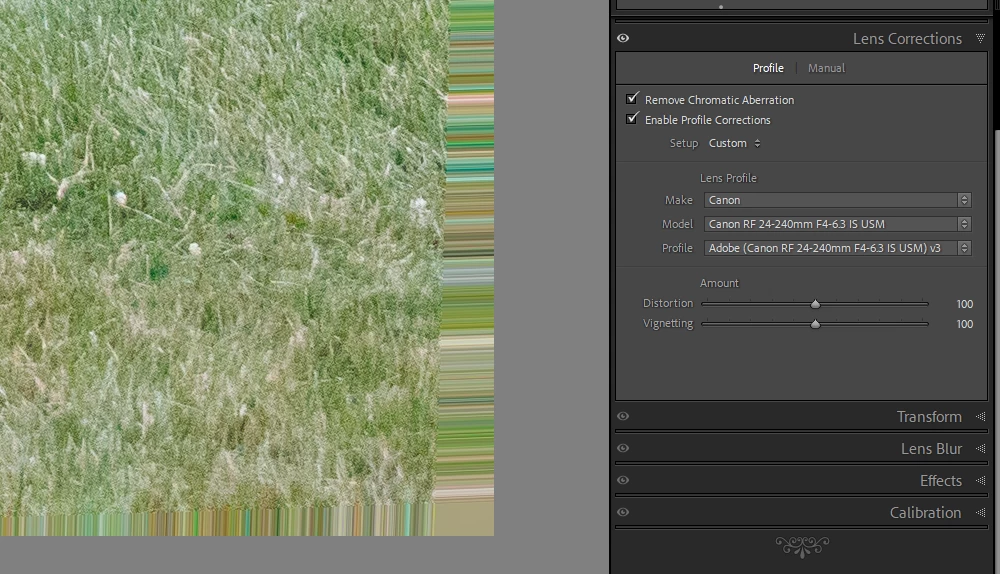
On the latest Lightroom Classic release version 13.5 there is a new lens profile (v3) for the Canon 24-240 lens. It has reintroduced the "bad borders" bug. Workaround is simply to select the older v2 profile.

This topic has been closed for replies.

56 replies

Ian Lyons
Community Expert
Community Expert
August 20, 2024

The issue is due to a faulty lens profiles. Select the v2 profile rather than the new v3 profile.

Participant
August 20, 2024

GoldingD
Legend
August 20, 2024

Please post your System Information as Lightroom Classic (LrC) reports it. In LrC click on Help, then System Info, then Copy. Paste that information into a reply. Please present all information from first line down to and including Plug-in Info. Info after Plug-in info can be cut out as that is just so much dead space to us non-Techs and it takes up vast amounts of scroll space making the reply less readable and less likely that others will bother with your post.

Inspiring
August 19, 2024

I wish I could file a bug, but so far I failed to find out how to file a bug with Adobe these days.

In Lightroom Classic with the lens profile for 24-240 RF selected the edges of every image are garbled. When I disable the lens profile and adjust some fetaures manually (e.g. vigneting) the image is correct.

How to report ths to Adobe?  I am not sure if only that one lens is impacted, and if other have already reported this issue.

Jeff Arola
Community Expert
Community Expert
August 16, 2024

The just released Camera Raw 16.5 includes a fix

https://helpx.adobe.com/camera-raw/kb/fixed-issues.html

Participating Frequently
August 16, 2024

I have ACR 16.5 and the problem still exists.  I believe the 16.5 fix was for the 24-105L lens.

Ian Lyons
Community Expert
Community Expert
August 17, 2024

Adobe have already been advised of the bug with the profile and a formal bug report submitted. 


> I believe the 16.5 fix was for the 24-105L lens.


The new v3 profile for the 24-240mm fixed a corner shading issue at wide angle end. The issue shown in above screenshots tends to occur at around 50mm and longer. As indicated in the original post at top of thread,  the v2 profile does not exhibit the edge streaking issue and is probably the better option for now.

Participant
August 16, 2024

I have lately a problem with some RAW pictures from my Canon EOS R with lens 24-240. The raw pictures have on both sides color stripes in an area that in the JPG pictures don't exist. This picture is an sreen cutting of the stripes on one side. 

Participant
July 25, 2023

In the Lightroom App on my iPad I still see artefacts on the borders of RAW images (cRAW) shot with the Canon RF 24-240 with some focal lengths (above 100 mm) . This was a problem in Lightroom Classic back in 2020 due to a corrupted lens profile v2 in Lightroom, the problem was then fixed in Lightroom Classic but it is still there in the mobile application. When I turn the lens correction off the artefacts are no more there. And when I look at the photo in Lightroom Classic there are no artefacts with both lens profiles (normal profile and v2) Has anybody a solution? By the way: why are there still two profiles for this lens in Lightroom? And which one should be the default setting?

Participant
November 18, 2024

I have the same problem.  LRC fixed the problem, but not LR for IPAD.  Any progress?