



johnrellis
Legend
November 18, 2025

P: Distraction Removal > People replaces people with black replacement patch

  • November 18, 2025
  • 4 replies
  • 162 views

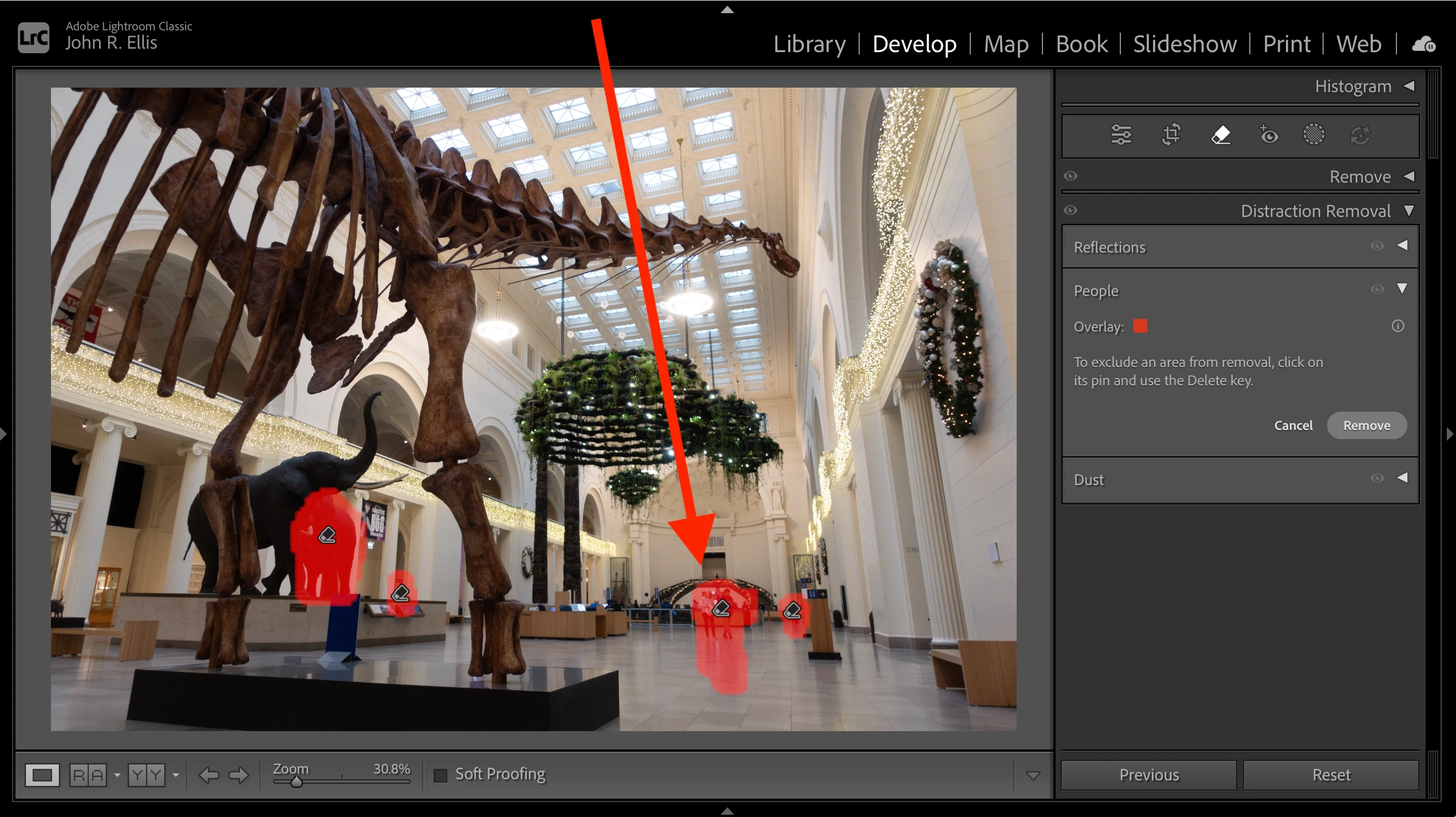
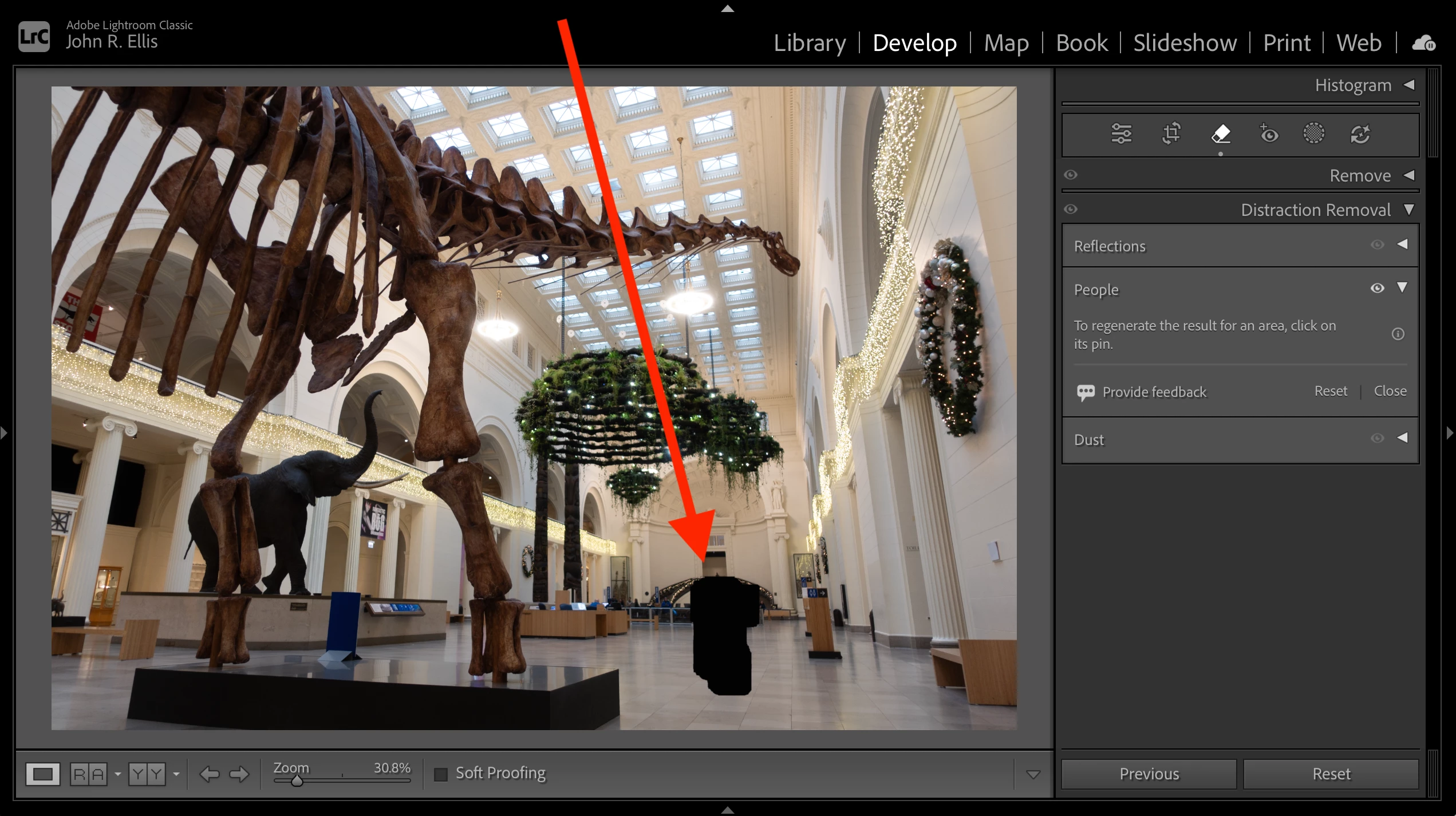
On the attached photo, Distraction Removal > People replaces a group of people with a black patch, not a generated removal.


Tested on LR 15.0.1 on Mac OS 15.7.1, Mac OS 26.1, and Windows 11 Intel (so not specific to a GPU or driver). See the attached screen recordings for each of the three installations.


To reproduce:


1. Import the attached photo DSC02574.ARW.


2. In Develop, select Distraction Removal > People. Observe the group of people and their reflections are selected:
 

3. Click Remove, and observe that selection is replaced by a black patch rather than a generated removal:


4 replies

johnrellis
Legend
February 21, 2026

I verified that the problem no longer occurs with the photo in the first post.

Rikk Flohr_Photography
Community Manager
February 20, 2026

Greetings all,  


A new update for the Adobe Photography products has been released.  The February update contains an update regarding this issue. 

If you do not see the update in your Creative Cloud Application, you can refresh it by pressing  [Ctrl/Cmd]+[Alt/Opt]+[ R ].

Note: It may take up to 24 hours for your update to be available in your Creative Cloud app.


Thank you for being so patient.  

Rikk Flohr: Adobe Photography Org
johnrellis
Legend
February 8, 2026

@Rikk Flohr_Photography, six more people have reported these symptoms of black replacement patches for Generative AI Remove in the bloated Generative Remove feedback thread. None has reposted the details and their upvotes here, despite being asked (of if they did, the reposts haven’t been migrated yet).


@udoh56051636 
https://community.adobe.com/questions-675/p-generative-remove-feedback-lr-classic-lr-eco-978899/index2.html?postid=7494109#post7494109


@Bentley B 
https://community.adobe.com/questions-675/p-generative-remove-feedback-lr-classic-lr-eco-978899/index2.html?postid=7494107#post7494107


@vincentr36861937 
https://community.adobe.com/questions-675/p-generative-remove-feedback-lr-classic-lr-eco-978899/index2.html?postid=7487887#post7487887


@thePhilograph 
https://community.adobe.com/questions-675/p-generative-remove-feedback-lr-classic-lr-eco-978899/index2.html?postid=7487597#post7487597


@michaelw47857878 
https://community.adobe.com/questions-675/p-generative-remove-feedback-lr-classic-lr-eco-978899/index2.html?postid=7485639#post7485639


@Brynn244646360put 
https://community.adobe.com/questions-675/p-generative-remove-feedback-lr-classic-lr-eco-978899/index2.html?postid=7493975#post7493975

Rikk Flohr_Photography
Community Manager
November 18, 2025

@johnrellis  I've moved this to Camera Raw as the CR Engine is responsible for the failure. 

Bug logged. Thanks for the image and the report. 

Rikk Flohr: Adobe Photography Org