


Known Participant
December 14, 2023

P: DNG Converter running out of memory (version 17.1.0.2100)

  • December 14, 2023
  • 5 replies
  • 1989 views

I've reported on memory issues with the DNG Converter before, but it's getting worse and someone needs to tell the developers.
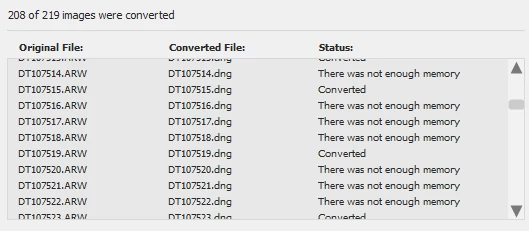
Today it failed to convert 11 images because it ran out of memory.  This is on a 64Gb system with 32 threads (AMD Ryzen 9 3950X 16-core)

From the outside looking in - I'm pretty sure there is a memory leak. I'm guessing that it opens the Sony ARW files and doesn't free up memory after converting and writing the DNG to disk.  So the more files it processes, the more memory it uses and pretty soon it runs out of memory.  It had successfully converted 42 files before it started showing the "not enough memory" errors. 

Before anyone suspects there was something wrong with the 11 images that it failed to process the first time, I re-ran the DNG converter and JUST those 11 images and it finished all of them very quickly and without error.
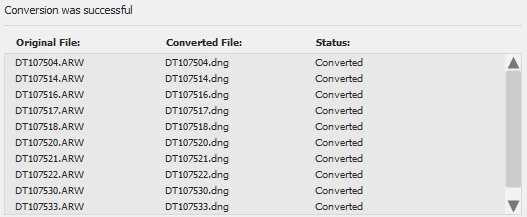

This is with version version 17.1.0.2100 set to:
Camera Raw 16.0 and later

JPEG Preview: Full Size
Embed fast load data

Don't use lossy compression
Preserve Pixel Count
Don't embed original


5 replies

Inspiring
October 8, 2025

I'm experiencing the same issues, in my case with converting to DNG in Lightroom. Converting 300 photos took over an hour, using practically all of my 64GB of RAM on an Intel Ultra 9. The performance issues in Lightroom are starting to become very worrying.

dwterryAuthor
Known Participant
April 24, 2025

This is really quite ridiculous. Are there any developers in here paying attention?  There were just 44 images and it ran out of memory for two of them.  This is on a 64GB Win11 system. There is nothing wrong with the two files that failed to convert. When I re-ran the conversion with just those two files they converted almost instantly.  I don't even exit the converter, I just click Ok, remove all of the files that converted successfully and then restart the conversion. This was with version 17.2.0.2155, but this running out of memory issue has been happening for awhile.


Known Participant
April 23, 2025

That is my experience but I have tried the standalone and in Bridge (I don't use LR) and have the same problem with both. It doesn't matter what I do it just throttles back when left alone. It is much faster if I am working on the computer and can keep the window of the standalone live. Like that it can do a 1000 in maybe an hour. If I leave it overnight it does about 350 in 8 hours! I have tried everything to make sure my computer isn't going to sleep when left, but it makes no difference. Completely bewildering.

Participant
April 23, 2025

Unfortunately bumping an old thread, but if it's any reconciliation, I have a 96GB Ryzen 9950X3D system and experience the same thing you do. The first 50-100 files go at a reasonable speed but then everything starts dragging and chugging once we get 100 photos in or so. I can get maybe 700 done in about 8 hours while I sleep and I'm shooting 3.5k shots a wedding... which is not ideal. 

Converting in the standalone converter seems to work faster than doing it in Lightroom. The standalone converter will at least saturate my memory, likely due to working on many photos at a time — it seems lightroom only converts one or two at a time. 

dwterryAuthor
Known Participant
December 14, 2023

I walked away after loading tonight's session and after about a half hour came back to discover the DNG Converter still had not finished converting about 900 files. That is crazy long on my system. I noticed that moving my mouse was jerky, and that the conversion itself appeared frozen. So I aborted it. Moved all of the finished files and restarted with only 211 files left to go.


After it had finished about 100 of the images, the system was again extremely slow and the conversions were taking forever. So I brought up Task Manager. You can see what it looked like in the screen capture down below (100% cpu utilization and 87% memory).  This is on a Windows 11 machine with 64GB of memory and an AMD 3950 with 16 cores (32 threads) all of them pegged at full utilization.

I suspect the problem is a memory leak causing the DNG Converter to usurp all available memory and then the system just drives itself into the ground when there's very little memory left.

This occured using version 16.0.1.1683 with the following settings:
JPEG Preview: Full Size
Embed Fast Load Data

Don't use lossy compression
Preserve Pixel Count
Don't embed original

And this happened while processing files from my fairly new Sony a7iv  (not 'R'). 

I have had a Sony a7Riv (different from above - this one is a 60mp camera) for a couple of years now and have experienced "slow-ish" conversions, but nothing approaching this level of sluggishness nor taking over the system CPU and memory the way this one is.  So the problem might be a combination of the new camera (a7iv) and the settings I'm using (see above).

Here is a screen shot of what Task Manager looked like after converting about 100 of the a7iv images:


PECourtejoie
Community Expert
Community Expert
December 14, 2023

Moving to Camera Raw forum, so that @Rikk Flohr: Photography can notice it.

dwterryAuthor
Known Participant
December 21, 2023

Just reporting back... I noticed there was a newer version today so I downloaded it.  Version 16.1.0.1728.

Same problem. It very quickly zooms up to 100% memory and cpu utilization.  I let it convert a couple hundred, cancel the conversion. Kill it via Task Manager (because it takes FOREVER to exit even though the UI has closed). Then restart it on the rest of the files.  It's tedious restarting multiple times, but it's faster than letting it get stuck forever at full cpu/memory utilization.