



Todd Shaner
Legend
January 13, 2022

P: Enhance Super Resolution Negative Vignetting With Fisheye Lens Image Files

  • January 13, 2022
  • 7 replies
  • 338 views

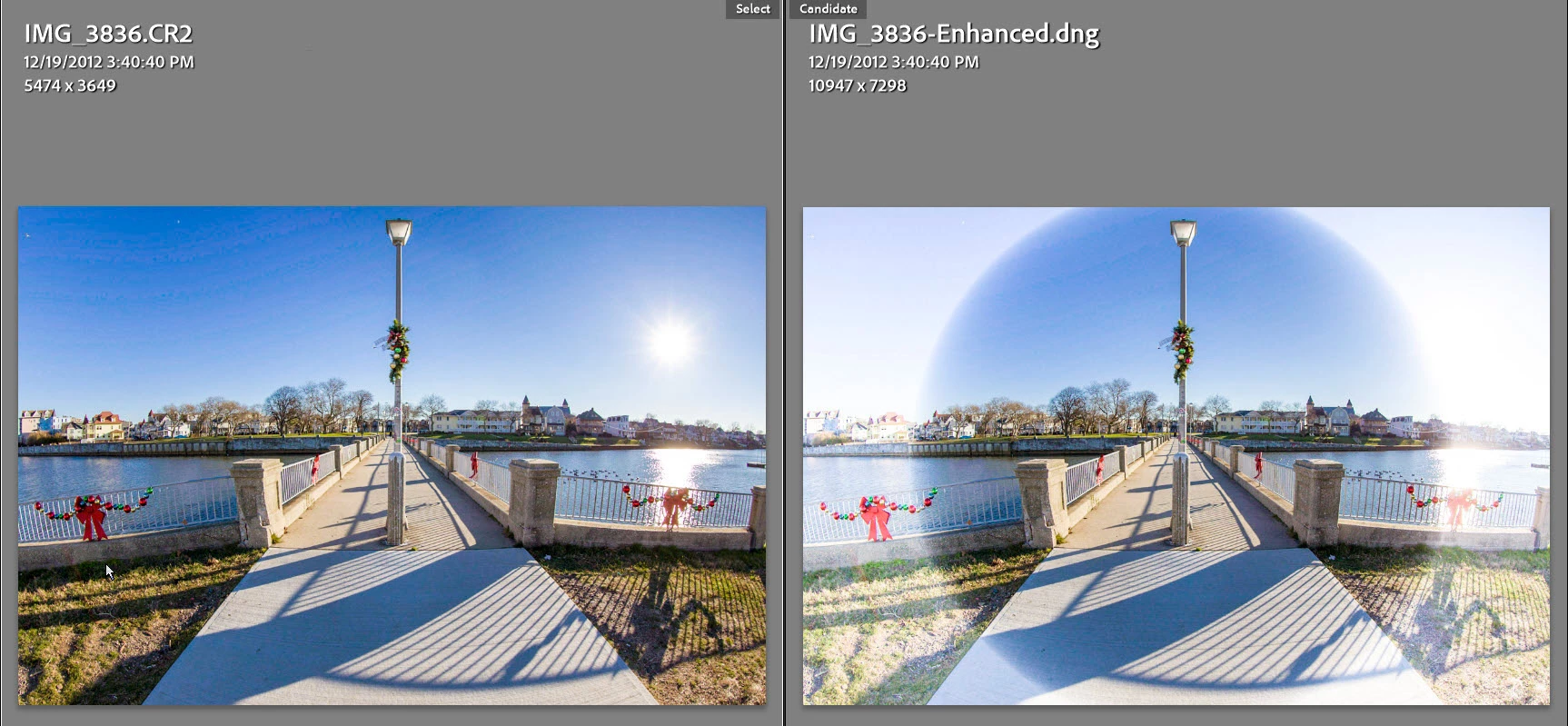
I'm using LrC 11.1 on a Windows 10 system with Canon 8-15mm F4 Fisheye USM lens and Canon EOS 5D MKII camera. When processing a CR2 file with Photo> Enhance> Super Resolution the resulting DNG file has a circular negative vigenette applied. I tried with GPU both enabled and disabled with the same results. Camera Raw 14.1 produces a DNG file with the same circular negative vigenette as shown below. If the file is exported to a TIFF file it does not exhibit the vignetting when applying Enhance Super Resoltution. It only happens with raw CR2 files.
 

This topic has been closed for replies.

7 replies

Todd Shaner
Legend
January 13, 2022

Thanks Rikk–Much appreciated!

Rikk Flohr_Photography
Community Manager
Community Manager
January 13, 2022

Set status - add bug number

Rikk Flohr: Adobe Photography Org
Rikk Flohr_Photography
Community Manager
Community Manager
January 13, 2022

Fails here too. I will get a bug written. 

Rikk Flohr: Adobe Photography Org
Todd Shaner
Legend
January 13, 2022

I checked my Canon Rebel T3i (AKA 600D) and it exhibits the same issue with the 8-15mm F4 Fisheye USM lens. I've added a CR2 raw file shot with that camera body to the above Dropbox folder link.

Todd Shaner
Legend
January 13, 2022

Rikk, here's a link to the CR2 file. I found a CR2 file shot with this lens on a Canon EOS 70D APS-C crop body and it does not exhibit the issue. It may be both camera model and lens specific, which in my case is the Canon 5D MKII with the Canon 8-15mm F4 Fisheye USM lens.


https://www.dropbox.com/sh/qoj7fvh4ae4f26b/AABJrqEuB1nhm1spm0PBk2Cea?dl=0


Rikk Flohr_Photography
Community Manager
Community Manager
January 13, 2022

I don't have that lens Todd. I tried it with a 5DMKII and a 15 MM Fisheye but didnt' get the circle. Any chance you can supply me with a sample file?

Rikk Flohr: Adobe Photography Org
Todd Shaner
Legend
January 13, 2022

I'm using LrC 11.1 on a Windows 10 system with Canon 8-15mm F4 Fisheye USM lens and Canon EOS 5D MKII camera. When processing a CR2 file in Camera 14.1with Photo> Enhance> Super Resolution the resulting DNG file has a circular negative vigenette applied. I tried with GPU both enabled and disabled with the same results. Both Camera Raw 14.1 and Lightroom Classic 11.1 produce a DNG file with the same circular negative vigenette as shown below. If the raw file is exported to a TIFF file it does not exhibit the vignetting when applying Enhance Super Resoltution. It only happens with raw CR2 files.