


The Art of Retouching
Inspiring
March 19, 2019

P: Fuji X-T3 Some images can not make Adjustments

  • March 19, 2019
  • 13 replies
  • 235 views

Lightroom 8.2 Supported camera Fuji X-T3 has some images come up with exclamation points saying:

"Lightroom has encountered problems reading this photo. You will not be able to make adjustments to the photo."

It's odd, from one image to the same in the same shoot it fluctuates between what is readable, and what isn't. I'd say file corruption, but they open fine in Adobe Camera Raw 11.2

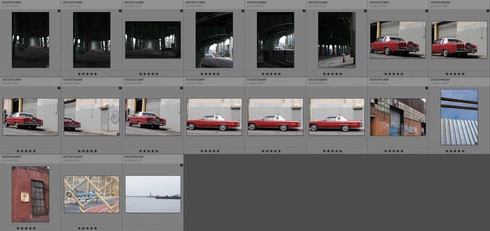
I've checked file permissions, tried on multiple Mac/PC machines. Everything seems normal. Attached screenshot is just example of how some images read/write fine and others have that black bullet with an exclamation point in it.
This topic has been closed for replies.

13 replies

johnrellis
Legend
March 19, 2019
If you upload one of the problem images to Dropbox or similar and post the sharing link here, we can see if the problem occurs with other LR installations or is specific to yours.
The Art of Retouching
Inspiring
March 19, 2019
Not THIS exclamation point. It's different. (See attached)

I know where the file is, it just says it can't modify it. I also tried to build Smart Previews, but they failed to build. I tried Quick Develop, but that failed.

FUN FACT: I WAS able to import with a Preset that adjust HSL and Auto Tone. LR doesn't show anything happening. But I Exported the Metadata (created XML File), and opened in Photoshop with Adobe Camera Raw 11.2 (same as LR) and it opened with the preset changes, including the Auto Tone.

This is a super bug somewhere. Any ideas?


Just Shoot Me
Legend
March 19, 2019
An Exclamation mark on images means the actual image file is missing. You either moved or deleted them. Right click on one of them and select Go to Folder in Library and then do that again and select Show in Explorer or Finder. See if the files are where LR thinks they are. If they aren't then Search you drive for one of them.