


Inspiring
August 24, 2011

P: Lightroom and ACR: Jagged edges on diagonals

  • August 24, 2011
  • 6 replies
  • 563 views

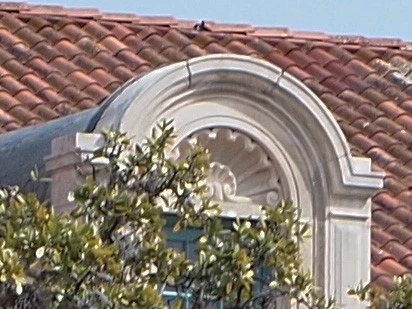
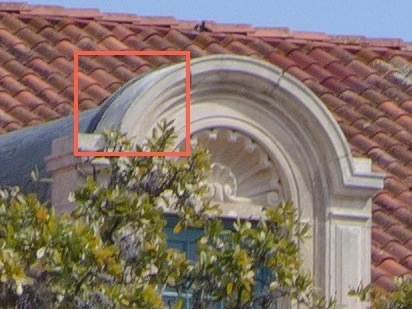
Olympus EP-L1 raw files have serious jagged diagonals. They're visible on sharp curved surfaces but not on straight sharp diagonals from 0o to 45o. Below is a comparison between in-camera jpeg and .ORF converted to DNG in Lightroom 3.3, ACR 6.3. BTW, this is visible on .ORF files as well as DNG. I took these photos with RAW+JPEG at full resolution, highest quality. Notice also how the Bayer decoding affects complex texture.

JPEG

RAW

Please take a look at my dpreview forum thread for more examples and comparisons to other RAW decoders.
http://forums.dpreview.com/forums/rea...

Running LR 3.4 on Mac OS X Lion

Best Regards

This topic has been closed for replies.

6 replies

Inspiring
November 29, 2012
OK! So this is something we have to accept if we are using LR4? No "fix" on the horizon?
dorin_nicolaescu
Inspiring
November 29, 2012
To be fair to ACR developers, I must say that I would not consider it a flat out bug, but rather a limitation of the demosaicing algorithm. A demosaicing algorithm is always a balancing act. On one hand, between detail and artifacts, quality in different cases patterns, and on the other hand, perhaps, between quality and performance too. So, compromises have to be made.

To illustrate this, I generated a few more renderings with dcraw, using different options. I also add the raw mosaic image for reference.


Note the same 2 pixel jaggies in the default dcraw AHD (Adaptive Homogeneity-Directed) rendering. They are gone with the -f switch (nterpolate RGB as four colors), at the expense of more color artifacts, especially in the near-vertical blade of grass.
dorin_nicolaescu
Inspiring
November 29, 2012
Here's my own example shot with a Nikon D70 and the 18-70 kit lens. In the ACR example, note the difference in rendering between the diagonal blade of dry grass on the right and the more upright (~30 deg) one on the left. In-camera generated preview does not exhibit the problem.


Lightroom 4.3 RC.
Inspiring
November 29, 2012
Lightroom 4, Ricoh GXR mount A12: the cameraprofile suffers from "jaggies". This camera has no AA filter. Probably there is a mixup with other GXR modules, such as A12 50 mm and A12 28 mm, which have the same sensor (but with a AA filter). Hope I am clear! Please correct profile for GXR mount A12. Many thanks.

Inspiring
August 25, 2011
Hi Benjamin

My thoughts exactly.
Most compact cameras have weak low-pass filters in order to get sharp jpegs. Such an improvement to the demosacing algorithm is becoming a priority as the market is flooded with RAW capable compacts.

Thanks!
Community Manager
August 25, 2011
This happens with raw files from cameras that have a very weak (or non existent) low pass (anti-aliasing) filter. We are working on improvements to our demosacing algorithm that will handle cases like this better.

Thanks,
Ben