


Inspiring
May 23, 2026

P: (macOS) Photoshop v27.7 ACR 18.3.1 Context menu doesn't work in Color Grading of masks

  • May 23, 2026
  • 2 replies
  • 55 views

macOS 26.5

Photoshop 27.7

Camera Raw 18.3.1
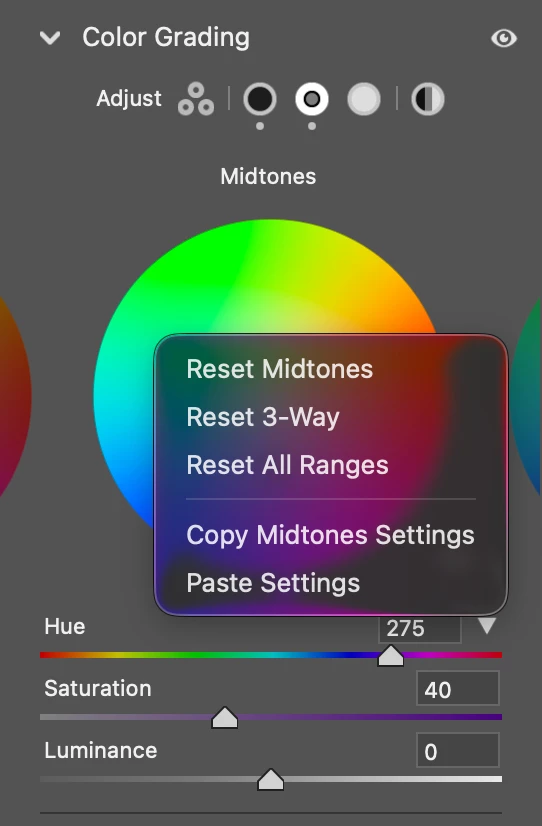
 

none of the menu items work

Steps to reproduce:

  1. Open any image in ACR
  2. Create a mask
  3. Do something in the Color Grading panel
  4. Right click on a color wheel to call out the context menu
  5. Choose Reset or copy / paste
  6. It does not wok

This happens only in masks.

You can still press ⌥ and click the Color Grading panel header to reset.


p.s. This new forum is a disaster. 

2 replies

Rikk Flohr_Photography
Community Manager
June 18, 2026

Greetings all,  


A new update for the Adobe Photography products has been released.  The June release contains an update regarding this issue. 

If you do not see the update in your Creative Cloud Application, you can refresh it by pressing  [Ctrl/Cmd]+[Alt/Opt]+[ R ].

Note: It may take up to 24 hours for your update to be available in your Creative Cloud app.


Thank you for being so patient. 

Rikk Flohr: Adobe Photography Org
Sameer K
Community Manager
Community Manager
May 25, 2026

Thanks for adding the steps. I can reproduce this. I've reported this to the team for review.


Thanks!
Sameer K
(Type '@' and type my name to mention me when you reply)