


Inspiring
October 10, 2017

P: Panasonic FZ80/82 white balance problem

  • October 10, 2017
  • 17 replies
  • 1043 views

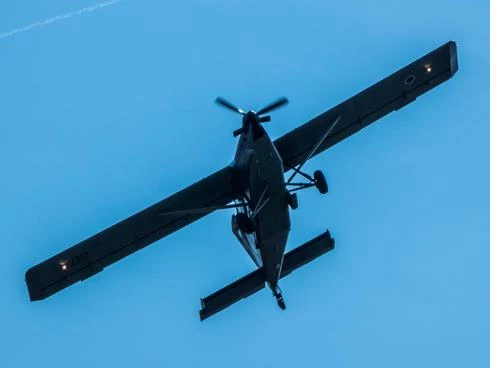
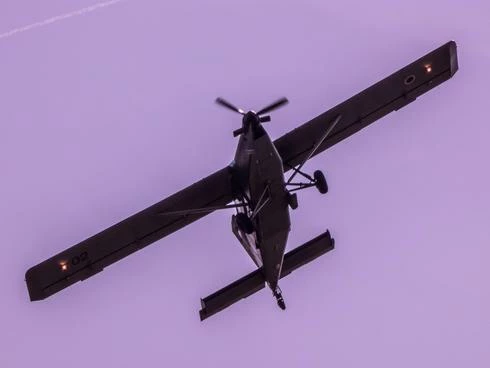
I found out that the presets for WB for Panasonic FZ80/82 are very inacurate and tend to tint pink/purple and green sometimes. Daylight setting is reported as 3300K instead of 5600K and so on. Is it possible to correct that? The first photo is camera WB, the second one Lightroom daylight settings.
This topic has been closed for replies.

17 replies

Todd Shaner
Legend
October 10, 2017
Simon, actually it is quite severe. I downloaded sample Panasonic DC-FZ82 RW2 raw files from the below site and see WB issues very similar to Alan Orlic's  posted 2017-10-01-13-27-18-109246.RW2 file.

These Daylight scene referred images all have 'As Shot' WB readings close to 3500, -30. The LR Daylight setting is 5500, +10. That's a 2000, +40 WB incremental difference.

http://www.photographyblog.com/previews/panasonic_lumix_dmc_fz82_photos/
Adobe Employee
October 10, 2017
Thanks for the sample files. I could see a slight magenta color cast when setting the WB to Auto or Daylight, although it is not as severe as what you have reported. The team will investigate further.
Inspiring
October 10, 2017
Inspiring
October 10, 2017
I don't use the panasonic. Nor any auto WB in any soft I use. This is many time risqué!
Everybody may work following it's own references.
But if you ask an auto WB with the kind of picture you show us, I imagine that the auto function won't be able to find the correct white reference to realise a correct WB.
More on that, do you use this auto  WB on RAW files? JPEG's are almost difficult to set up correctly

Las but not least can you provide a RAW or TIFF format of that   picture? 
Adobe Employee
October 10, 2017
Could you provide a sample image file? Thanks.
Inspiring
October 10, 2017
No, the same. I also checked with Raw Therapee and problem is the same, looks like Panasonic has an issue?
Rikk Flohr_Photography
Community Manager
Community Manager
October 10, 2017
Sometimes weird behavior is corrected/cured by resetting the preferences. 

Reset Procedure: 

1. Close Lightroom.
2. Hold down [Alt/Opt]+[Shift] while restarting Lightroom. 
3. Overwrite the Preferences when prompted by the dialog.
4. Close Lightroom.
5. Restart Lightroom.

Does the WB behavior continue after resetting the preferences?
Rikk Flohr: Adobe Photography Org