



P: PSDs exported from merged photos don't have correct compatibility layer, causing problems w Indes
PSDs exported from photos created by Photo > Photo Merge don't have a completely correct compatibility layer, causing InDesign to think that such a PSD is missing a compatibility layer. A user reports that having many such PSDs in an InDesign document causes it to slow down quite a bit, presumably because it is using a slower, more general code path to interpret the layers of the PSD.
The cause of the problem is that, when exporting a PSD, LR fails to include a Version Info resource block (id 1057) with the "hasRealMergedData" flag. Normally, this doesn't confuse applications, since most exported PSDs have just the compatibility layer, and applications ignore the "hasRealMergedData" flag.
But in the case of photos created by Photo Merge, the PSDs have two layers, the compatibility layer and a second layer containing the transparent pixels (compatibility layers can't store transparent pixels). Because there is no "hasRealMergedData" flag, InDesign must assume there isn't a valid compatibility layer. (Unlike most applications, InDesign can interpret layers, so it really does need to know whether there is a valid compatibility layer.)
Note that the mere presence of a compatibility layer doesn't indicate the layer actually contains the merged image data. When Maximize Compatibility is not selected, Photoshop produces a compatibility layer consisting of all white pixels (run-length encoded to save space). The "hasRealMergedData" flag tells applications whether or not the pixels in the compatibility layer are "real" (representing the image) or "not real" (all white).
To reproduce the bug:
1. Start InDesign and do File > New > Document.
2. Drag the file exported-from-lr.psd to the document. (The PSD was exported from a photo resulting from Photo Merge.) InDesign will pop up this warning:
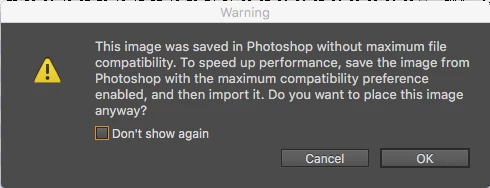
3. Drag the file exported-from-lr.with-flag.psd to the document. InDesign doesn't show the warning. Using a hex editor, I added a Version Info resource block with hasRealMergedData = 1 to this file.
 AdChoices