


Known Participant
September 13, 2024

P: Select Subject mask is shifted by Generative Expand

  • September 13, 2024
  • 2 replies
  • 330 views

To recreate bug:

Part one: normal editing.

Edit a photo in LR.

Edit in Photoshop, using layers, adjustment layers etc. 

Save / close

Go back to LR.


Part two: further edits.

Edit PSD photo more in lightroom using select Subject Mask / Select Background mask.

'Edit in Photoshop'

Generative expand background.

Save / close. Return to LR and find this:
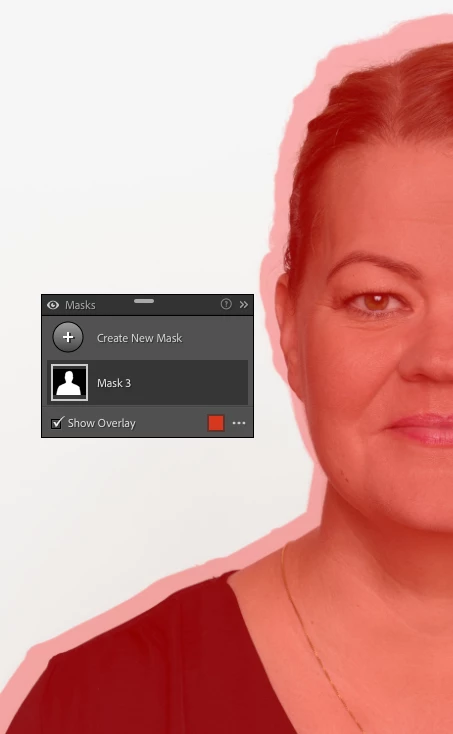
 

Once this happens AI masking can't be used with the image. its consistently masks the image incorrectly, and the only way to resolve this is to delete the image and start over again.

This topic has been closed for replies.

2 replies

Rikk Flohr_Photography
Community Manager
Community Manager
September 13, 2024

Adding bug number and assigning status.  Moving to CR Bugs

Note that this affects all LrC, LrE, CR and CR as a filter where Gen Expand is used after a mask has been applied. 

Note that following the recommended order of operations should avoid this:


  1. Denoise 
  2. Heal (includes Generative AI Remove)
  3. Crop (includes traditional Cropping, Lens Correction, Transform, or any operation changing the geometry of the image, including round-tripping to PS to use Gen-Expand)
  4. Global Edits
  5. AI Selective edits (Sky, Person, etc)


Rikk Flohr: Adobe Photography Org
Rikk Flohr_Photography
Community Manager
Community Manager
September 13, 2024

I am seeing the same failure with Camera Raw as a filter which means it is likely not an LrC bug. I am conferring with the engineers to see if this a CR engine failure or if it is actually a PS bug.


Rikk Flohr: Adobe Photography Org