



P: Sony a7III Camera Profiles are Broken
Hello! Never had a need to post here so hope this is the right place.
I'm the proud owner of Sony's new a7III, so I've been shooting a lot recently putting it through it's paces. Lightroom finally got support for the camera with v7.3, so I've been digging through my RAWs. Very happy except I did notice a few odd artefacts on a few shots, but nothing that caused too much concern... UNTIL NOW!!
Basically, it seems that either my versions of the Camera Profiles or indeed Lightroom's overall are broken. At first I thought it could be to do with compressed vs. uncompressed RAW, but Sony's own RAW viewing software does not exhibit these issues. OBSERVE!
Exhibit A: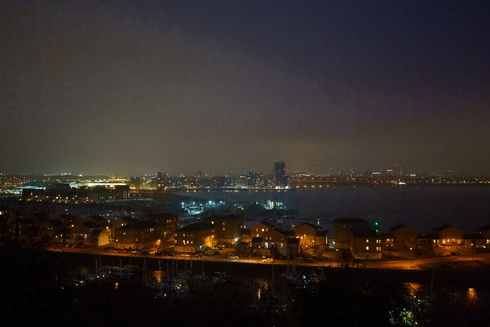
This is unprocessed in Lightroom with the Camera Standard profile applied.
Exhibit B: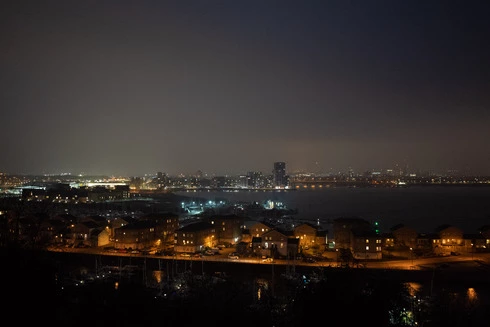
This is the same shot using the Adobe Color profile.
All the horrendous image noise/compression/whatever has gone, and the detail and smooth gradients are fine, the same as Sony's software. So, not a camera or RAW issue and this persists across all the profiles marked as Camera Matching... but does not exist in any of Adobe's profiles.
A ploy to try and persuade me to use Adobe colour profiles?! Maybe! But I thought you should be aware of it as clearly, something isn't being processed right by the Camera Matching profiles. I also went back to some of the images I'd spotted artefacts in... they were all fixed by using the Adobe profiles not the Camera Matching ones.
I appreciate it's early days with the new profile system, but if there's anything anyone can suggest I'd be very grateful. Hopefully it's an issue only I'm experiencing, otherwise there's a lot of other unhappy a7III Lightroom users right now!
FYI, I have reinstalled both Lightroom and Photoshop before posting here, and this happens on images of a variety of ISOs and noise levels... it's a software thing and I was just using this night image because of the transition from light pollution to sky (and it's the worst I've seen it). Also, this happens in Photoshop with Camera RAW using the same profiles.
Thanks,
Duncan
 AdChoices