
Participant
Nov 20, 2026 10:10 AM UTC
Open for Voting

P: Sync Settings button missing on first selected image regardless of filmstrip orientation; switching orientation restores it until a new selection is made
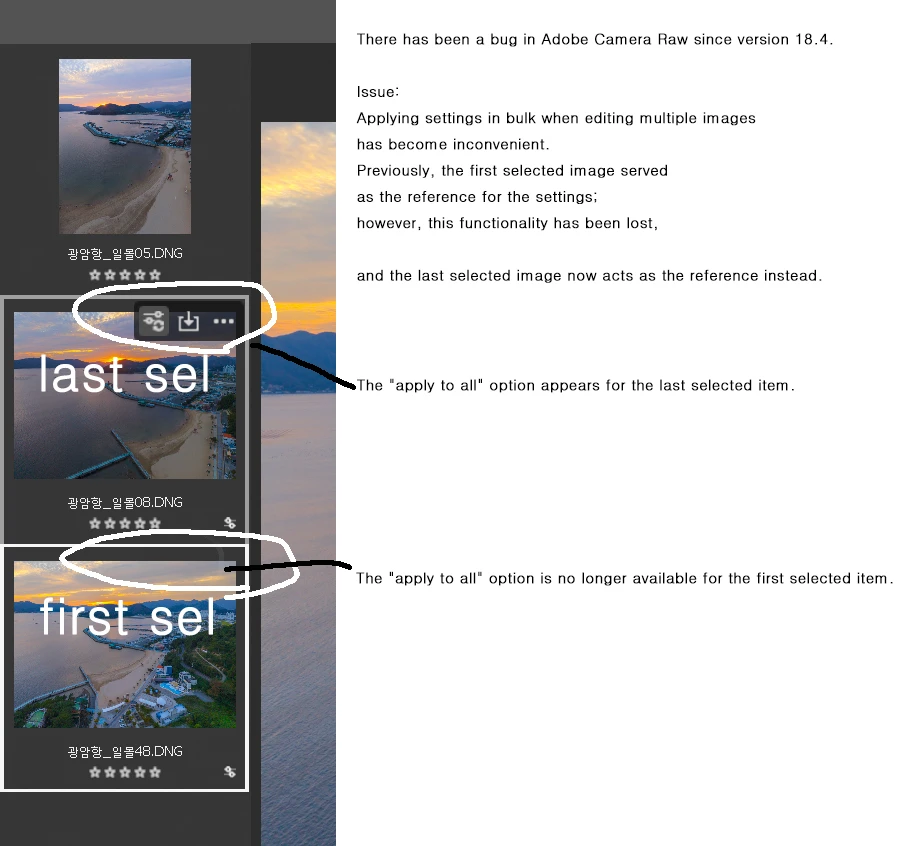
There has been a bug in Adobe Camera Raw since version 18.4.
(Works correctly in v18.4; issues occur in subsequent versions up to v19.)

Issue:
Applying settings in bulk when editing multiple images has become inconvenient.
Previously, the first selected image served as the reference for the settings; 
however, this functionality has been lost, 

and the last selected image now acts as the reference instead.


    1 reply

    Srishti Bali
    Community Manager
    Community Manager
    Nov 20, 2026 6:30 PM UTC

    Hi ​@jeong26115667swzm,

    We’ve been able to reproduce the issue on our end, and our product team is already investigating.

    We also confirmed that the issue can occur in both Horizontal and Vertical Filmstrip views, where the Sync Settings button is missing from the first selected image.

    In the meantime, as a temporary workaround, please try switching between Horizontal View and Vertical View. This restores the missing button for the current selection, but the issue may return when you make a new selection. You can repeat the workaround if needed.

    Thank you for your patience while we work on resolving this.

    Translate
    Thanks, Srishti Bali | Community & Engagement Strategist, Digital Imaging | Adobe