


April 20, 2020

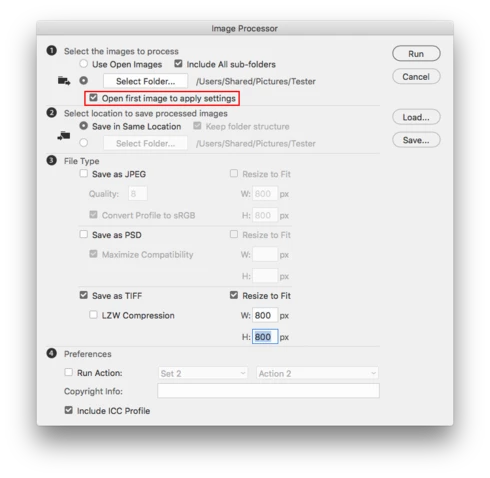
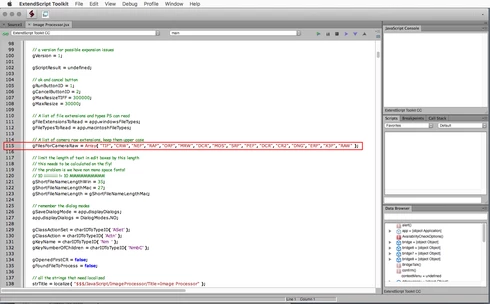
P: to use Open first Image to apply settings, the proper extension needs to be present in line 115

  • April 20, 2020
  • 5 replies
  • 782 views

The Image Processor script needs to updated in order to work properly with cameras that have been introduced since the script was written.

Specifically, in order to use Open first Image to apply settings, the proper extension needs to be present in line 115. For example, in order to use this feature with Sony cameras, one needs to add the .ARW extension at line 115. If the proper extension is not present then the camera raw dialog does not open in order to make adjustments to the first image.


This topic has been closed for replies.

5 replies

Jeff Arola
Community Expert
Community Expert
May 13, 2021

Thank you for the fix.

nikunj.m
Community Manager
Community Manager
May 13, 2021

Hi,


We're happy to announce the release of Photoshop 22.4 which should include the fix for this issue. To update Photoshop to the latest version, you can check: https://helpx.adobe.com/creative-cloud/help/creative-cloud-updates.html


For information on other issues fixed with this update, please check: https://helpx.adobe.com/photoshop/kb/fixed-issues.html


Regards,

Nikunj

Legend
May 7, 2020
you can manually add the file extension types to the JSX file in the line that's highlighted above.
Inspiring
May 7, 2020
Sort of a huge oversight. Can it be fixed right away?
Please?
Legend
April 21, 2020
Thanks. I'll see what we can do to address this.