
Inspiring
September 8, 2025

Cant Open files from Creative Cloud on Illustrator Beta

  • September 8, 2025
  • 5 replies
  • 274 views

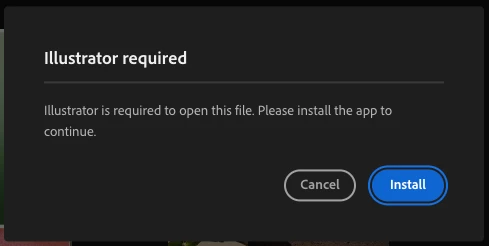
I cant seem to open AI files from the creative cloud app directly and have to move files around in order to be able to open them as CC doesnt recognise the beta version of Illustrator as compatible. Additionally, cannot open files or save files from the CC projects tab through Illuistrator.
5 replies

September 25, 2025

I am checking on this @Keegan35548218sbey 

Inspiring
September 22, 2025

I am running the most recent update, updated today and the one issue of not being able to see projects has been resolved, however I still cannot open files directly from creative cloud as it gives the same error.

September 22, 2025

@Keegan35548218sbey can you please confirm your version of the Beta app?

Inspiring
September 9, 2025

Checked that out and it said "Default" So i assumed that meant the applications folder as thats where all my adobe apps have downloaded to, including Illustrator Beta, however I have manually changed the location to the Applications folder and will get back to you if that makes a difference.

jane-e
Community Expert
Community Expert
September 9, 2025

@Keegan35548218sbey 


I've moved your post from Creative Cloud desktop to the Illustrator Beta forum.


Jane

kglad
Community Expert
Community Expert
September 8, 2025

did you use the cc desktop app to install illustrator beta?  if yes:


in the cc desktop prefernces, what's the designated app install location?


is that the same as the location used to install illustrator beta?