Participating Frequently
August 9, 2025

File Not Saving

  • August 9, 2025
  • 6 replies
  • 351 views

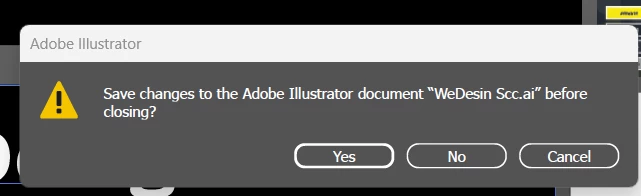
when I save the its not getting saved .  I trise Ctrl + S . After that aslo when it try to close it shows the file is not saved 
6 replies

August 14, 2025

tagging @realistic_Zenith5086 for notification

Adobe Employee
August 13, 2025

Hi,

To help us resolve the issue more quickly, would you be available for a debug session at your convenience? This will allow us to analyze the problem and work towards a solution faster. Please let me know a suitable time for you.

August 13, 2025

Thank you for sharing this. I'll pass this to the team and will reach out for more questions and if I have a solution/ fix for this available.

August 12, 2025

Ok thank you for sharing some background. Can you please share which Beta build you are using? and what are you machine specifications? 

Participating Frequently
August 13, 2025
I am Using Illustrator beta 29.9 version .. My system Spec is
Asus Tuf gaming F15 . 16 Gb ram , 4 GB Nvidia Graphic , 11th Gen Intel(R)
Core(TM) i7-11800H @ 2.30GHz (2.30 GHz) processor
[image: image.png]
August 12, 2025

Hello @realistic_Zenith5086 in addition to what Monika has requested, also kindly share is this regular or happening for the first time? If first time/ one off incident, what actions did you perform? Did you copy, or what kind of operation/ action you were doing?

Participating Frequently
August 12, 2025
actually i think that an bug .. when i closed the file its shows file not
saved . when i clicked no and then reopen the file . file is saved only
Monika Gause
Community Expert
Community Expert
August 9, 2025

Can you tell us your system? and also show a screenshot of your Preferences > File Handling?


The file has been saved once using "Save as", right? Or is that your first file saving operation?
