

Inner Glow turns object gray when fill is solid color (Illustrator bug?)
Correction: I accidentally posted this in the Illustrator (Beta) section. This issue also occurs in the regular release version of Illustrator.
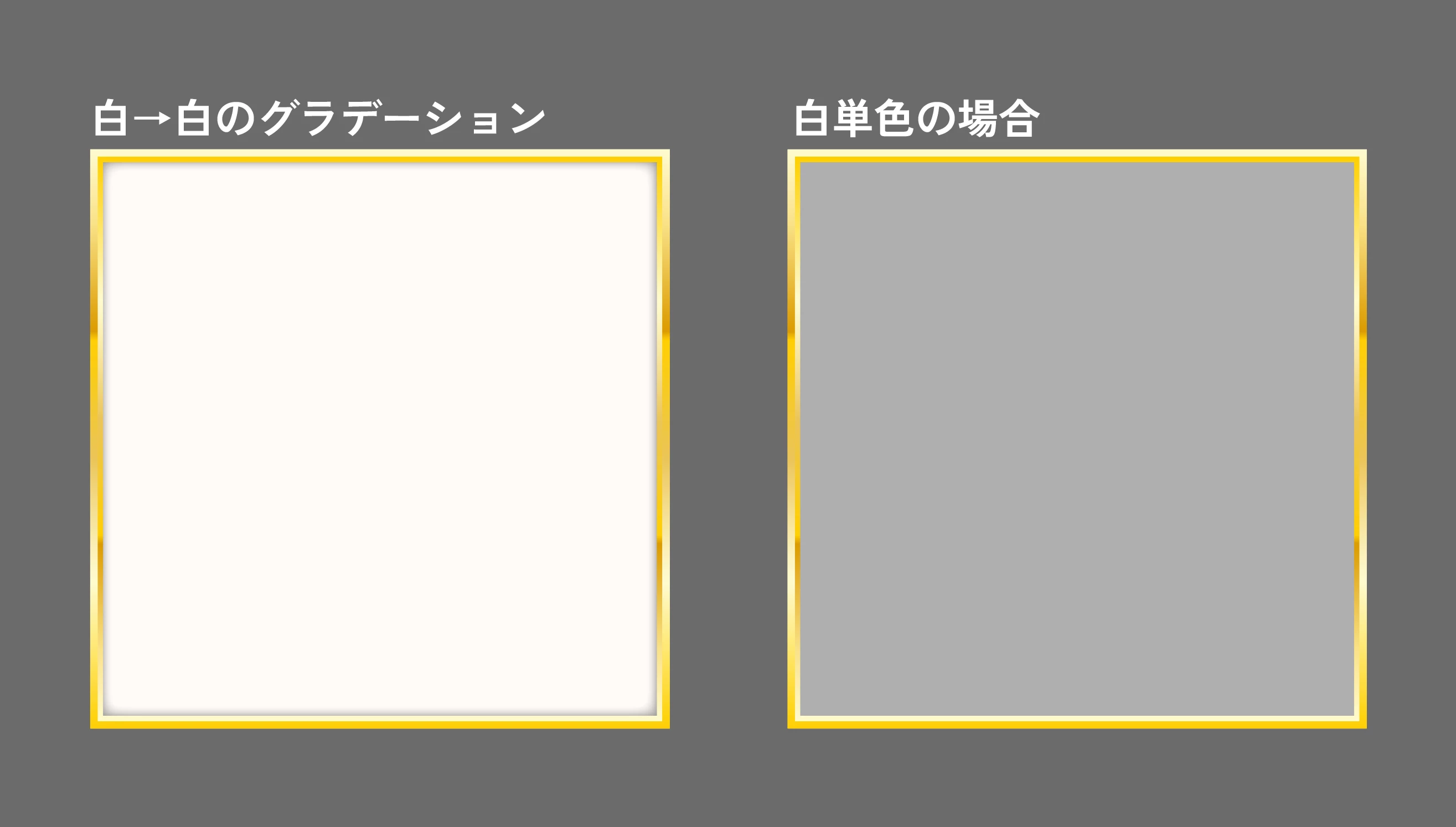
単色にアピアランスでグレーシャドウを入れた場合、内側の光彩が反映されず前面がグレーになってしまう。
Description
When applying Inner Glow to an object with a solid fill color (e.g. white 100%), the entire object becomes gray and the effect does not render correctly.
This issue occurs after reopening the file — the appearance changes and looks like a gray overlay is applied across the whole object.
However, when using a gradient fill (even white 100% → white 100%), the Inner Glow effect works as expected.
This behavior breaks the original design and seems inconsistent.
Steps to reproduce
- Create an object with solid fill (e.g. white 100%)
- Apply Inner Glow
- Save the file
- Reopen the file
- The object appears gray instead of white
Expected result
Inner Glow should render correctly regardless of whether the fill is solid or gradient.
Actual result
The object becomes gray and the effect does not display correctly.
Workaround
Using a gradient fill (same color on both ends) restores correct rendering.
This happens intermittently...
Adobe Illustrator 2026 30.3
OS: Mac
GPU Performance: On / Off


 AdChoices