
Open for Voting
Upon login, the screen to select a template or create your own is populated in such a way that only the bottom half of text is visible.
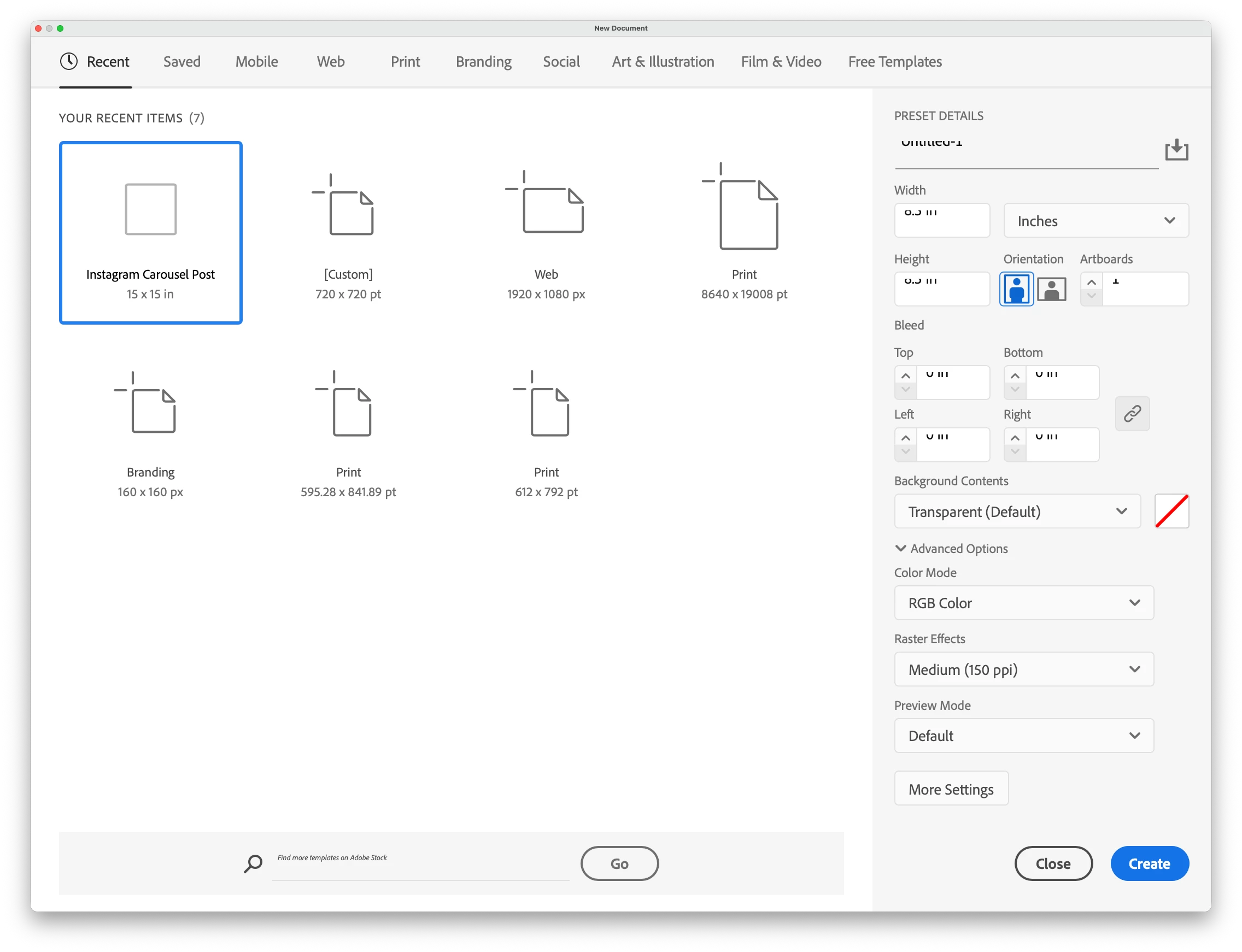
Title: Input field text clipped vertically in New Document dialog (Illustrator Beta 30.4.159)
Application: Adobe Illustrator Beta Version: 30.4.159 OS: macOS Hardware: Mac Studio
Steps to Reproduce:
- Launch Adobe Illustrator Beta 30.4.159
- Open the New Document dialog (File > New)
- Observe any numeric input field in the Preset Details panel (Width, Height, Bleed, etc.)
Expected Result: Text in input fields displays fully, with characters vertically centered and unclipped within the field bounds.
Actual Result: Text in input fields is clipped at the top. Character ascenders are cut off, making values difficult to read.
Reproducible: Yes, consistently on launch
Notes: Issue appears in all input fields within the New Document dialog's Preset Details panel. Likely a UI scaling or field height regression introduced in this build. Screenshot attached.


 AdChoices