


Open for Voting
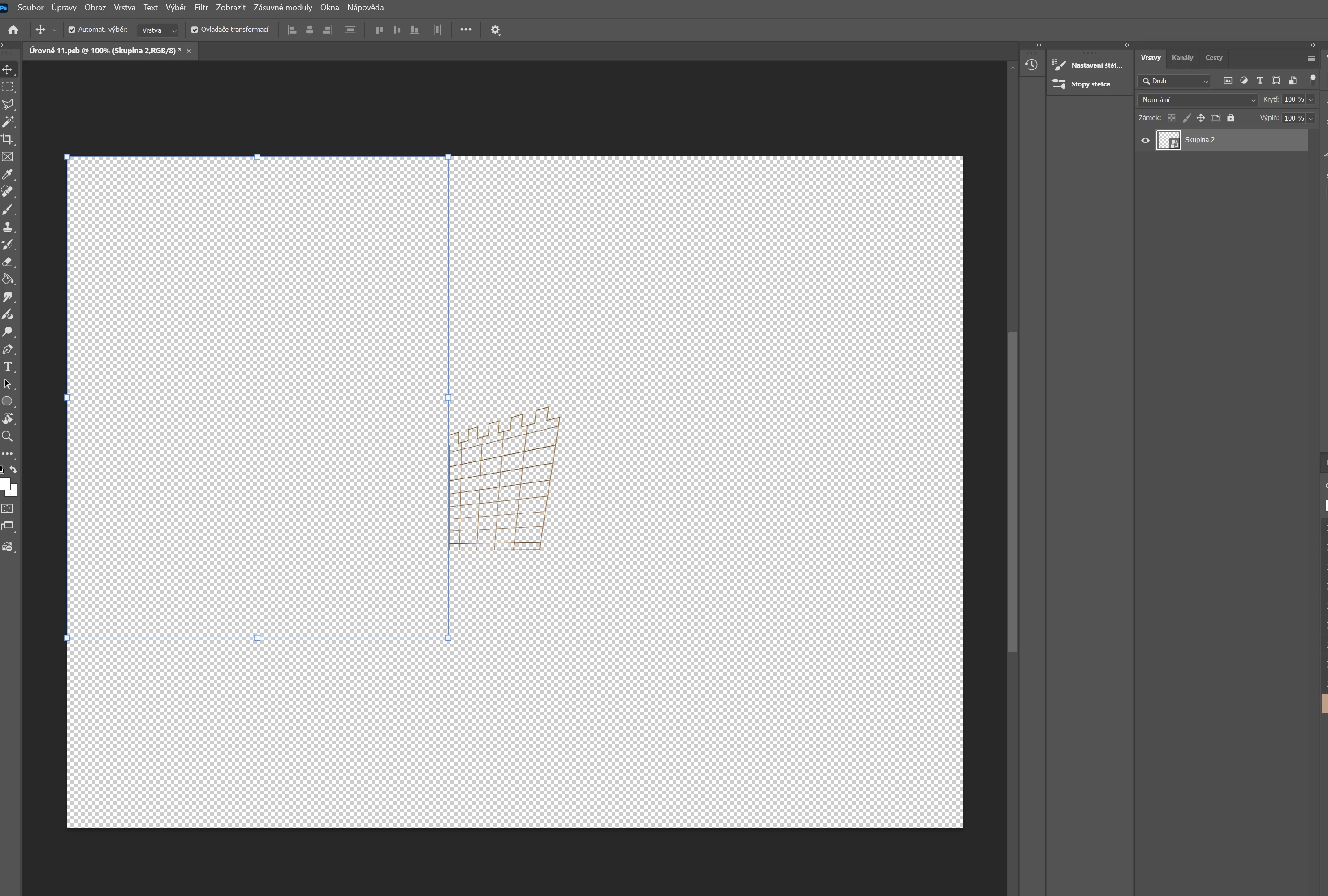
Transform bounding box jumps to the upper-left corner after using Distort on a Smart Object.
Photoshop version:
27.9.1
Steps to reproduce:
- Open a PSD/document.
- Place an image and convert it to a Smart Object.
- Use Free Transform to scale the Smart Object down.
- Press Ctrl+T again.
- Choose Distort.
- Move the four corner handles to create a trapezoid/perspective shape.
- Press Enter to commit the transformation.
- The transformed object itself remains in the correct position.
- However, the Transform bounding box/handles immediately jump to the upper-left corner of the document, completely away from the object.
- Pressing Ctrl+T temporarily puts the bounding box back around the object, but after pressing Enter it jumps to the upper-left corner again.
Expected result:
The Transform bounding box should remain around the transformed Smart Object.
Actual result:
After committing a Distort transformation, the bounding box and transform handles jump to the upper-left corner of the document and no longer correspond to the transformed object's position or dimensions.
Additional information:
The problem does not occur with ordinary scaling. It occurs immediately after using Distort on the Smart Object. GPU acceleration was tested both enabled and disabled. Legacy Compositing was also tested and did not resolve the issue.
 AdChoices