



Ren Sukhram
Known Participant
October 22, 2018
Question

2019 and reviewing rig for upgrades

  • October 22, 2018
  • 1 reply
  • 459 views

So i am only posting here in the AE section because I believe this app is a little more hungry than the others...I know RAM might be the single most important factor but if the rest of the system is balanced i would assume the other Adobe app would run well.

My rig is about 4 years old with:

  • Asus X-99-E board.
  • i7-5960
  • 64 gb RAM.
  • GTX-Titan X GPU.
  • M.2 SSD for primary
  • 1TB SSD for caching
  • 1TB SSD for rendering
  • 16TB Areca in Raid 5 for project files (this is a TBolt connection)

I was wondering where I can get some gains on this system.  I thought maybe swapping the CPU for the E5 Xeon (comparison below) but there are pros and cons spec-wise.  Maybe removing that Titan since it seems like it not pulling its money's worth...

what would you do?  I use PS/AI/ID/PR/LR/AE/AU/SG/BR for apps
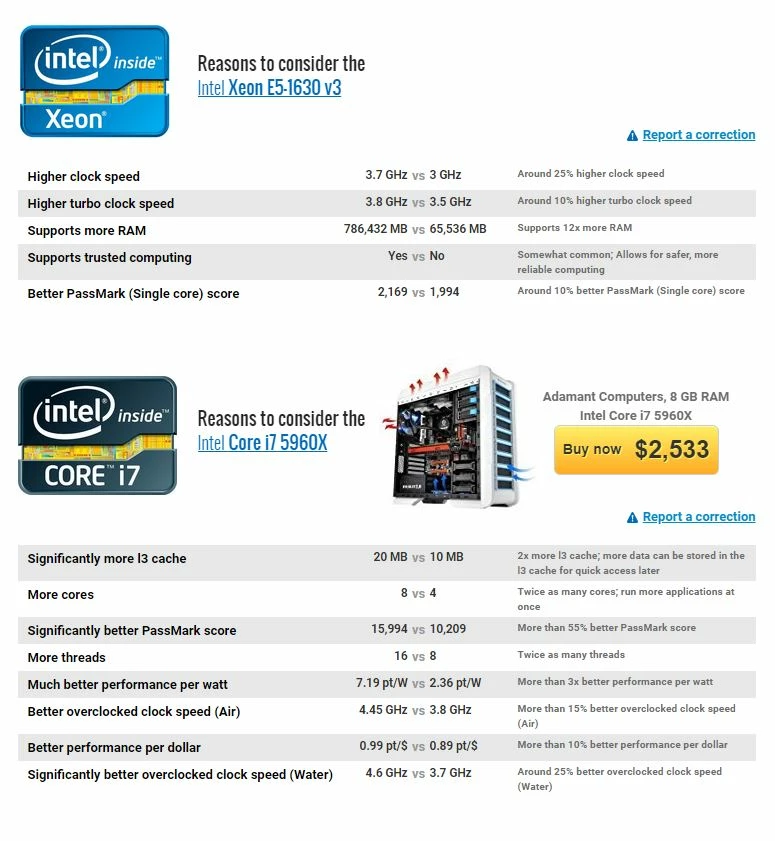
    This topic has been closed for replies.

    1 reply

    Szalam
    Community Expert
    Community Expert
    October 22, 2018

    Higher clock speed is the most important factor on a CPU for most uses with AE. Now, some things (like the Grain effects, Camera Shake Deblur effect, and C4D renderer) are multithreaded and would use a lot of cores, but base clock speed is most important. The i9 and i7 chips are generally considered the better chips for AE. The only benefit the Xeon chipset offers is the ability to have two processors on a motherboard. Again, that's just adding cores and not clock speed, so it's not beneficial to every aspect of AE like having a higher clock speed is.

    There are a bunch of i7 and i9 chips out there that you could research. Or you could check Puget Systems' website. They often do testing of different hardware with AE and other software to see which performs the best.

    Ren Sukhram
    Known Participant
    October 22, 2018

    what about RAM usage for AE?  With the single Xeon i can expand past 64GB (allow by the i7) but does it make sense to reach for a potential 256 GB RAM as opposed to the 64 GB i currently have?

    8 x DIMM, Max. 128GB, DDR4 3200(O.C.)/3000(O.C.)/2800(O.C.)/2666(O.C.)/2400(O.C.)/2133 MHz Non-ECC, Un-buffered Memory *1

    8 x DIMM, Max. 128GB, DDR4 2400/2133/1866 MHz ECC, Un-buffered Memory *2

    8 x DIMM, Max. 256GB, DDR4 2400/2133/1866 MHz ECC, Register Memory *2