cyw28900043
Participating Frequently
March 6, 2018
Question

3% CPU usage during exporting

  • March 6, 2018
  • 4 replies
  • 1050 views

I've been exporting series of 18 files at 720x480 resolution that are around 40 minutes long each, in Adobe Encoder, and it has taken over 24 hours.The Task Manager shows that there is on average, 3% CPU utilization. Occasionally it will spike up to 90%, but usually stays around 2-3%.

My computer has an AMD FX 4300 processor, 8GB RAM, and a GeForce GT 430 GPU.

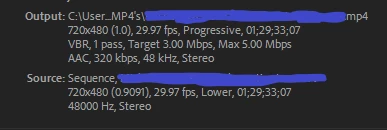
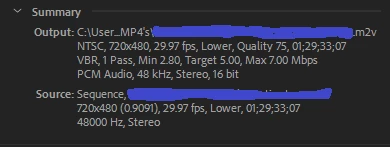
The option to use the graphics rendering was greyed out, but my edits are simply encoding from mpeg to mp4 and m2v (see pictures below) I didn't use any color correction or any other "special effects" only cutting and rearranging clips, so I don't think the GPU would be used anyways for this kind of encoding. As a possibly related note, I haven't been able to find my graphics card in device manager, and so even though everything shows up fine on the monitor, it may be possible that it's not fully functional, though again, I don't think that should matter for this kind of encoding.

Thanks for any help on this matter.
This topic has been closed for replies.

4 replies

Bill Gehrke
Inspiring
March 10, 2018

That 500 GB Hard drivrewith 400 GB on it has a read access time of about 25 milliseconds which in video editing is a terrible amonut of time when you switch from reading to writing which you are doing.  What problems prevented you from cloning the OS to the SSD?  It sounds like you had 400 GB of OS/application that you tried to clone to a 256 GB SSD which of course is impossible.  Move all the extra garbage from the Toshiba to one of those external drives.  Try to get down to no more than 128 GB.  Then clone the OS/Applications to the SSD. which has microsecond access time.  Then to really fix your system is add ono more SSD for all current project and media storage and when you finish a project move it off-line

Relly
Participating Frequently
March 10, 2018

is anything rendering coming off the external hard drive? if so i would think that would be the culprit as well

Legend
March 9, 2018

It's your GPU that's a MAJOR contributor to that CPU bottleneck. You have a SEVERELY lopsided mismatch between that GT 430 and even your FX 4300 towards way too much CPU. Low-end GPUs such as your nearly eight-year-old GT 430 actually misuse CPU resources that could have been used to improve performance. If newer, higher-performing GPUs weren't so expensive right now due to the cryptocurrency mining craze, I would have strongly recommended replacing that horrible GPU first.

And your RAM and disk setup also need some improvement.

Peru Bob
Community Expert
Community Expert
March 6, 2018

You might need more RAM.  8 GB isn't much.

cyw28900043
Participating Frequently
March 7, 2018

I know that the specs of the computer aren't that fast, but we're talking 720P video, I can't imagine that 8gb of ram would bottleneck the CPU to only run at 3%    

Peru Bob
Community Expert
Community Expert
March 7, 2018

Please tell us about your hard drive(s):

How many, what kind, what is on each, and how full?