



4K Monitor: slow UI / not realtime RAM Preview
Hello,
Since working on a 4K monitor, After Effects UI is very slow and although the preview is fully cached to RAM, it does not play in real time.
I've read about a workaround for this issue, which also works for me: overwriting high dpi scale by the system. When using this option, it runs smooth and fast.
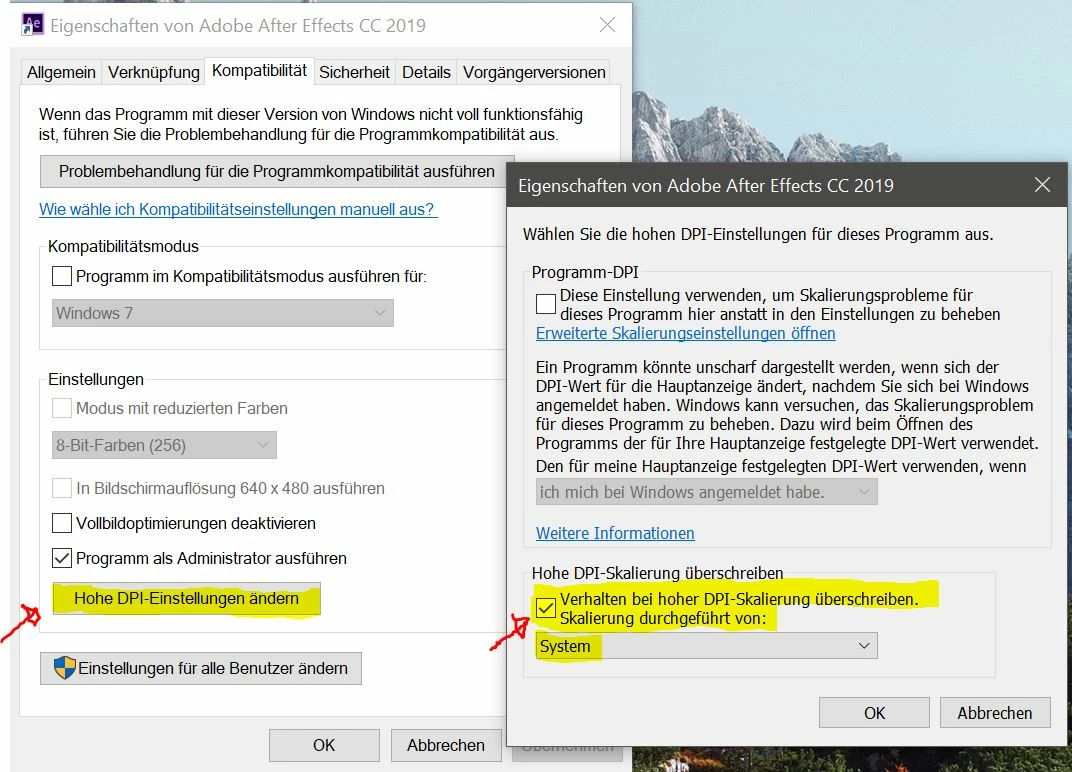
But it makes the UI blurry and that's why I am looking for a better solution.
The not real-time RAM preview issue is solved by choosing the "Full Screen" preview option. But the very slow/choppy UI happens all the time when not using the previously mentioned setting.
Windows 10 latest Build 17134,472
Intel Xeon E3-1231 v3 @ 3.4GHz
RAM 32 GB
NVIDIA GeForce GTX 970 (latest Driver)
Monitor: AOC U3277PWQU
After Effects, Footage, and Cache on separate SSDs
I have tried to activate/deactivate Hardware Accelerate Composition, Layer, and Footage Panels, with no impact on performance.
Any tips for this issue?

 AdChoices