


Inspiring
January 8, 2017
Answered

Adding A SSD

  • January 8, 2017
  • 1 reply
  • 692 views

I have a Z87 pro motherboard with a 4770k Processor

C=drive Samsung ssd 840 pro for op system and programs

D= drive WD Black 1 TB for Exports

E= drive Samsung ssd Evo 500GB for disc cache

F= drive WD black 1 TB for media

H=drive WD black 500GB for projects

I=drive WD black 500GB for after Effects  Cache/scratch

My question is I have a spare 128GB Samsung Evo,I have used all of my boards 6Gb ports, Can I use one of the two ismedia ports(also 6GB)  for this ssd and what would be the best arrangement of drives now if I add this.

Using a lot of dynamic linking between After Effects and Premiere Pro cs6

Not interested in a raid configuration right now.
    This topic has been closed for replies.
    Correct answer hurleyvcr

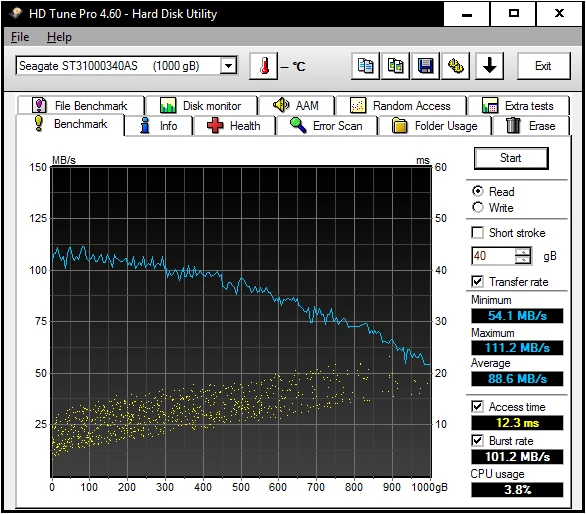
    Do not use a 50% full hard drive for your current editing video media, it is just for archiving or backup not for anything you are currently editing.  Here is what happens to a typical hard drive and notice how the read (and write) speed falls off as you fill the hard drive.  At 50% full you only have a read rate of about 80 MB/second.  Wouldn't you rather have a read rate of 400 to 500 MB/second for your media

    I do not use any hard disk drive for anything but backup or archiving.  SSD's Are the only way to go and then with the immense speed from even the SATA III SSD's you do not have to spread files over many different devices which makes archiving and retrieval so much simpler


    Thanks Bill, I guess I will use the extra 128GB ssd for media that I am using for my project then archive that media onto another HD when the project is finished would that make sense now?

    1 reply

    Bill Gehrke
    Inspiring
    January 9, 2017

    I would suggest first of all test all your drives to make sure they really do what they are supposed to do and then put your current media on the SSD instead of that hard disk drive.  How full are the hard disk drives, they slow down immensely as they fill up.  My current configurations (desktop and this laptop) do not have any hard disk drives except for backup and archiving and these are externally connected 

    In fact I do most of my editing in my easy chair with this laptop and have all project files on a Samsung T3 USB 3.1 portable SSD and then unplug it and go to my desktop for exporting.  I do leave all temporary files like the "Media Cache" and "Media Cache Files" folder contents in the default "Users" location on the boot drive. 

    hurleyvcrAuthor
    Inspiring
    January 9, 2017

    My media drive is a about the fullest (little less than half full) but I would like to use all of the drives to spread out the work load the best I can. I guess using the ssd (e drive) for cache/scratch files is good but my next ssd (the spare 128gb) I want to use for something that will also take advantage of its speed. I mostly use premiere cs6 and dynamic linking with AE.

    Bill Gehrke
    Inspiring
    January 10, 2017

    Do not use a 50% full hard drive for your current editing video media, it is just for archiving or backup not for anything you are currently editing.  Here is what happens to a typical hard drive and notice how the read (and write) speed falls off as you fill the hard drive.  At 50% full you only have a read rate of about 80 MB/second.  Wouldn't you rather have a read rate of 400 to 500 MB/second for your media

    I do not use any hard disk drive for anything but backup or archiving.  SSD's Are the only way to go and then with the immense speed from even the SATA III SSD's you do not have to spread files over many different devices which makes archiving and retrieval so much simpler