

Participant
January 24, 2017
Question

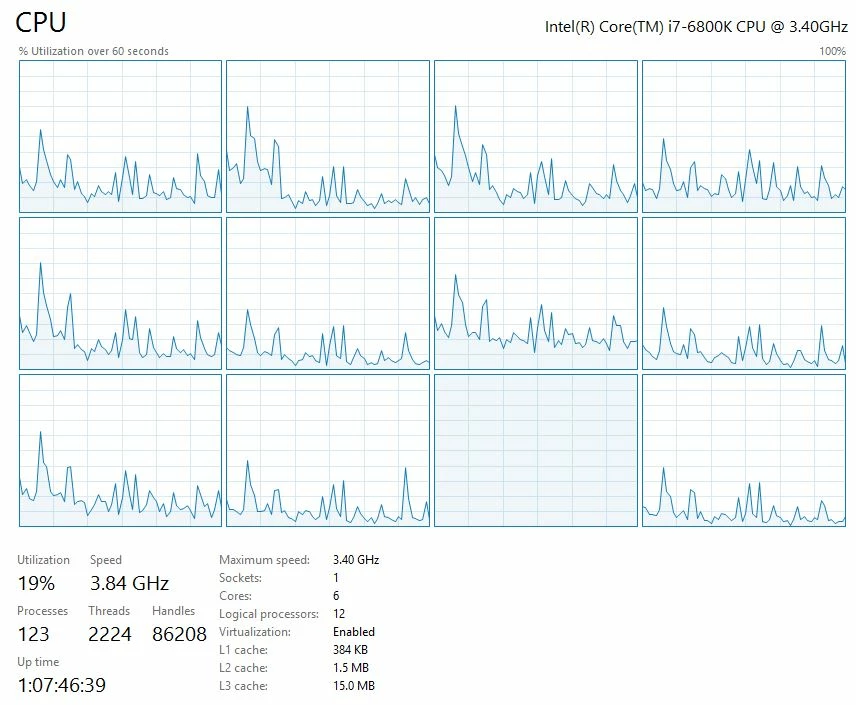
Adobe Premiere CC 2017 use only one core to export

  • January 24, 2017
  • 3 replies
  • 1854 views

Hi there,

I tryed everything but when i export Adobe Premiere CC 2017 (and Adobe Media Encoder also) user only one core at 100%, check my screenshoot.

Any ideas?

Thanks,

    This topic has been closed for replies.

    3 replies

    chrisw44157881
    Inspiring
    January 25, 2017

    most likely issue:

    1. cores parked?  powermanagement computer set to high performance to unpark cores

    rendering HD to HD h.264, premiere is hard code limited to 12 threads. using 4k to 4k h.264, it uses all cores. Try 4k export to 4k h.264 to test.

    also, what does GPU-Z say about your gfx card usuage?

    what is your hard drive setup like?

    using Denoiser or neatvideo?

    exporting from premiere or ame?

    Participant
    January 25, 2017

    1. i have my computer set to : "High Performance"

    2. render was from 1980 to h.264 1980

    - my GTX 970 was ~40% usage

    - HDD drive setup: project to SSD export to SSD

    - not using any plugins except Lumetri Color

    - i tryed to export and from Premiere and from AME and was the same

    my CPU is OC with Asus AI Suite 3 and i have 32GB Ram

    chrisw44157881
    Inspiring
    January 25, 2017

    try opening AME and import the Premiere sequence instead of premiere launching ame. a bug for some people.

    Bill Gehrke
    Inspiring
    January 24, 2017

    What media are you using and what format are you exporting, maybe a screen shot of your export window will be helpful.  Also I notice you have 123 processes running, I have typically have only 70-80 running, have you tuned your computer?

    Ann Bens
    Community Expert
    Community Expert
    January 24, 2017

    Moved to Hardware forum.