


Best drive setup for Ae Media & Disk Cache
There are many posts just like this one seeking advice for the best Ae drive setup, but since most of them are fairly outdated, and tend to be quite contradictory, this one will hopefully end all the confusion.
So when Zen3 and Ampère will be released I'm planning to upgrade my complete system, allowing me to revise my drive setup too. Currently I am using a 256gb SATA SSD for my OS and programs, but it also serves as my Media & Cache drive. My projects and source files are on a 1tb HDD and I use a 4tb HDD as a backup drive. Obviously for my new build I'd like to speed things up with a NVME, but I'm not sure what setup would be the best in terms of performance for Ae. I made this table in order to keep things straightforward:
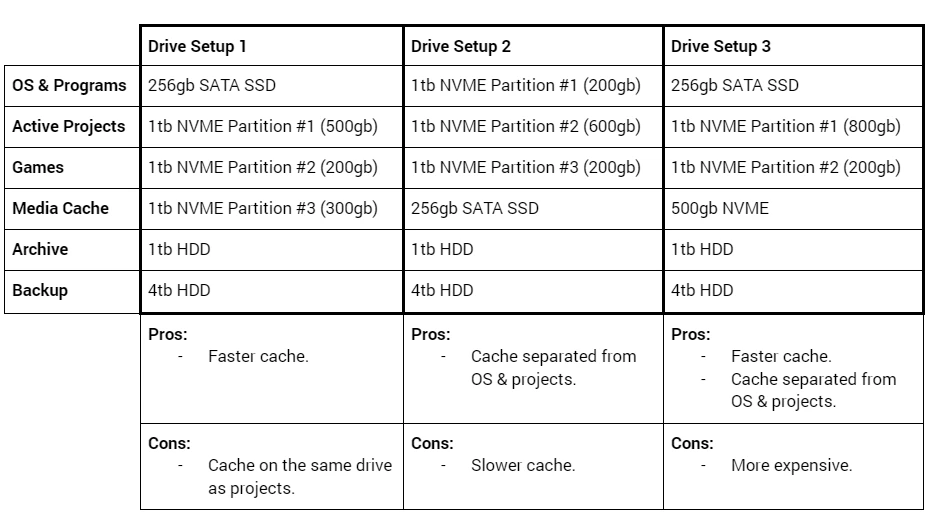
In regards to the different setups:
- Is it better to have faster cache, but it's on the same drive as projects (like in Drive Setup 1), or to have slower cache, but it's seperated from OS and projects? (like in Drive Setup 2)
- Does it matter if the OS and programs will be on the same drive as projects & source files? (like in Drive Setup 2)
- Would setup 3 actually be worth the extra cost?
- Which setup would you pick?
Thanks!
 AdChoices