

Participant
September 11, 2023
Question

Can the HP Elitebook x360 830 G8 work with Adobe Premiere Pro?

  • September 11, 2023
  • 3 replies
  • 1147 views

Can the HP Elitebook x360 830 G8 work with Adobe Premiere Pro? 
Specs as below: 
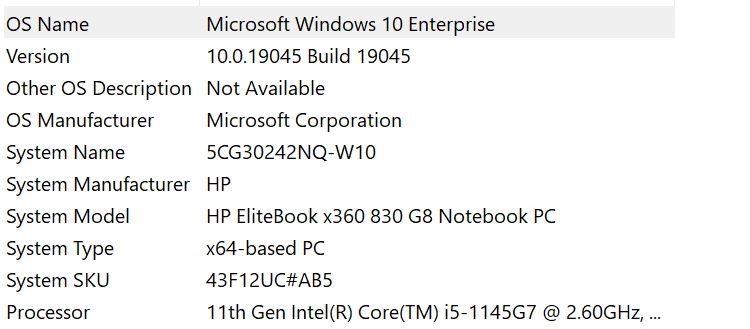
 

This topic has been closed for replies.

3 replies

John T Smith
Community Expert
Community Expert
September 13, 2023

An i5 will work - slowly if you are editing HD video

Participant
September 12, 2023

Adobe Premier Pro should work on a a HP Elitebook x360 830 G8 with a Intel i5-1145G7 CPU, 16GB of RAM, 256GB SSD, and Intel Iris Xe Graphics. The only caveat is the Intel Iris Xe Graphics would need at least 4GB for some HD and 4K media, however with 16GB of system memory your graphics memory should be fine - to check the amount of graphics memory go to Settings (press the Windows + i keys) > System >  Display > Advanced display settings > Display adapter properties for Display 1 > Total Available Graphics Memory.


Hope this helps.

Participant
September 13, 2023

Thanks so much! Graphic memory is 8GB. Just curious, as i saw the hardware requirements for adobe premiere pro required i7/i9, will my processor (i5) works?


Participant
September 13, 2023

This is the requirements page I am referencing: Adobe Premiere Pro System Requirements


This page only recommends a i7 or above.

John T Smith
Community Expert
Community Expert
September 11, 2023

1 - how much ram?

2 - what size and what kind of drive?

3 - does it have a discrete video adapter?

Participant
September 12, 2023

1. 16.0 GB
2. Disk drive; 238GB 

3. No
