


Inspiring
March 14, 2024
Question

Do you know if the Acer ConceptD 5 has DisplayHDR1000?

  • March 14, 2024
  • 2 replies
  • 360 views


Do you know if the Acer ConceptD 5 has DisplayHDR1000? 

https://www.acer.com/us-en/conceptd/laptops/conceptd-5


The DisplayHDR Website said that the

Acer ConceptD CP7271K P

is DisplayHDR 1000 certified . It looks like this is a screen monitor. I wonder if the conceptd laptops are also DisplayHDR1000


This page says these products are for video editing and other stuff, so I was looking at the Acer ConceptD 5

https://www.acer.com/us-en/conceptd/target-audience/editors-influencers-podcasters 


I wonder why Adobe Recommends DisplayHDR1000 when most or all of the suggested laptops don't have DisplayHDR1000.

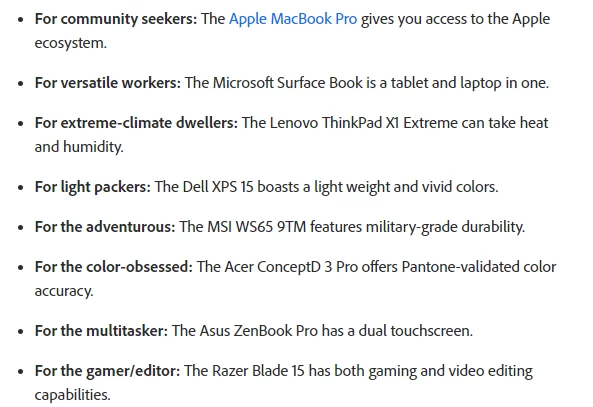
These are the recommended laptops from Adobe, most of them don't meet the max recommended requirements. I was looking at the ACER ConceptD 5, because it may have DisplayHDR1000, also it is listed on 2 lists that I saw.
The American Graphics Institute also, recommends the Acer Concept D , but it does not specify which one. 

A lot of these computers above dont meet the max recommended requirements also.


I don't think the Acer Conceptd 3, has enough memory, so I was looking at the ACER ConceptD 5.


If you scroll down this page. It shows computers made for Video Editors, Influencers and Podcasters

https://www.acer.com/us-en/conceptd/target-audience/editors-influencers-podcasters 


This topic has been closed for replies.

2 replies

Warren Heaton
Community Expert
Community Expert
March 19, 2024

As you've noticed, the Acer ConceptD CP7271K P is an external display, not a laptop or laptop display.  


As far as I am aware, the Certified Products - VESA Certified DisplayHDR™ page is for external displays only and not built-in laptop displays.

When evaluating a laptop, look for "HDR Mode" to be listed in the "Maximum Brightness" display specifications.  The Acer ConceptD 5 is 400 nits / cd/m2 with no HDR mode indicated.  As such, it would require connecting an external display for HDR still work or HDR video work.  Of Acer brand laptops, the Acer 17" Predator Triton 17 X Gaming Laptop shows "1000 nits / cd/m2 (HDR Mode)" as its maximum brightness.  

For working with still images and Adobe Camera RAW, you'd want to meet the HDR requirements listed here:


That is, we want an HDR10-capable display that meets or exceeds HDR level 1000.


For working with HDR video for desktop and social media in Adobe Premiere Pro, you'd want to meet the HDR requirements listed here:


For working with HDR video for broadcast in Adobe Premiere Pro, you'd want to follow these requirements (desktop or laptop):


To check what we're able to see on a display, I like to use the Wide Gamut Checker home page (https://www.wide-gamut.com/) and the Wide Gamut Checker test page (https://www.wide-gamut.com/test).


As far as built-in laptop displays go, the Apple MacBook Pros with XDR displays exceed the maximum still image HDR requirements.  I think everything else requires an external display.  For a list of Windows-based laptops that support HDR mode, visit B&H Photo Video, and search for "HDR laptops".   Of the handful of results, most have a maximum brightness of 400 for HDR mode (so, HDR, but not optimized).

Peru Bob
Community Expert
Community Expert
March 14, 2024

Moved from the Premiere Pro forum to the Video Hardware forum.

Grace5E91Author
Inspiring
March 14, 2024

okay, thanks.