


Final Touches on First Workstation Build.
Hey guys,
I am close to setting up my Premiere workstation after a few months of research/planning. I wanted to list my specs/workflow and see if the experts here can chime in to see if I could optimize it any better. Any opinions are well appreciated.
CPU:
AMD Ryzen 1700X
Can probably overclock to 3.8Ghz but tired of random BSOD errors in the middle of working on projects.

RAM:
Corsair Vengeance 32GB (2 x 16GB) DDR4-3000
Can overclock to a stable 2666Mhz since latest BIOS update.

GPU:
MSI GeForce GTX 1060 6GB ARMOR OCV1
No need to upgrade to 1080Ti because of negligible performance gains within Premiere Pro specifically. I ran my own tests with a 1080Ti to come to this conclusion.

Motherboard:
ASRock X370 Taichi
Has lots of great features but boot time is slow (~25 seconds).
OS Drive:
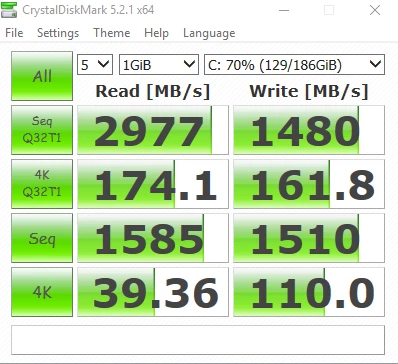
Samsung 960 EVO 250GB
Works great, can't say I'm missing out on anything from the 960 PRO.
Media Drives:
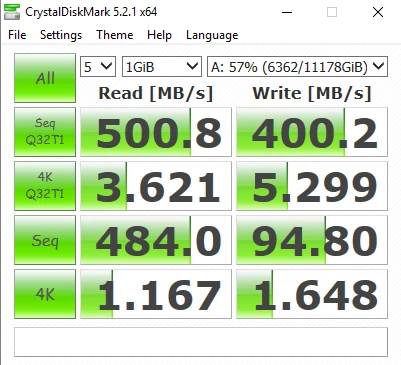
Hitachi Deskstar NAS 4TB 3.5" 7200RPM (x3 in RAID0)
Created volume via disk management disk striping. Seems to run okay, but I can't notice any real-life performance gains compared to working from a G-Drive.
Cache Drives:
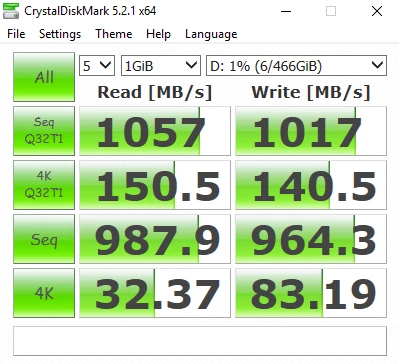
Samsung 850 EVO 250GB (x2 in RAID0)
Created volume via disk management disk striping. Not sure if there is any value of having two SSDs for cache files.
Backup Drives:
G-Drive 5TB (x2)
G-Drive 2TB
Everything from the 12TB RAID is manually backed up to these external drives. Looking into using a program called Beyond Compare to schedule automatic folder copying. Has anyone else used this program? I set up this configuration instead of a 24TB RAID10 because of the convenience of having portable drives.
Archive Drives:
WD easystore 8TB External Hard Drive
WD Caviar Black 1TB 7200RPM (x2)
WD Elements 2TB
Archive space for wrapped projects. Quickly filling up. Anyone used cloud-based archive storage before? Is it cost effective? I have gigabit internet so it's an option.
Lender Drive:
LaCie Rugged 4TB
This drive goes out to other editors I'm working with.
 AdChoices