



Harm_Millaard
Inspiring
June 18, 2010
Question

Generic Guideline for Disk Setup

  • June 18, 2010
  • 53 replies
  • 377239 views

There have been many questions about how to set up your disks.

Where do I put my media cache files, where the page file, and what about my preview files?

All these allocations can be set in PR, so I made this overview to help you find some settings that may be beneficial. It is not a law to do it like this, it is a generic approach that would suit many users, but depending on source material, workflow and backup possibilities, it is not unthinkable you need to deviate from this approach in your individual case.

The reasoning behind this overview is that you want to distibute disk access across as many disks as possible and get the best performance.

Look for yourself:
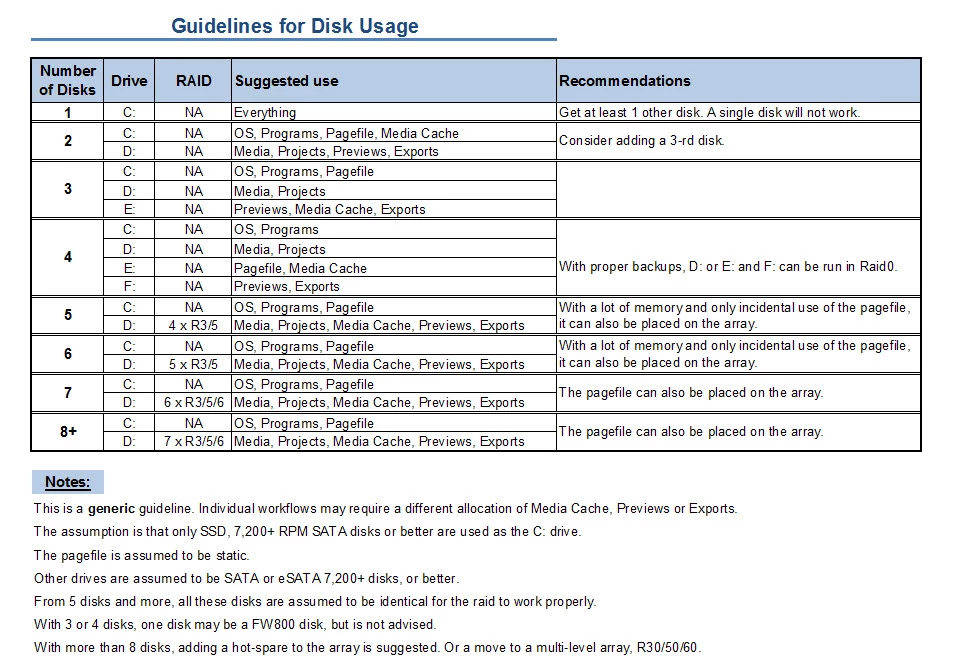
I hope this helps to remove doubts you may have had about your setup or to find a setup that improves performance.

    This topic has been closed for replies.

    53 replies

    Participating Frequently
    July 10, 2010

    Hi Harm,

    Thank you for the disk guidance.  Per your advice, I am going to reorganize my disks and get rid of my RAID 0  I have three 1TB disk, and one 320 GB disk.

    Which disk should I use the 320 GB one?  I'm thinking Pagefile, Media Cache.

    I have an ASUS P6X58D motherboard and I can use two SATA 3 drives.  Although it seems like current SATA 3 drives aren't much better than the SATA 2 drives, when I get SATA 3 drives, which ones would benefit the most for performance?

    Aloha,

    Roy

    Harm_Millaard
    Inspiring
    July 10, 2010

    The 320 for Pagefile and Media Cache is fine.

    SATA III is theoretically faster than SATA2 in terms of bandwidth. However no conventional disk uses the full SATA2 bandwidth, so it is a fable that SATA III is faster in practice. The only advantage of SATA III disks is the larger 64 MB cache and it makes no difference at all whether such a disk is connected to SATA III or SATA 2.

    Participant
    July 9, 2010

    Hi Harm:

    Thanks for the awesome guidelines and posting on all things hardware. You 'da man.

    I now have a 4-disk CS5 setup (upgraded from a 2-disk CS4 setup), and will follow your guidelines. I think I understand the rationale of it all (spreading disk read/writes over multiple, low-filled physical HDDs).

    A few questions:

    1. Does the media cache files (assuming these to be indexes, peak files, etc.) AND the media cache database go on the same drive? (E: in my case)
    2. Does the media (video files, stills, music, etc.) AND the *.prproj go on the same drive? (D: in my case)

    It looks like Project Settings>Scratch Disks sets up the Captures, Video and Audio Previews in CS5. And Preferences>Media sets the "Media Cache Files" and "Media Cache Database" locations.

    I have a WD Raptor 10k rpm drive for my OS/Program drives and a pair of 1TB WD Black 7,200rpm drives for my E: and F:.  I have a motley mixture of SATA drives, all 7,200rpm of various sizes for my legacy projects & media.

    I also have a software mirror drive (a Green WD 1.5TB) that backs up necessary files every morning via MirrorFolder software. So I guess I technically have a 5-disk system.


    Thanks in advance!

    Harm_Millaard
    Inspiring
    July 9, 2010

    The table shown is about your normal disks, not about backup disks, network drives or NAS/SAN drives. In your case I would say you rank in the 4 disk category, because of the motley of various disks you have, even though this motley may be about 8 or more disks.

    Participant
    July 9, 2010

    Fair enough, about the disks numbers.

    Can you provide any help on the two questions I asked, please?

    Colin Brougham
    Participating Frequently
    June 18, 2010

    Harm,

    Thanks for posting this; very interesting. It's now making me question if I did the right thing in setting up my hard drives!

    I must admit I didn't do much research on this aspect (because I thought I was going to have burn-in time, but I had to hit the ground running with the new system!), but I think I have enough drives to squeeze out a decent bit of performance.

    I see that you're recommending RAID 3 or 5; I had setup my 4x 1TB Samsung F3s as a RAID 10. Did I do not such a smart thing? It looks like I could probably better utilize these for speed and storage space by perhaps changing up the way they're set up. I have been running RAID 0 with my three-year-old HP workstation for my media drives (2x 320GB) and haven't had a problem, so I really don't have any qualms about RAID 0, especially with proper backups, as you suggested. I'm using the built-in ICH10R RAID controller on the mobo for the moment, as I don't have the change for a separate hardware RAID controller right now, and I believe it only provides RAID 0, 1, 5, and 10.

    The OS and programs are on the VelociRaptor, and I have a 500GB/7200RPM Hitachi for projects, graphics, and the like. I usually export to the "Projects" drive, and I currently have the page file there.

    Any quick thoughts about how to make it better?

    Thanks again for the thought-provoking post...

    Harm_Millaard
    Inspiring
    June 18, 2010

    In my Raid article, I described a Raid10 as:

    RAID10

    The RAID level for paranoids in a hurry. It  delivers the same redundancy as RAID 1, but since it is a multilevel  RAID, combined with a RAID0, delivers twice the performance of a single  disk at four times the cost, apart from the controller. The main  advantage is that you can have two disk failures at the same time  without losing data, but what are the chances of that happening?

    If you have not had any qualms about using a 3 disk raid0, than I would suggest to use a raid5 with your 4 disks. Gives you almost the speed of a 3 disk rai0, but with protection against one disk of the four failing without data loss.

    Colin Brougham
    Participating Frequently
    June 18, 2010

    HA! Good call... yeah, I guess I was being needlessly twitchy. I've always got backups of my media before it even hits my edit drives.

    I was running just a two-disk RAID 0 before, which was ample for my needs at that time--of course, my system didn't know the difference, because it couldn't eat that fast. The new box has a bit more of an appetite, and everytime I walk out of the room, I swear I hear, "Feed me, Seymour!"

    Between the choice of a 3-disk RAID 0 + 1 extra for whatever versus a 4-disk RAID 5, you'd say take the slight performance hit, and go for peace of mind? Makes sense to me...