Jose Somolinos Accedo
Inspiring
June 15, 2020
Answered

Hardware Encoding Unavailable on Mid 2014 MacBook Pro with Adobe Premiere Pro 2020 (14.2)

  • June 15, 2020
  • 1 reply
  • 1966 views

Hi, 


I just updated to the Adobe Premiere 14.2 and I still get the no hardware acceleration message when encoding h.264. 


My specs

MacBook Pro (Retina, 15-inch, Mid 2014)

2,5 GHz Quad-Core Intel Core i7

16 GB 1600 MHz DDR3

NVIDIA GeForce GT 750M


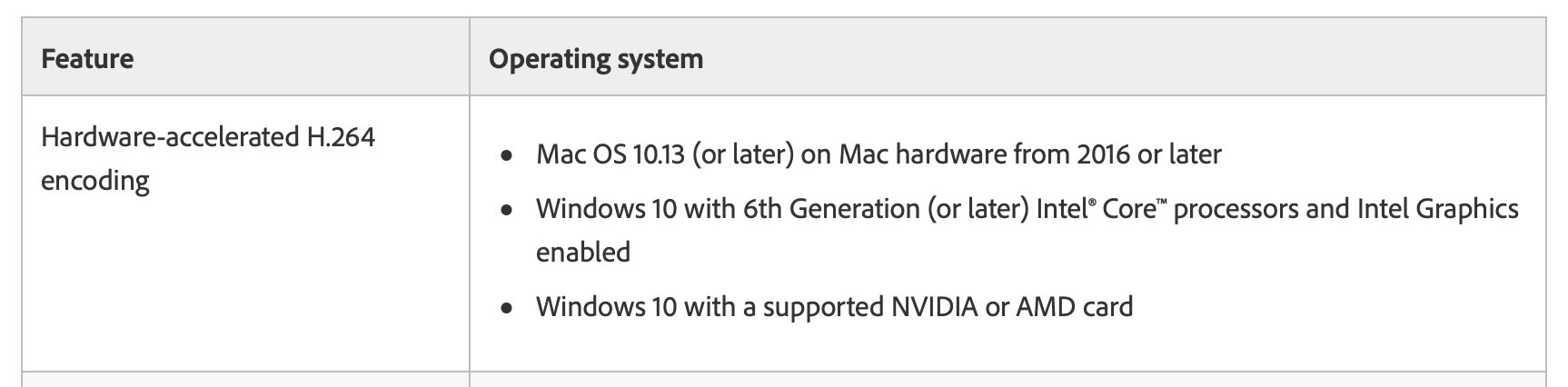
I checked the system requirements in the official page and it looks that only works on hardware from 2016 or later. 


Does it mean that I'm doomed? Any magic workarounds?


Thanks for your suggestions. 

    This topic has been closed for replies.
    Correct answer Jose Somolinos Accedo

    Hi, and thanks to both for your replies. 


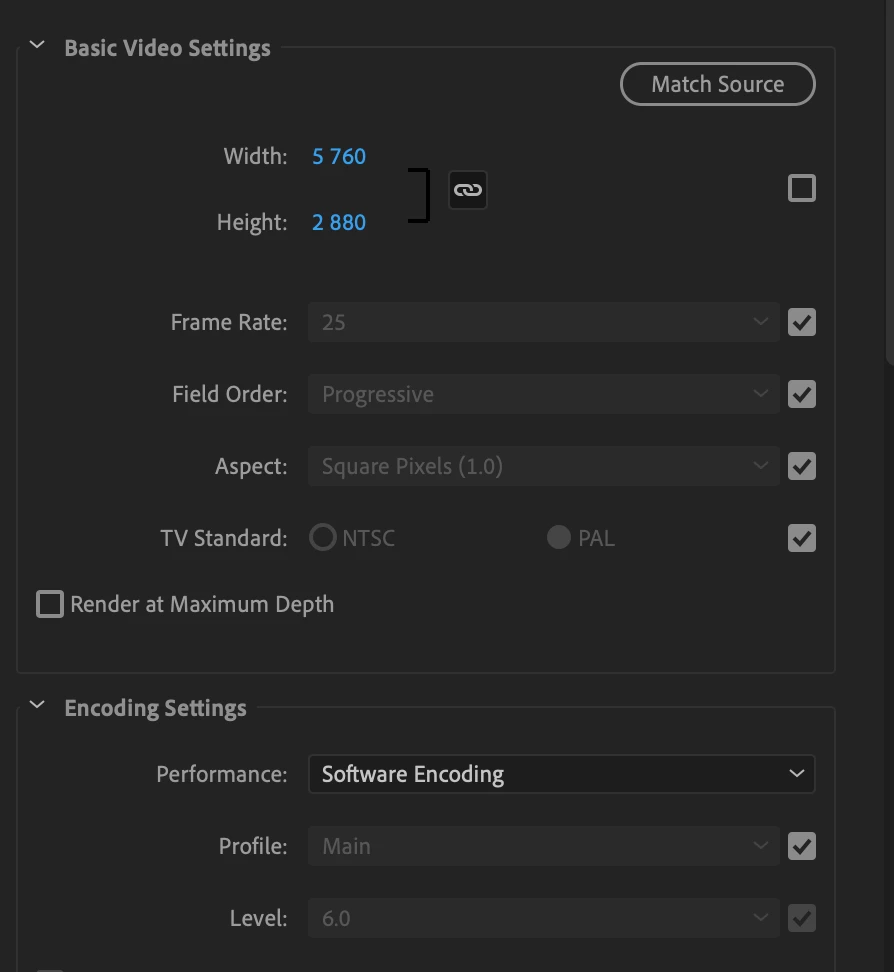
    My laptop is 5 years old, but I believe it has good specs even for today's standards. It also allows the Metal Rendered. BTW, I'm editing VR video, 5.7k (5760 x 2880). It's a bit slow, but it works smoothly if I set the previews to the minimum resolution and toggle off the filters when editing. 


    I've been doing some tests to understand why your laptop is showing hardware encoding and not mine, and I've found an explanation.


    When I export, if my video is smaller than 4096 pixels, then Adobe Premiere allows hardware encoding. If it is more than that, then only software. 5760 seems too high to handle but I haven't read anything about limitation based on resolution. 
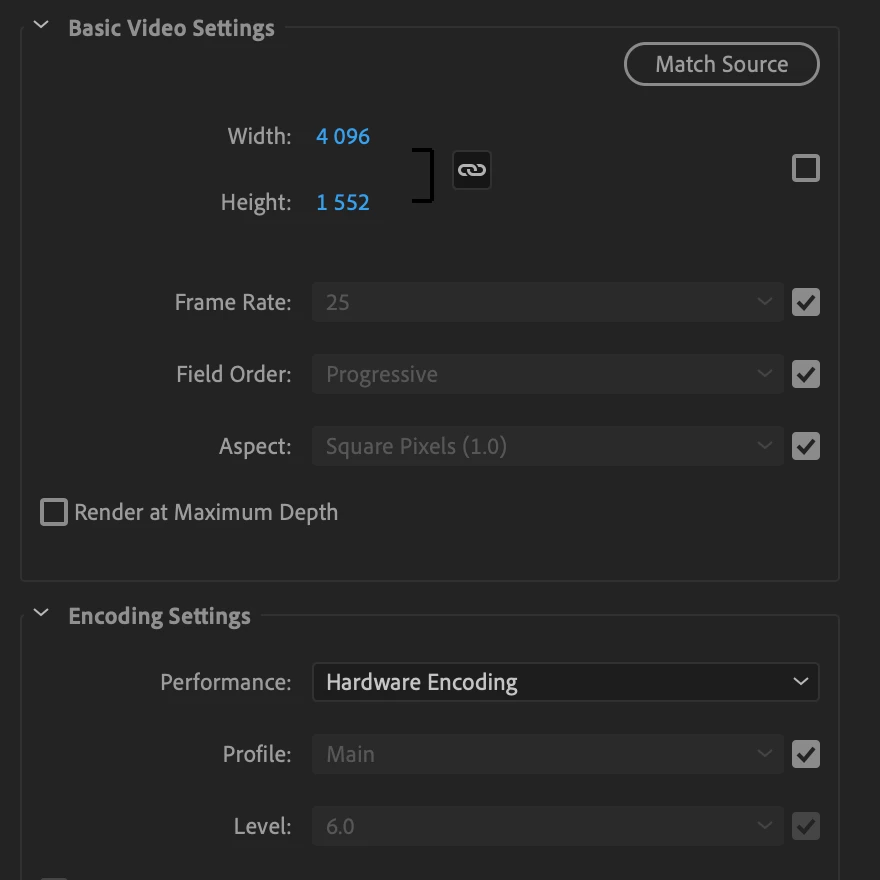
     

    I wonder if a more powerful machine would have hardware encoding for 5.7k in h.264 or is a limitation for everyone. 


    So now checking more on Nvidia, it seems to be pretty normal to cap based on resolution. Only newer and expensive models allow more than 4K hardware accelerated encoding. I guess is the universe telling me that I need to buy a new computer? 😄

    https://developer.nvidia.com/video-encode-decode-gpu-support-matrix

    1 reply

    Legend
    June 15, 2020

    You're doomed, in this case. All support for that GT 750M has already been completely ended by Nvidia itself. Apple had no choice at all whatsoever, in that case.


    Going forward, if you want to even continue running Premiere Pro at all, you will need newer hardware. That 2014 MacBook Pro will very soon be put into "Vintage" support status at Apple itself. It has already been discontinued for five years.

    Kevin-Monahan
    Community Manager
    Community Manager
    June 15, 2020

    Hey There,

    What's trippy is that I have a lesser machine...


    ....and I have Hardware Encoding available. 


    I am not sure if it is Quick Sync or my NVIDIA GPU accelerating decoding for H.264, but something is doing it (I don't think Premiere Pro will indicate which function it is using). I am thinking it's the former since Premiere Pro has been giving me hardware acceleration before 14.2. I am not sure why the OP should not at least show Quick Sync Hardware Acceleration.


    Check it out. I also have MPE for Metal available, as well.


    I should not be operating a machine so out of spec but have yet to retrieve my newer laptop at the office. This one has treated me well for 7 years. Might be about time as this baby, a 2013 MacBook Pro, is probably on its last legs as a useful editing machine - definitely not meeting system specs.


    It does make me wonder why the OP is still having trouble while I am not.
    Happy Monday and have a good week! 😉

    Thanks,
    Kevin

    Kevin Monahan - Sr. Community & Engagement Strategist – Pro Video and Audio
    Jose Somolinos Accedo
    Inspiring
    June 16, 2020

    Hi, and thanks to both for your replies. 


    My laptop is 5 years old, but I believe it has good specs even for today's standards. It also allows the Metal Rendered. BTW, I'm editing VR video, 5.7k (5760 x 2880). It's a bit slow, but it works smoothly if I set the previews to the minimum resolution and toggle off the filters when editing. 


    I've been doing some tests to understand why your laptop is showing hardware encoding and not mine, and I've found an explanation.


    When I export, if my video is smaller than 4096 pixels, then Adobe Premiere allows hardware encoding. If it is more than that, then only software. 5760 seems too high to handle but I haven't read anything about limitation based on resolution. 
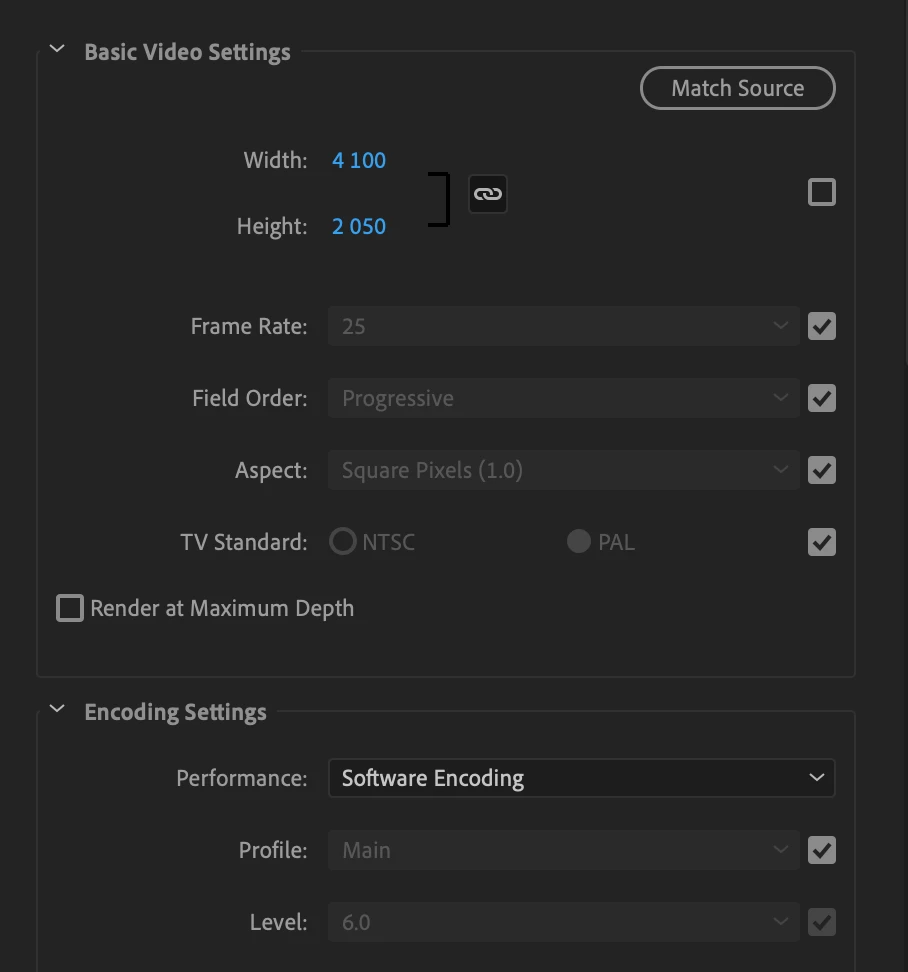
     

    I wonder if a more powerful machine would have hardware encoding for 5.7k in h.264 or is a limitation for everyone.