



HD Benchmark Tests VS Server - Break that bottleneck!
Recently our studio installed a proper video server for all our editors to work from. The main reason for doing this was logistics. Like many small studios we were perpetually trading drives with footage, back-ups were in many different places, footage would be lost on occasion. It was a terribly messy and unreliable system. Additionally in the last year we moved from shooting primarily on RED Epic-X and DSLR to RED Epic-W and Sony Cinema. So we started to have to deal with 8K R3D files and garbage Sony codec files! FUN FUN! Our poorly little (extremely top of the line) edit suites were choking. Initially it was perplexing to me because we have multi-cpu Xeon machines with top line geforce cards, fast m.2 caching. The works! So where is the bottleneck? Well it's in storage. Maybe every editor on earth but me already know this but boy was this server build and install an eye opener for me.
I did some before and after benchmarks and I am posting them here in hopes that people will find them helpful!

This first test is from a 2TB drive that is internal in one of our editing machines. The typical protocol would be to put footage on this drive to do an edit. Then once the edit was complete the footage would be moved off this HD onto a USB 3 RAID. However more often then not, projects started to exceed the 2TB so we started editing straight from the RAID in many cases. This was a WD Black Caviar.
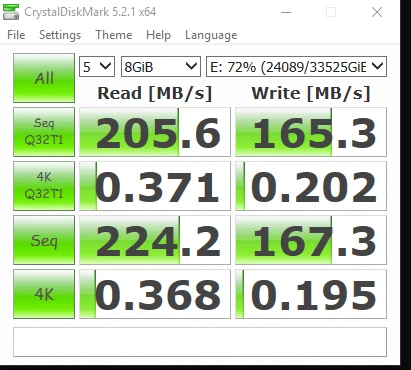
Here's the same test run from the Raid. Inside we had 8 x 6TB WD Black Caviar drives. This was over USB 3 in a RAID 10+ configuration. We had data security and a small bump in read and write speeds. In practice however, anything from the Epic-W or Sony internal codecs would choke. This was however a solution we used for a long time because it was economical. Most small studios I come across use this kind of configuration for their main storage/editing setups; but as you can see there's a huge bottleneck here. USB 3 is technically rates for 640 MBps and we weren't even saturating 1/3 of that bandwidth. Now I know this isn't 100% cut and dry. The on board controller we were using in the RAID box is probably not great; but again. This is an economical solution that A LOT of small studios use. This solution would run you around $3500 CND. Ok so now comes the server!
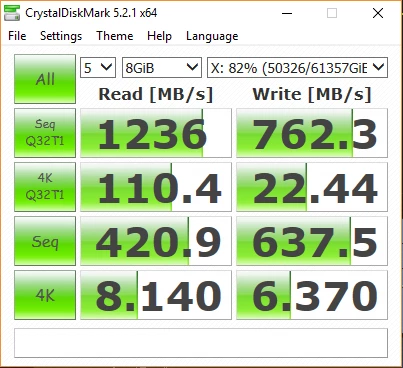
So again same test, now run from the new server. Inside the server is 16 x 6TB WD RED NAS drives configured using ZFS. There is also a 512GB Samsung EVO SSD configured for caching. The server is connected through dual 10gb links to a 10gb switch. Each editing machine is also connected to this switch via dual 10gb links. One thing to note that I have not sent up teaming on the network cards yet (having some stupid driver issues) so currently only 1 of those two links per machine is being used. You can see straight away we are far exceeding the bandwidth of USB 3. I am also happy to report that anything on the crappy sony codec flies. No lock ups what so ever. R3D 8k? Well still struggling but much improved. At this point I have to believe it is because the support in CC is still technically in beta, but who knows. I will say however before on 1/4 resolution I couldn't make an 8K R3D file do much, now I can get it to play and it lags here and there but it goes! So is this system economical? No not really, but we are growing as a studio and the added convenience and security of having our data centralized is worth it. Including server, hard drives, 10gb switch and a sound proofed small server rack this is around a $14,000 CND solution.
Other considerations:
Why not use a Drobo NAS? Well frankly they aren't flexible. you can't expand them, add drives to them etc. They are also pretty expensive considering what you are getting. For $2000 CND or so you can get 8 drives onto the network. Then what? The server solution is at the end of the day a computer. It has an OS, it a part breaks you can replace it, you can upgrade the specs as needed etc. While more expensive overall allows for 24 drives and since we are using a legacy virtual RAID solution ZFS; we can expand beyond that in the future if needed. For us it was all about flexibility for the future and I don't see much value in the drobo if your pile of data will continue to keep growing.
What about thunderbolt! I dunno. We are an all PC studio for the most part so I can't really say. I would speculate however that it doesn't matter because the typical hard drive or hard drive array cannot come close to saturating the full bandwidth of the data link anyways. Technically speaking, once I have networking teaming working properly one single machine accessing the server at one time will be able to handle 20gbps which means 2500MBps. Right now So currently my server solution is basically JUST saturating the 10gb pipe!
What about cloud storage for legacy footage!? Sure. Probably something we will considering once we have maxed out the current server build. The reality is though that here in Canada our telecom infrastructure is garbage. Our office is in a newely renovated, ultra hip, building and we still can only get 50MB up from our internet provider. That's 50MB advertised which really is about 35-40 in practice. Currently the average project we are working on is around 1TB.
I am not an expert when it comes to this stuff. Just an editor (mostly former editor at this point) and cinematographer who has been dealing with real world GB's for 8 years or so! These are my finding and I hope this is helpful for someone out there!
 AdChoices