


How to: Enable CUDA GPU Support for "Unsupported Cards" in CS6 (same process as in CS5+) :) for MAC
Hi all, I previously was involved in some discussion regarding GPU acceleration with CUDA in Premier Pro CS5 using an 'Unsupported card' with my Macbook Pro... I would like to show you this still works and will be here to show the process for anyone, and will post a video of the whole thing as a step-by-step probably tomorrow (its quite late where i am just now) but I'll give you a quick run through just now... Proof at bottom of page...
Ps. This only applies to Nvidia card Macs.. I have no ATI card mac to try this out as OpenCL etc but i would imagine it would be a similar process...
Step 1... Install Cuda drivers for your Mac (im using 4.2.7) here CUDA DRIVERS FOR MAC ARCHIVE
Step 2... Install GfxCardStatus and force your graphics (if using a laptop) to discrete card only gfxCardStatus
Step 3... Open Terminal... and run GpuSniffer... path as follows for original default installation directory, copy and paste then hit enter or change as required
/Applications/Adobe\ Premiere\ Pro\ CS6/Adobe\ Premiere\ Pro\ CS6.app/Contents/GPUSniffer.app/Contents/MacOS/GPUSniffer
This should give you an output as follows, while it may differ this is my output...
--- OpenGL Info ---
2012-05-02 01:00:28.642 GPUSniffer[6661:2403] invalid drawable
Vendor: NVIDIA Corporation
Renderer: NVIDIA GeForce GT 330M OpenGL Engine
OpenGL Version: 2.1 NVIDIA-7.18.11
GLSL Version: 1.20
Monitors: 2
Monitor 0 properties -
Size: (0, 0, 1920, 1080)
Max texture size: 8192
Supports non-power of two: 1
Shaders 444: 1
Shaders 422: 1
Shaders 420: 1
2012-05-02 01:00:28.666 GPUSniffer[6661:2403] invalid drawable
Monitor 1 properties -
Size: (0, -1200, 1920, 1200)
Max texture size: 8192
Supports non-power of two: 1
Shaders 444: 1
Shaders 422: 1
Shaders 420: 1
--- GPU Computation Info ---
Found 2 devices supporting GPU computation.
CUDA Device 0 -
Name: GeForce GT 330M
Capability: 1.2
Driver: 4.02
Total Video Memory: 511MB
OpenCL Device 1 -
Name: GeForce GT 330M
Capability: 1.1
Driver: 1
Total Video Memory: 512MB
Not chosen because it did not match the named list of cards
Step 4... Using the name of your card from the above output, i have it underlined, in my case a GeForce GT 330M, copy this exact name as we will now add it to the list of supported cards...
Step 5... Using terminal still, again assuming default install directories, copy and paste then hit enter on the following...
sudo nano /Applications/Adobe\ Premiere\ Pro\ CS6/Adobe\ Premiere\ Pro\ CS6.app/Contents/cuda_supported_cards.txt
You will then be asked for your computer password, type it and hit enter, it will not be shown as you type FYI... You will then see the default supported cards, add your card by pasting the name you have as in Step 4, then use ctrl+x to escape, type Y to save and hit enter a couple of times to get out...
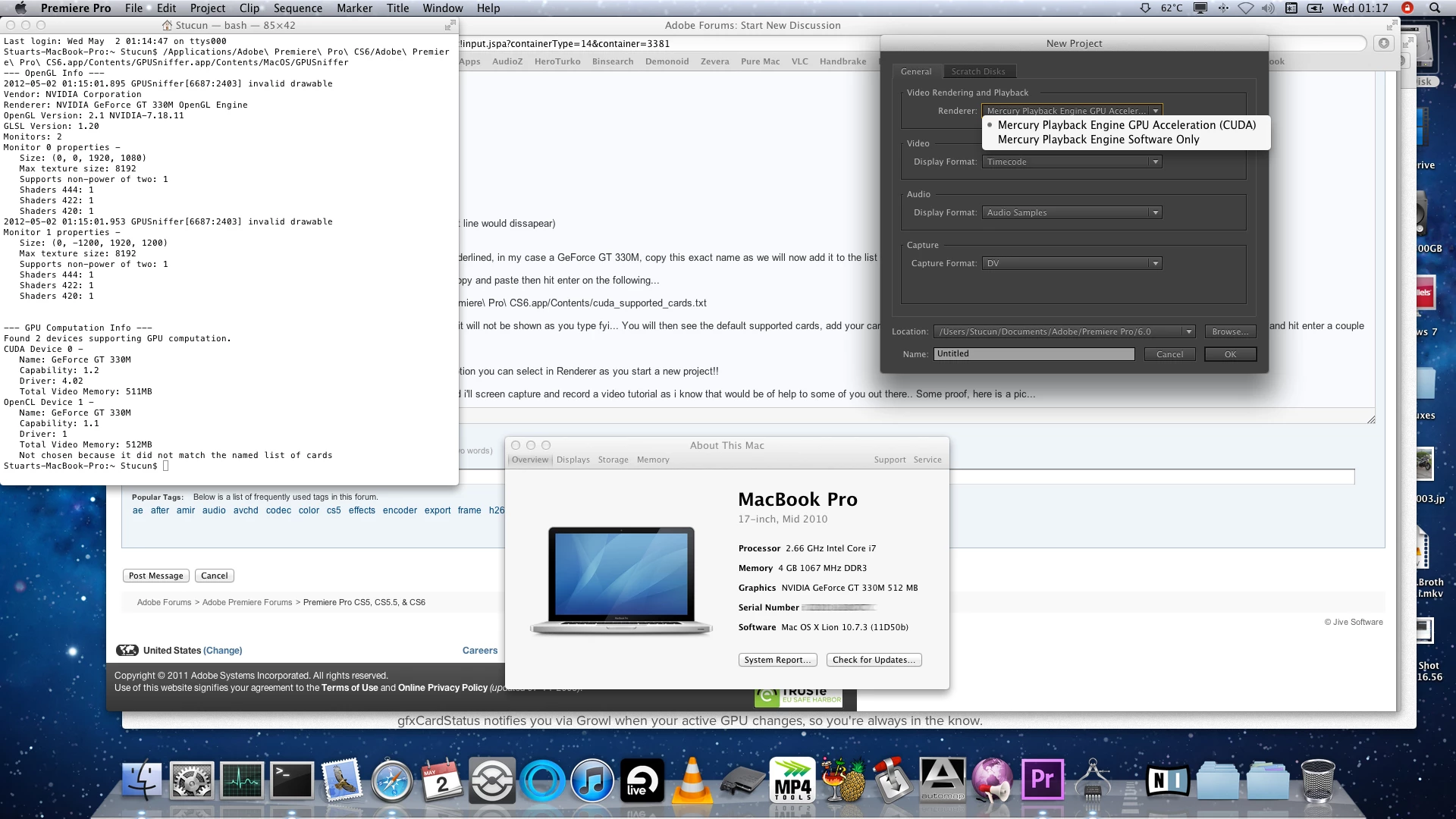
You should now be able to run Premier Pro CS6 using the CUDA GPU option you can select in Renderer as you start a new project!!
Any questions i will try to answer them as soon as possible, and as i said i'll screen capture and record a video tutorial as i know that would be of help to some of you out there.. Some proof, here is a pic...
PS. It is a full 1080 pic so it is quite large...
Message was edited by: StuCS5 - Changed Font Size
 AdChoices