

Participant
September 29, 2020
Answered

I already update my gpu driver, adobe's all software still not using it

  • September 29, 2020
  • 3 replies
  • 333 views

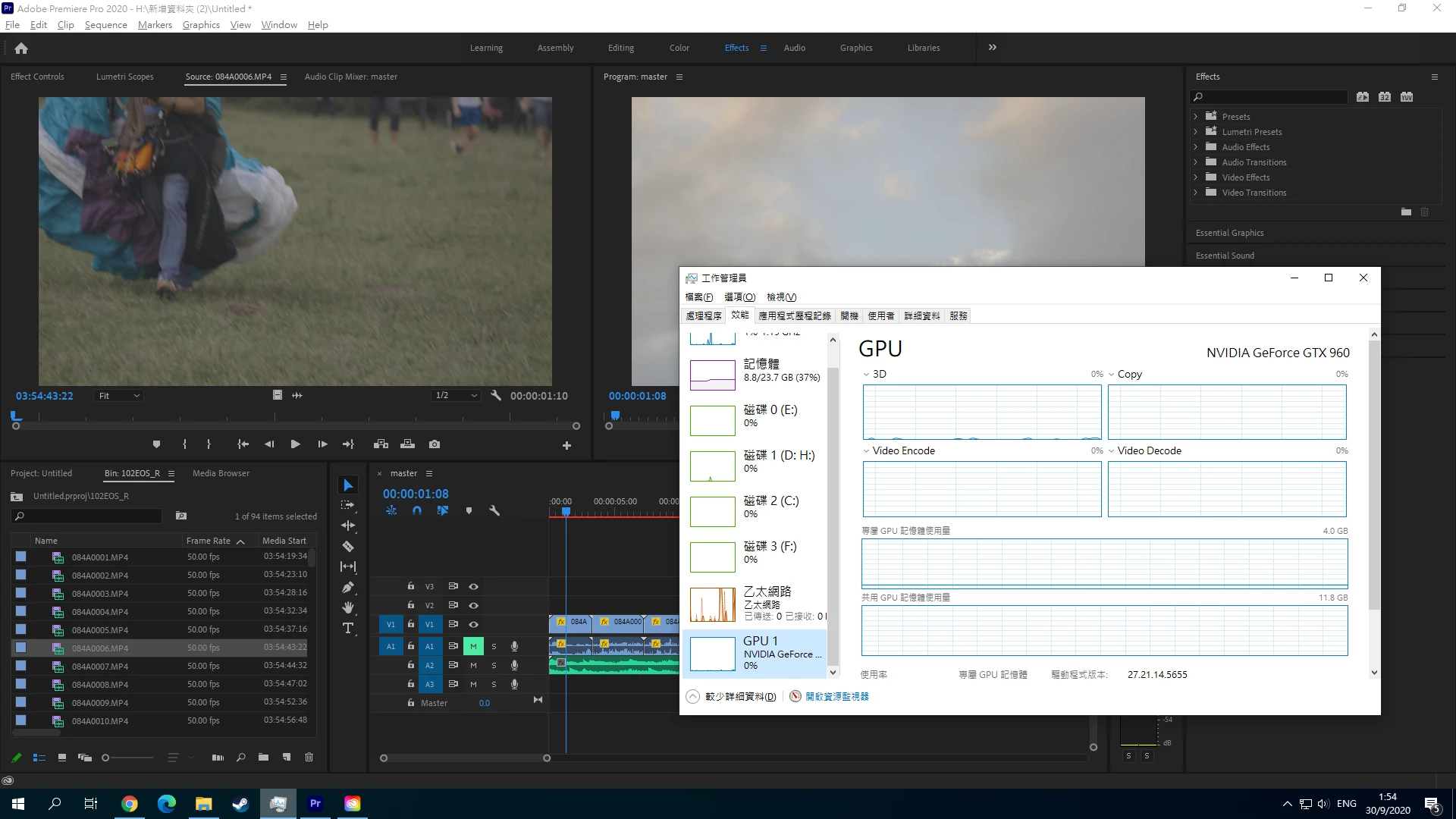
this is my computer setting.

I7-7820x

36GB ram
Nivdia GTX960

all my programs already up to date


    This topic has been closed for replies.
    Correct answer RjL190365

    In addition, since version 14.3.1, Premiere Pro will now require 10-bit support through OpenGL just to even be supported at all. Unfortunately, the GTX 960 does not support 10-bit color through OpenGL, as it is limited in the hardware, and all gaming GeForce GPUs prior to the GeForce 10 series are restricted to only 8-bit support through OpenGL. So will running a newer GeForce GTX, RTX or Titan GPU with the Game Ready (as opposed to the Studio) Driver. And since your GPU is too old for any of the Studio Drivers, you will be permanently stuck with software-only rendering with any newer version of Premiere Pro no matter what.

    3 replies

    RjL190365Correct answer
    Legend
    September 29, 2020

    In addition, since version 14.3.1, Premiere Pro will now require 10-bit support through OpenGL just to even be supported at all. Unfortunately, the GTX 960 does not support 10-bit color through OpenGL, as it is limited in the hardware, and all gaming GeForce GPUs prior to the GeForce 10 series are restricted to only 8-bit support through OpenGL. So will running a newer GeForce GTX, RTX or Titan GPU with the Game Ready (as opposed to the Studio) Driver. And since your GPU is too old for any of the Studio Drivers, you will be permanently stuck with software-only rendering with any newer version of Premiere Pro no matter what.

    Legend
    September 29, 2020

    I took a look at that screen shot. You have a red line above all of the tracks in your timeline, which means that Premiere Pro will not utilize  the GPU at all for that particular timeline render. In fact, it is supposed to utilize only the CPU. However, I also noticed that the CPU usage is both low and erratic. This indicates that your system has a bottleneck somewhere. The RAM is being used, but the disk I/O is hardly used at all. 


    All this means that your system's Windows software configuration (aka tuning) is not optimized for Premiere Pro. You might have so many background processes going on that they prevent the full use of the system resources. You might have well over 200 background processes going on in that system - closer to 300 or 400.
