


If I get a laptop, Will it be Good For 5 years, Or Will The Recommeded Requirements Change Too Much?
If I get a laptop, Will it be Good For 5 years, Or Will The Recommeded Requirements Change Too Much? So that the newest version of premiere pro won't work.
I was looking at the MSI Creator Z16P.
A few lists and a few people said this was a good computer for Video Editing in Premiere Pro.
I was trying to check if it met the system requirements
https://helpx.adobe.com/premiere-pro/system-requirements.html
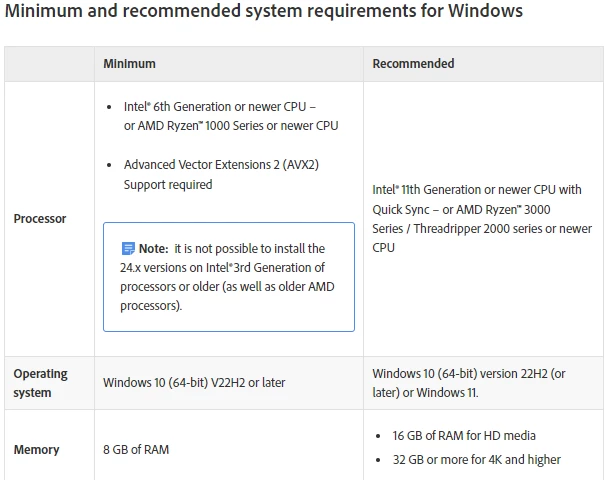
1. The 12th Gen. Intel Core i7 processor - its 11th Gen or more so I think it passed, also I think Core i7 has quick sync. I don't think it needs Threadripper 2000 series or newer CPU, or AMD Ryzen 3000 series, or I could have read that wrong.
2. Windows 11 Pro - met the requirement
3.
| Ram Memory Installed Size | 32 GB |
- met the requirement
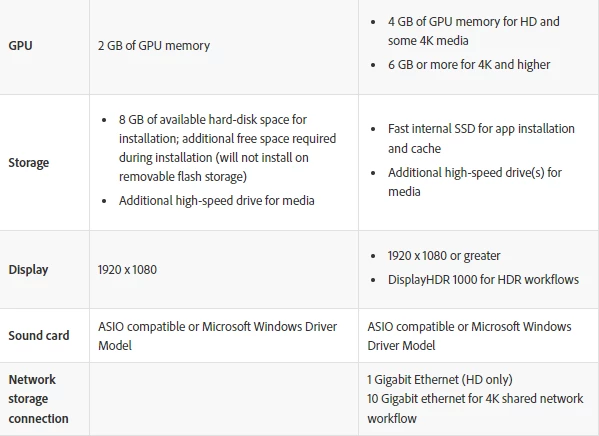
4. Is GPU the same as graphics card ram size -
Graphics Card Ram Size
| 8 GB |
- in a table at the bottom this was listed
5. a. What is fast internal SSD? Does
Hard Drive
| 1 TB SSD |
count as fast internal SSD?
b. What are additional high speed drivers for media? I did not find information about this
5.
Screen Resolution
| 2560 x 1600 pixels |
- this is more than 1920 X 1080 or greater
6. I could not find any computers that were DisplayHDR 1000 and also had 32 GB of RAM, Do you know any? I saw that the MSI Creator 17 (which is a different computer) has DisplayHDR 1000 but it has
| 16 GB DDR4 |
of RAM not 32GB. Does 16 GB DDR4 Mean 16GB of RAM or something else. Do you know any computers with DisplayHDR 1000 that would match the maximum recommened specifications?
7. I'm guessing that all windows computers are Microsoft Windows Driver Model Compatible, is this the case?
8. How can I tell if the computer has 10GB Ethernet?
Please help me, someone might buy me a laptop, but they don't want to buy me one if it won't be compatible with Adobe Premiere Pro for 5 years. They want to buy it, most likely, later on in the year.
Do you know any Windows Computers that meet the maximum recommended system requirements, and will be good for 5 years.
Do you know any computers with DisplayHDR 1000 and also meet the other requirements. I went on the DisplayHDR Website some time ago, and did not find any, but maybe they did not list all the computers.
Also, I looked up many other laptops before, going through the specifications and for some things they fel short. Also, it was confusing, because some of them had 5 different ways to set the specifications for the laptop. So, even if the laptop was named the same, it could either pass or fail the requirements based on what was chosen.
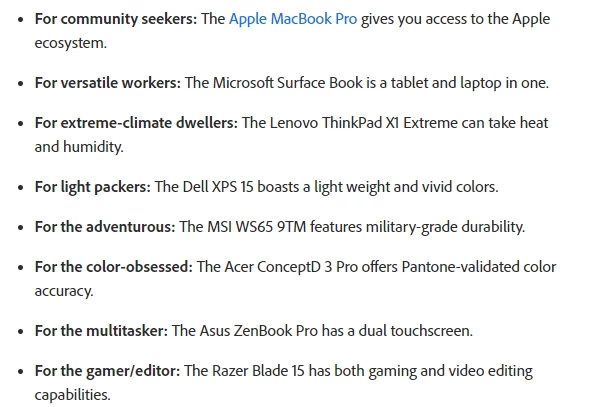
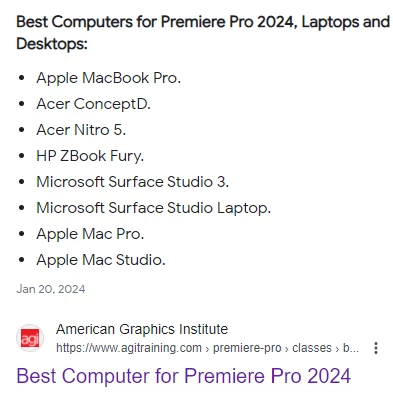
Also, some of the laptops listed on Adobe as suggestions for premiere pro. I don't think they meet all of the requirments. I also researched the laptops from the American Graphics Institute. I didn't think that all of them met the requirements either.
I'm learning Premiere Pro on videoeditors.io skool.com group page, a lot of the people say they use a Mac computers but I don't want to switch to apple. 1 person says that their computer lags someime though.
I read on 2 different lists last year that the MSI Creator Z16P laptop was the best quality for the best budget. This year also, I saw a few people on Youtube said that was the best video editing computer for them.
So, can you help me choose a Windows laptop that meets the maximum recommended requirements, and that will last 5 years, that is, keep up with the newest version of Premiere Pro, after each update.
I'm a little less than half confused, and like I said, my dad doesn't want to buy me a laptop that won't work, or won't last 5 years.
Remember the MSI Z16P is not DisplayHDR1000, so that may be a problem with HDR Workflows? I'm not sure how common that is when you get jobs, and I don't want to take a job, and the computer can't handle it.
 AdChoices