


Participant
June 18, 2018
Answered

Intel Xeon + NVIDIA GeForce GTX 660 - Premiere Pro lag playback

  • June 18, 2018
  • 2 replies
  • 3439 views

Hello,

I am wondering if it is time for an upgrade to my system. I have been experiencing stuttering and lag on the preview while trimming clips, I have to Render In to Out in order to watch the the timeline video in real time. The peak of problems occurred trying to render a transitions heavy video (a template from Motion Array) for final output. I'm not looking for a miracle computer, just looking for smooth playback, final rendering time that's reasonable and no lag.

Here are the computer specs. Essentially it is a pre-built HP with a NVIDIA GPU and has been going strong since 2012:

OS Name Microsoft Windows 10 Pro

System Model HP Z420 Workstation

Processor Intel(R) Xeon(R) CPU E5-1620 0 @ 3.60GHz, 3601 Mhz, 4 Core(s), 8 Logical Processor(s)

Installed Physical Memory (RAM) 24.0 GB

NVIDIA GeForce GTX 660 (driver version 397.93)

Adobe Premiere Pro CC 12.11

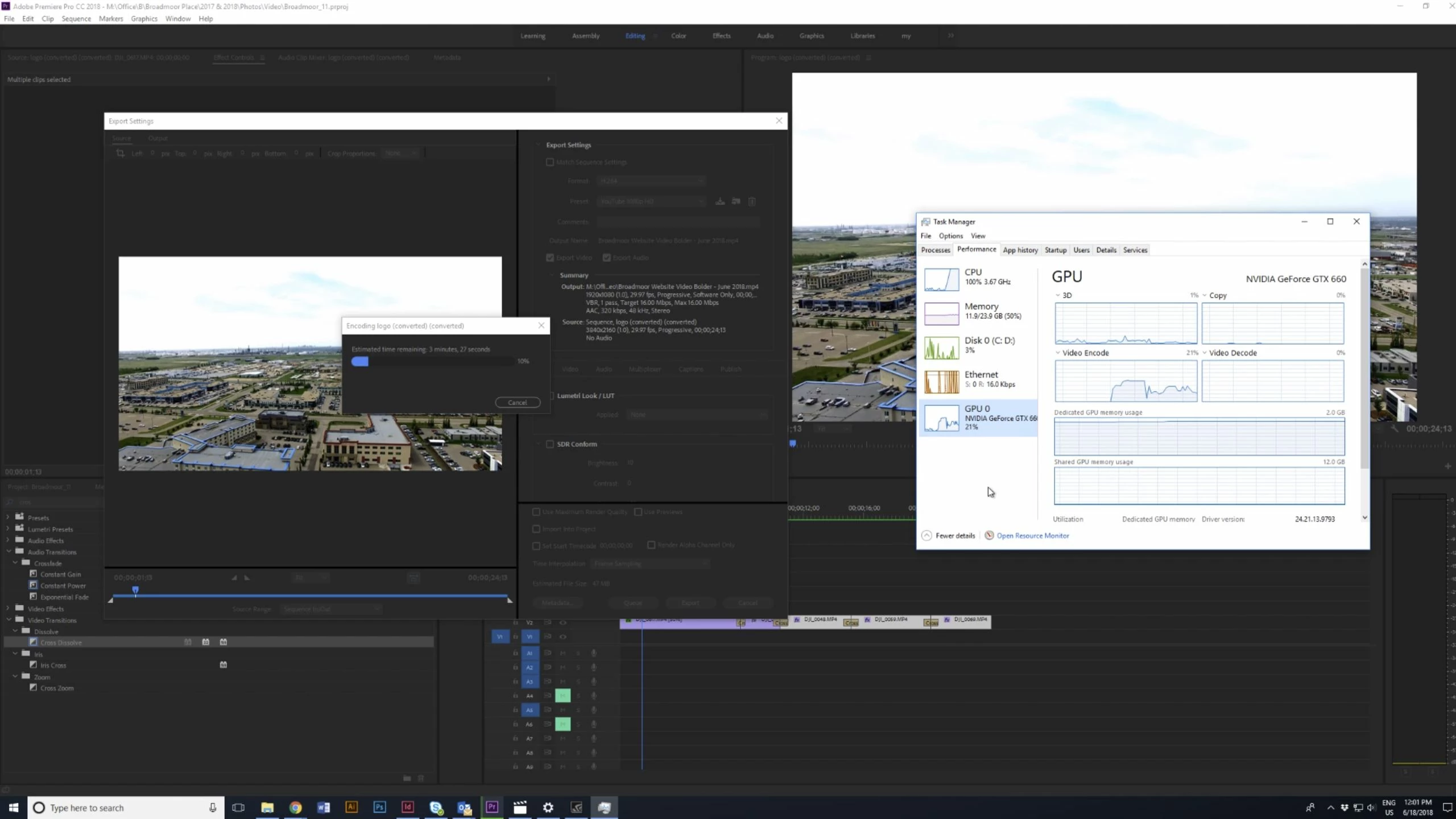
And here is a screenshot of what happens when I export a plain cut of media: 25 seconds of 4K footage to standard 1080P YouTube format. The CPU is up to 100%.
Thanks for the assistance!

This topic has been closed for replies.
Correct answer Peru Bob

Try adding a disk for projects and media and a disk for Media Cache and Scratch files.

2 replies

Participant
December 6, 2020

I can tell yoh the fact, your gpu doesnt have effect on your rendering since your gpu decocind usage is zero. Gtx 660 is a good graphics card, adobe doesnt support because gpu  manufactures and, game and software developers support eachother to get two way benefit.if you use a basic free editing software you will see your graphics card does rendering and even in much shorter time. So if you chose a commerciysoftware such as premiere you have to keep up date also your gpu and pay more.

Legend
December 7, 2020

Sorry, but that was very seldom the case. Most basic free software, in my experience with even the newest versions, do not utilize the GPU at all, while utilizing only one core of a multi-core CPU. That really makes video editing and rendering frustratingly slow even on a monster workstation PC.

Peru Bob
Community Expert
Community Expert
June 18, 2018

What is your hard drive setup (how many, what kind, what is on each, and how full)?

gigihkAuthor
Participant
June 19, 2018

Here are my local drives:

Drive C:

Description Local Fixed Disk

File System NTFS

Size 455.89 GB (489,505,681,408 bytes)

Free Space 103.57 GB (111,207,215,104 bytes)

And a recovery drive:

Drive D:

Description Local Fixed Disk

File System NTFS

Size 9.09 GB (9,761,189,888 bytes)

Free Space 1.10 GB (1,178,595,328 bytes)

I also use an office server for file storage.

Peru Bob
Community Expert
Peru BobCommunity ExpertCorrect answer
Community Expert
June 19, 2018

Try adding a disk for projects and media and a disk for Media Cache and Scratch files.