


Participating Frequently
February 8, 2018
Question

is there reasons to buy powerful computer for adobe?
  • February 8, 2018
  • 3 replies
  • 889 views

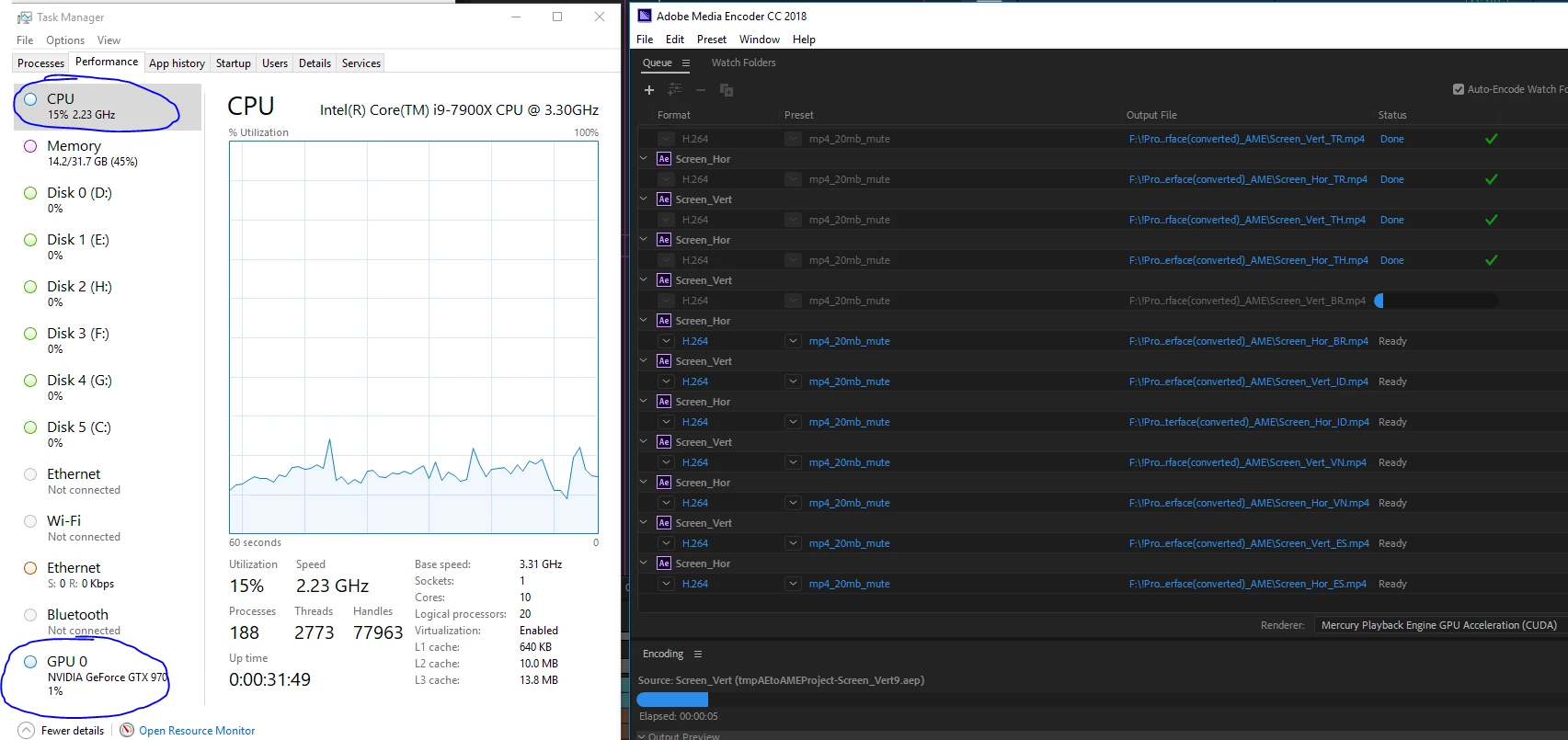
I just buy powerful computer and don't have any speed up.
3ds max work 4X faster with new PC, but Adobe CC can't use all available power.

I don't use any third party tools, just shapes animation.

    This topic has been closed for replies.

    3 replies

    heavypen
    Participating Frequently
    March 16, 2018

    Simple answer - no, not really. It all depends on your time. A faster machine (>3.0ghz) with decent RAM (>8gb) will really speed things along. But RAM size is absolute must. Example: I have tried to use Adobe CC on a PC (Dell Inspiron i5, 2.2ghz 8gb ram), a slower mac (4k Retna) and a faster mac (5k Retna). To be honest, the 4k Retna (2015 w 8gb) was frustratingly slow - I tended to max out the ram too often. The PC was faster with Ps and Ai -but impossible to use with Premier. My 5k Retna with 24gb ram is so much better on all fronts. I can have Premier and Photoshop loaded with open browser windows. AND I have three monitors running (which is really cool).

    heavypen
    Participating Frequently
    December 29, 2023

    UPDATE - Since 2018, I've gone through an HP Envy (x360 15 w/i7-7500U CPU @ 2.7Ghz and 16 GB ram, 512 TB SSD) and a MacBook Pro (16" 2019 w/16 GB ram and a 512 TB SSD). I recently added a Mac Mini M2 with 32 GB RAM and a 2 TB SSD. As far as the laptops go, the MacBook was surprisingly resilient. But none of them worked as well as the Mac Mini, and I attribute that superpower to the beefy 32 GB of RAM and the roomy 2 TB SSD. The only problem - lately - is Apple OS's mishandling of USB power config, which tends to shut down external drives after about an hour of inactivity (which I hope I've solved by installing the Amphetimine app, but I digress). Again, the final answer is, "No, not really. But you need that RAM (at least 16 GB), and I'd add a larger internal HD (minimum 512 SSD) if possible. 

    Conrad_C
    Community Expert
    Community Expert
    December 31, 2023
    quote

    But none of them worked as well as the Mac Mini, and I attribute that superpower to the beefy 32 GB of RAM and the roomy 2 TB SSD.

    By @heavypen


    I don’t think the RAM and SSD are what make the Mac mini faster. The Mac mini probably did better simply because it’s an Apple Silicon M2 processor, which is significantly more efficient (higher performance per watt) than the Intel processors in any of the other computers you mentioned.


    The proof would be that if you specced out the 16-inch Intel MacBook Pro with 32GB RAM and a 2TB SSD, chances are, those changes would not make it that much faster, and you would probably find that the M2 Mac mini still performs much better.


    The 16" MacBook Pro was converted to Apple Silicon in 2021. When the 16" was an Intel model, as with your 2019, like other Intel Macs of that era its performance was disappointing. The Intel Core CPU ran hot, and the heat led to thermal throttling and noisy fans in the too-thin Apple enclosure design. The 8-core Core i9 upgrade for the 16" was notorious for not actually being much faster than the 6-core Core i7 model in real world use, because once it got hot, thermal throttling held down performance.


    But the lower performance per watt of Apple Silicon lets an M2 Mac achieve the same performance with lower power consumption, causing less waste heat, minimizing thermal throttling so that the SoC can run at full performance for a longer time under load.


    The 16" 2019 Intel MacBook Pro, depending on the model you got, had 6 to 8 CPU cores, with 4 to 8GB of memory for its discrete GPU. But the M2 Mac mini starts at 8 Apple Silicon CPU cores, and its 10- to 19-core GPU can use a flexible, unrestricted amount of graphics memory out of your 32GB Unified Memory, after the system and applications have allocated their RAM.


    So overall, the reason the M2 Mac mini is a better performer is that its M2 CPU and GPU are faster, more flexible, more power-efficient and therefore less subject to thermal throttling than the 2019 MacBook Pro’s 9th generation Intel Core i9. (Recent generations of Intel CPUs are more competitive with Apple Silicon in terms of efficiency.)

    Bill Gehrke
    Inspiring
    February 9, 2018

    What Adobe CC programs are you using?.  IF it is primarily After Effects then you will not see any multicore usage it is still basically a single threaded program and more cores will not have any speedup.  For AE single core speed is important see this article by Puget System where you will see a 6-core processor at 1/3 the cost would be faster than your i9-7900X for much of AE processing.  So it does depend on what software you use it it is Premiere Pro then cores do count and also IF you use GPU acceleration effects and features you will see some GPU usage.

    ArturArteAuthor
    Participating Frequently
    February 9, 2018

    OMG. Adobe developing team should make After Effects to use all cores.

    Peru Bob
    Community Expert
    Community Expert
    February 9, 2018

    artura46789124  wrote

    Adobe developing team should make After Effects to use all cores.

    Add your voice here:

    Feature Request/Bug Report Form

    Peru Bob
    Community Expert
    Community Expert
    February 8, 2018

    Moved to the Hardware Forum.