


Chrisatom
Participating Frequently
September 18, 2018
Question

Is this true... no point in more than 16GB & Windows is slower than Mac

  • September 18, 2018
  • 2 replies
  • 4266 views

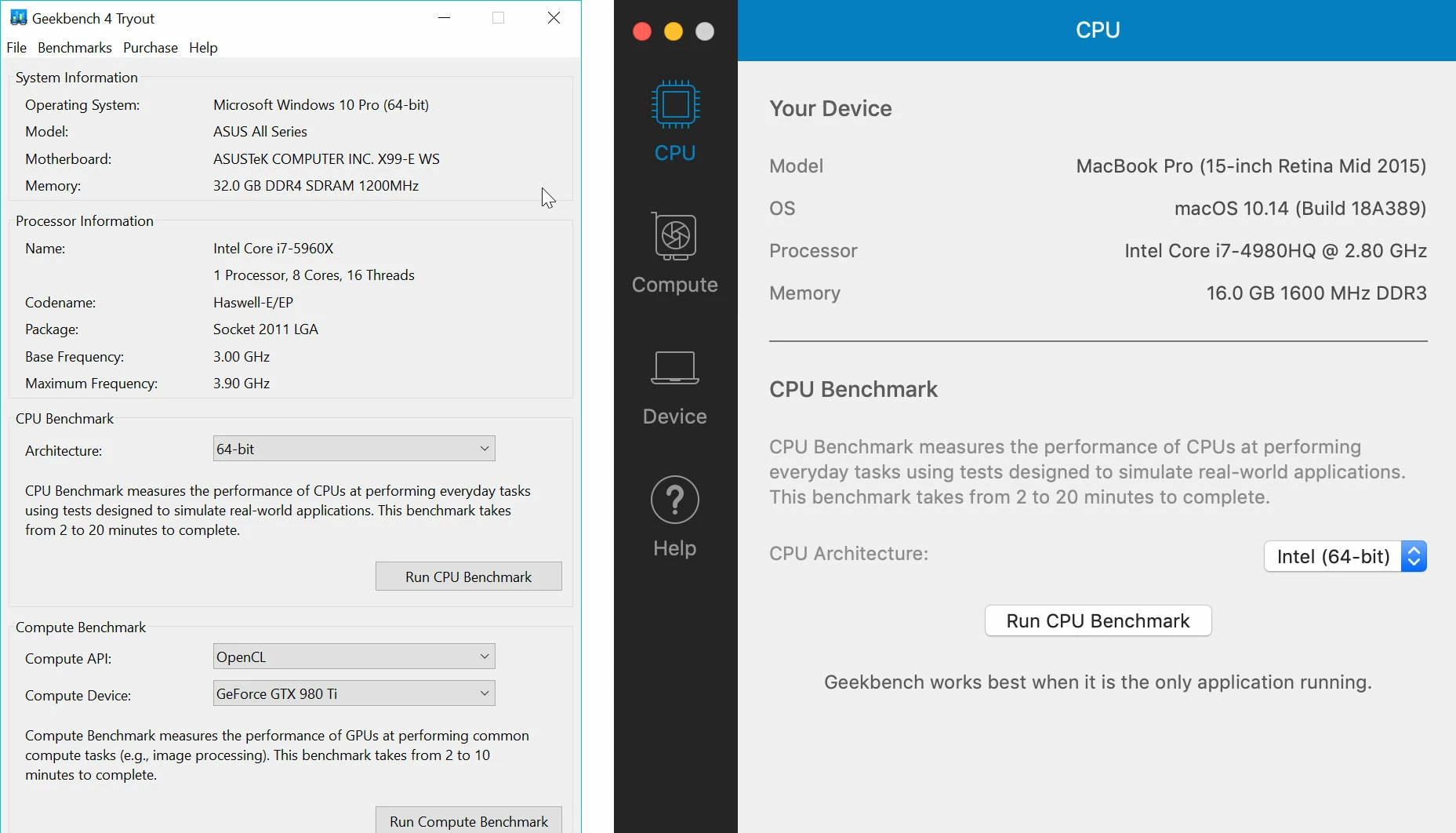
I have a pretty beefy PC with a 5960X, 32GB RAM and 3x 980ti GPUs (AE only uses 1 though). When using AE it felt laggy and struggled when trying to preview a project. I tried it on my mid-2015 Macbook Pro and to my surprise AE felt more responsive and previewed much faster. I rang tech support and he made the following claims that surprised me:

  1. AE will never use more than 16GB RAM when working on a project so adding 64GB won't make a difference
  2. AE isn't as quick/optimised on Windows as it is on Mac
  3. The issues with AE on Windows will be resolved in the next update

Are these true? I've seen tests online where people use 128GB RAM and see speed improvements but would that only affect the final render? Is AE just not as good on a PC as it is on a Mac? Although the previews are still ever so slightly slower compared to the Macbook, it's less laggy now (the audio is out of sync at the start though) after he went into Preferences > Memory and changed it to 19.9GB for Adobe applications and 12GB for system. On my Macbook, I have 13GB for Adobe and 3GB for other applications.

I must admit I'm very confused by all this. I was planning on buying a new PC but this has certainly put the cat amongst the pigeons so to speak.
This topic has been closed for replies.

2 replies

Chrisatom
ChrisatomAuthor
Participating Frequently
September 18, 2018

I will try it but it's already setup to only use one GPU with AE and I don't think you're familiar enough with GPU rendering with Redshift/Octane - they're not just being used for the final rendering (where a different rig would make sense). They speed up your workflow as you're working on projects via the viewport view. Using one GPU would yield a 2/3 reduction (roughly). Yes I could have a second Octane computer but that creates problems when it comes to having to have licenses over 3 machines (including my macbook).

Like I said, I'll test it with only 1 GPU but I really can't see it making any difference at all.

P.M.B
Legend
September 18, 2018

Maybe you;re right. Maybe I don't know enough.   May I ask what's the point using 3 GPUs while working in the viewport?  Is it real time final rendering quality while you work?

~Gutterfish
Chrisatom
ChrisatomAuthor
Participating Frequently
September 18, 2018

More GPUs = more CUDA cores which speeds up final rendering and the live viewer (viewport) as you work. This allows you to see incredibly complex effects like motion blur, depth of field etc in real time. By using more GPUs it makes the whole process from starting the project to final renders so much quicker. Until clients get involved.

Community Expert
September 18, 2018

The fastest machine depends entirely on the project, the effects applied, the formats used and the build. There is no universal fastest for everything machine. Ram is always good. AE can use as much as it needs and it helps the length of Ram previews. Windows machines typically take more maintenance than a Mac and do not hold their retail value as well. I sold my first Intel iMac that I bought in January of 2006 to a client when I upgraded and it's still running the version of AE and Photoshop I sold with it 17 years ago. Both systems occasionally have real headaches with updates. My advice, figure out what you can afford, how much it is going to cost you to maintain and balance that with current performance levels. For the kind of work that I do, I'm still a Mac guy for almost everything and I don't spend a penny on maintenance because I trade up every second upgrade and the Mac's I use cost me less than the equivalent windows machines. For one of my applications (Autocad), I run a windows machine because I have to but the same considerations apply.

As far as fixing issues, some will be, some won't, and some new issues will likely appear. That's life in the computer business.

Chrisatom
ChrisatomAuthor
Participating Frequently
September 18, 2018

Whilst I appreciate your response, Rick, that’s really just conjecture. I was looking for someone that might have been told by Adobe or for someone from Adobe to confirm that AE only ever uses 16gb and that it is better on macOS compared to windows... I personally doubt what the tech support advisor told me.

Regarding the effects and other variables that could be affecting the performance, it’s the same project without a single effect applied. It’s such a basic project and yet my PC cant seem to preview it right and I have had to reduce the RAM usage to only 19GB from 29GB.

I’ve always been a Mac user but 5 years ago I switched to Windows and have had a nightmare experience when I bought my second Windows machine 2 years ago. I’ve always been told that once you’re in the software, the difference is non-existent and so it surprised me when the advisor told me that macOS was better for AE.

P.M.B
Legend
September 18, 2018

After Effects can utilize as much RAM as you throw at it.

Based on the info you provided I'd guess that your issue (or one of your issues) is the 3 GPUs.

I'd bet my lunch if you yank two of them your performance will improve dramatically.

Also your belief that 128gig of ram would only improve final render is completely backwards.

RAM will not effect final render times at all.  That's all CPU.

You don't need a new computer.  But if you get one I would suggest a Mac.

Not because AE runs better on Macs but because Macs run better for people who don't know alot about computers.

And in my experience people using more than one GPU usually don't know much about computers. 

No offense.

~Gutterfish