


Legend
August 8, 2020
Answered

Is Windows Hardware accelerated GPU Scheduling Setting good for Premiere Pro ?

  • August 8, 2020
  • 3 replies
  • 2659 views

In a recent Windows 10 update, I found this unchecked graphic settings section:


Settings -> System -> Display -> Graphics Settings
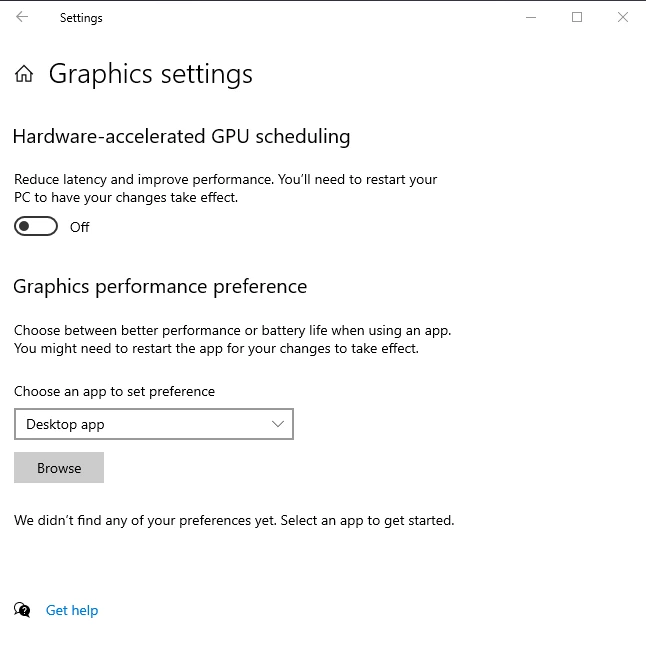


Is this required to assist PPro and AE work better for GPU hardward acceleration? 


I pulled up a few blogs, and read that it might be a 'beta version' as they are still working out the kinks ?


Thanks for you thoughts on this one,

Letty


my system Ryzen 7 , 32gb , gtx1050ti , bunch of SSDs, cuda and hardware accel enabled.

Correct answer Richard van den Boogaard

To be honest, I don't know the answer to this one. I assume that because Adobe talks directly to the GPU for it's hardware accelleration, you don't need Windows to do this as well. I'm guessing that this may apply to improvement of other apps (Mindcraft perhaps?)

3 replies

Participant
January 13, 2021

This is a major inconvenience as I have apps workflow apps that require this to be enabled. So basically if I need to do something quick in Premiere... reboot... make quick edit... reboot... continue on with work. Killing my production time.

Richard van den Boogaard
Community Expert
Community Expert
August 12, 2020

To be honest, I don't know the answer to this one. I assume that because Adobe talks directly to the GPU for it's hardware accelleration, you don't need Windows to do this as well. I'm guessing that this may apply to improvement of other apps (Mindcraft perhaps?)

Letty2019Author
Legend
August 13, 2020

Seems logical that this is a 'windows thing'.  I'm not going screw with it, it might interfere with Cuda or other settings in PPro.  why take the chance?


Thanks,
Letty

Letty2019Author
Legend
August 10, 2020

Bueller?  Bueller?

Letty2019Author
Legend
August 12, 2020

😞  nobody on this one?