


sidew98600302
Participating Frequently
May 15, 2018
Question

Last Premiere not using CUDA 1070 as HW decoder

  • May 15, 2018
  • 3 replies
  • 1014 views

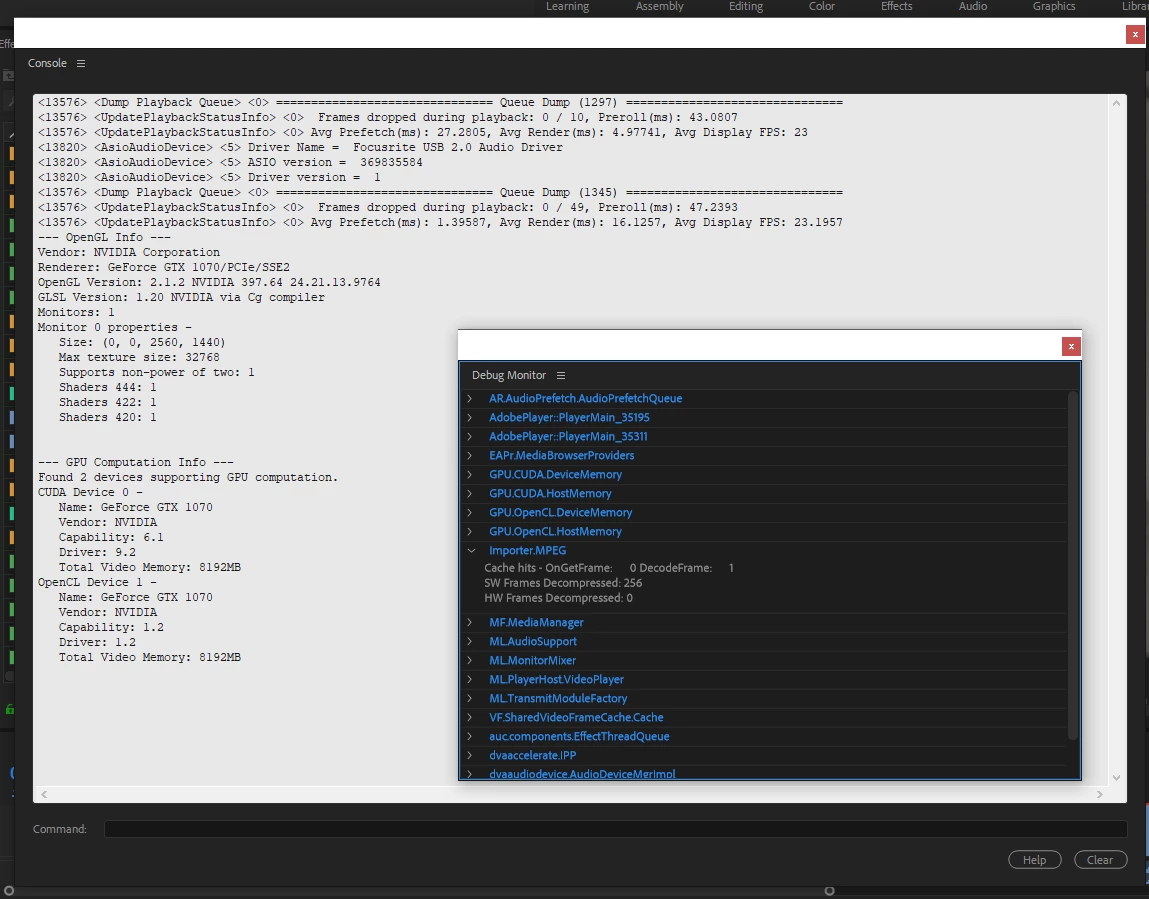
Get last premiere and my multi cam (with proxies 720p mp4 ingest settings) is very very slow. I checked debug monitor, and all decoding done by CPU. My cuda 1070 is not works at all! But all my past projects was done in same pipeline and CUDA was perfectly runnig my multicams.

Please help as it impossible to finish projects with such lags on SW decoding:
My PC i7 5820k (no QS)

Gtx 1070

Premiere 12.1.1

[Moderator note: moved to best forum.]

This topic has been closed for replies.

3 replies

sidew98600302
Participating Frequently
May 15, 2018

Sorry, but i don't know using premier gpu for decoding or not. But now GPU is not used while playback, and i can't use Multicam at all. On 2018.0 version of premiere all worked flawlessly

R Neil Haugen
Legend
May 15, 2018

To say again ... the GPU is used for certain things, and not in general for playback. "Standard" encoding/de-coding processes don't normally involve the GPU as stated above.

For some people, on some computers, 12.1 is a bit slower than 12.0 or the 11.x builds of the 2017 version. For me, it's about the same for playback & general operations.

Which proxy codec did you use? I hope the Cineform preset they ship with it. I've no clue why anyone would use an interframe codec (H.264) for a proxy to 'solve' H.264 playback issues. And I presume you know that to actually use the proxies, you need to drag the Toggle Proxies icon to the Program manager control block & then click it to the blue state to toggle on proxies.

Neil

Everyone's mileage always varies ...
sidew98600302
Participating Frequently
May 15, 2018

I used h.264 proxy 720p, as always. I had no troubles before this, and all worked flawlessly.

I'm premiere power user, i know how to enter debug menu, and know some under the hood settings, so it's not the thing that i disable proxy by mistake. So i tried all that i could. Disable/Enable intel QS in media settings, switch cuda on/off. Resets all settings and reinstall premiere completely. Rollback few nvidia drivers. and still nothing helps (

sidew98600302
Participating Frequently
May 15, 2018

Premier cannot play mp4 media in realtime, even proxy.

I not changed any HW configuration a year or more. So previous version of premiere use my GTX1070 to play multi camera. And i even can play 4k sony XAVC files almost without a lag, when CUDA selected in project. And i saw that my video card usage was  90-100%.

But now GPU is not used at all! All playback is on CPU now. (and it doesn't have Intel QuickSync) So i'm begging for help, how to get premier use CUDA for playback as it was before.

R Neil Haugen
Legend
May 15, 2018

For playback, CUDA and the GPU are used only on those sections where there are GPU accelerated effects, that hasn't changed. This app has never used the GPU for basic decoding/decompression for playback. I've got three versions of PrPro installed, and it's the same on all three ... no GPU involved on any playback until I've got a GPU-accelerated effect on the clip.

So ... no GPU use in playback after initial import. Apply Lumetri corrections on a clip, now that clip invokes the GPU in playback.

Neil

Everyone's mileage always varies ...
R Neil Haugen
Legend
May 15, 2018

Not sure which part is the problem ... creating proxies, playback in PrPro, or exports. So a bit more explanation would be useful.

If you've got a relatively new Intel CPU, there's an option for 'hardware acceleration' that utilizes the Intel QuickSync internal process on the CPU itself. If that's checked, then the CPU takes over all decoding/encoding processes ... period.

Past that, the GPU is not normally used for basic decoding/encoding unless there's some resizing going on or there are GPU-accelerated effects involved. They have a list under that name ...

GPU Accelerated Effects: https://helpx.adobe.com/premiere-pro/using/effects.html

But in general, explaining a bit more of your situation would help. Including the media involved.

Neil

Everyone's mileage always varies ...