


mikeklar
Inspiring
September 30, 2017
Beantwortet

M.2 SSD and Motherboard Bios conflict with X99-E WS/USB3.1

  • September 30, 2017
  • 1 Antwort
  • 2168 Ansichten

Samsung’s 950 and 960 Pros run at the specified speeds as long as one does not use Samsung Magic’s latest firmware update.  If the latter is used two of the three M.2 SSDs changed to PCIe 1 x 4 from 3 x 4, with a two third reduction in speed. 

This can be resolved with the motherboard firmware update.  However, until recently an update for the X99-E WS/USB3.1 with a Haswell processor was not made available.  The last approved BIOS version was 0501. 

Updating to BIOS version 0602 resolved the issue and now all three M.2 SSDs run at the specified speeds. 

I took a chance and upgraded the BIOS one level further, to version 2006 and everything seems to run ok. 

So, here is my question: 

  • - There are five more upgraded version of the BIOS’ starting with version 3004 all the way to version 3402.  Many of which indicate desirable upgrades to various board function. However, they appear to be Broadwell CPU based. 
  • - Does anyone know of, or has upgraded to the latest BIOS versions on a 99-E WS/USB3.1 with a Haswell CPU mounted?

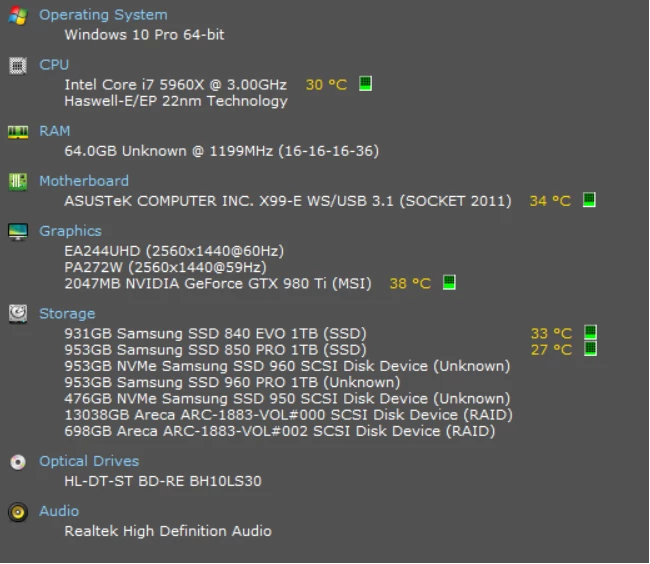
Below is a summary screen capture of the system in question: 
    Dieses Thema wurde für Antworten geschlossen.
    Beste Antwort von mikeklar

    Bill. Checked with ASUS regarding upgrading to the latest BIOS', the following is their response:

    • Thank you for contacting ASUS Product Support. My name is ..., I understand that you want to know if you can update your BIOS with the BIOS versions succeeding the 2006 version with a Haswell CPU attached on your motherboard. I know how important it is to know if the BIOS updates will work well with your Haswell CPU as the succeeding ones are for Broadwell CPU. Let me go ahead and help you.

      The succeeding BIOS versions are updates to support Broadwell CPUs and will not affect the performance of your Haswell since you want your motherboard to be updated up to the recent BIOS version. Should you try to update your BIOS to the succeeding versions, it will work fine with your Haswell CPU.

    So, as soon as I have time I'll give it a try

    Cheers

    1 Antwort

    Bill Gehrke
    Inspiring
    October 1, 2017

    Sorry cannot help but a big THANKS for the heads-up!  I have the early USB3.0 version of that board.

    mikeklar
    Inspiring
    October 3, 2017

    Thanks for replying Bill.  Was hoping you'd already done this ...

    Will try to do a further upgrade of the Bios in a week or so (working on a project right now) and will let you know.

    Cheers