Participating Frequently
May 5, 2018
Answered

Media encoder only ultilizes 22-25% CPU on render. Help

  • May 5, 2018
  • 1 reply
  • 31920 views

Hi,

I just put together a new rig with a focus on CPU rendering (i7 8700k).

When I use Media Encoder render any file (uncompressed or compressed - H264) my CPU only uses up to 25% of load capacity to process.

How can I increase this amount?

Please help and many thanks.

Ben.

[Here is the list of all Adobe forums... https://forums.adobe.com/welcome]

[Comments is to ask about the operation of the Forum, not a specific program]

[Moved from the Comments forum to the specific Program forum... Mod]

    This topic has been closed for replies.
    Correct answer Bill Gehrke

    Maybe Bill Gehrke or RjL190365 could chime in here.


    I do not use the Media Encoder.  It is dynamical linked (I believe via Ethernet) to Premiere.  I only use direct export from Premiere.  Early development of our PPBM we found that the dynamic link method was not a good benchmark-able test.  When we switched to direct export testing we found much more repeatable results

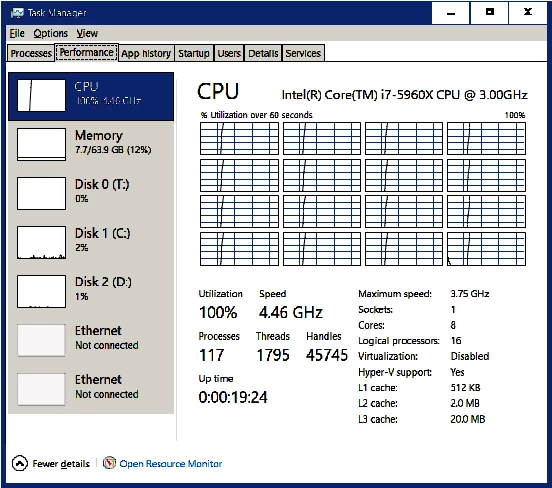
    Here is a software only export from Premiere showing 100% CPU usage

    This is one of the four tests in PPBM, the CPU intensive timeline export .  Here all four test results;

    "91","62","24","233", Premiere Version:, 12.1.1.10

    Exporting that same timeline which has many GPU accelerated effects and feature with my SC GTX 1060 6GB reduced that 233 seconds to 24 seconds.

    And yes,  the export device was a Samsung Portable T5 USB 3 SSD, why don't you run the PPBM benchmark

    1 reply

    Peru Bob
    Community Expert
    Community Expert
    May 5, 2018

    What is your hard drive setup (how many, what kind, what is on each, and how full)?

    What graphics card do you have?

    Participating Frequently
    May 5, 2018

    Hi Bob,

    Thank you for replying. It seems that this issue is either not affecting others or something that is of not much interest.

    I guess I was expecting to wake up to a few more replies and maybe even an Adobe admin one lol.

    In regards to your questions, I don't see how any of that is relevant to CPU load but:

    SSD system drive

    WD Black Work drive

    Seagate Barracuda Cache drive

    GTX770

    Regardless of other hardware bottlenecking possibilities the CPU load should be the same and put strain on the other items in the chain.

    I have heard rumors/read on other sites that the problem and bottleneck is the software itself (Adobe CC Premiere, AE and AME).

    These sites state that Adobe has not made adjustment in the software for the rendering to be processed by more that 1 core/thread etc - Ie. new Gen 8 CPUs.

    Is this possible?

    Is the bottleneck the software/Adobe?

    Are there any settings, scripts, adjustments etc I can use to force more CPU load?

    25% is dismal.

    Thanks in advance,

    Ben.

    Peru Bob
    Community Expert
    Community Expert
    May 6, 2018

    The bottleneck may be your hard drives for storage and cache.  How full are they and what size?

    What size and how full is your SSD?