


KShinabery212
Community Expert
Community Expert
July 5, 2020
Question

Need help for perfect PC Tower Configuration for video and more.

  • July 5, 2020
  • 3 replies
  • 244 views

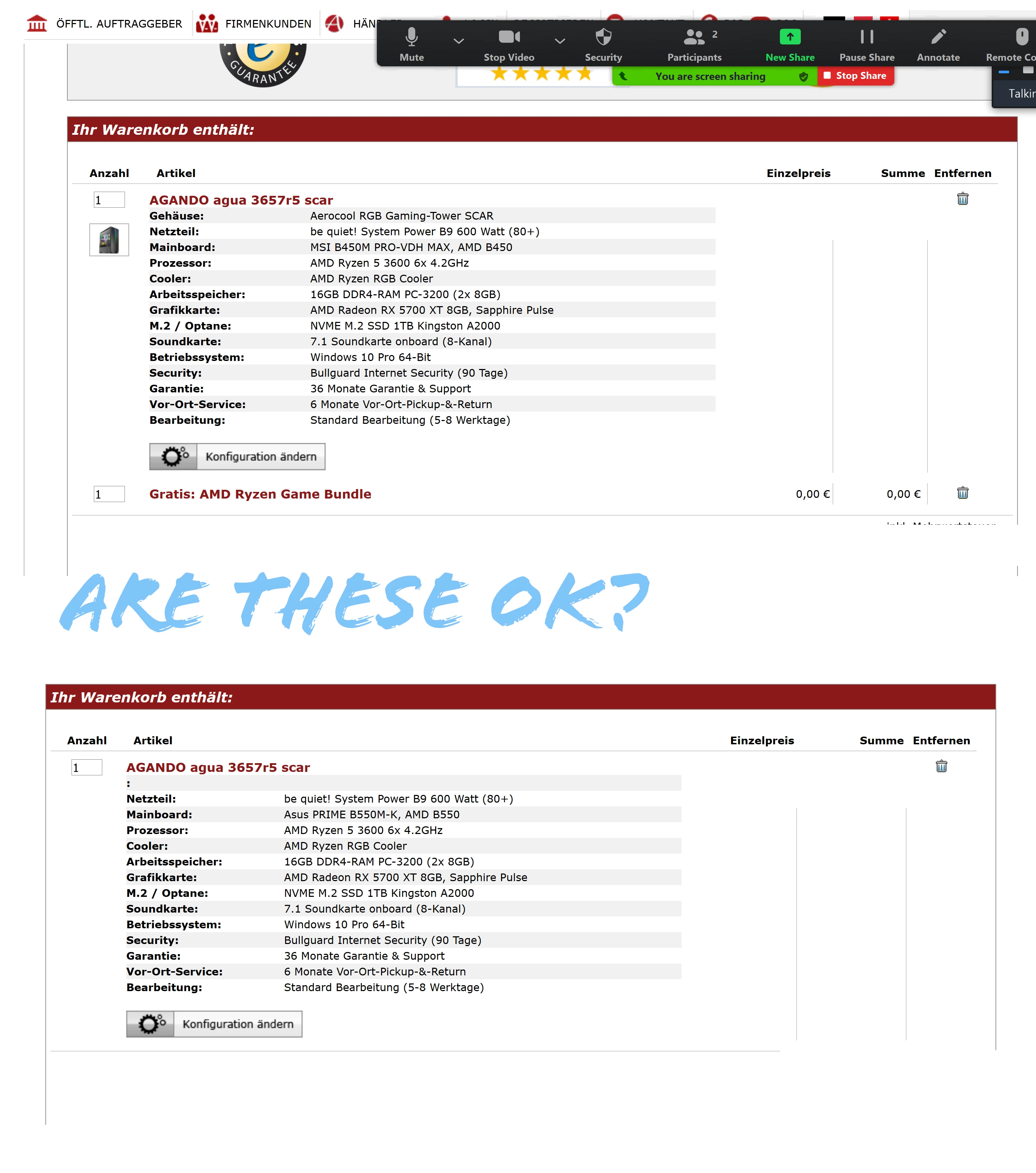
So I am considering two PC Towers.

I really can not go above 1K.

The first is just under 900... the second about 1.2K


The reason I am asking here in the Premiere Pro area, is that I heard there may be an issue with it in regards to Premiere.


Now, I want a computer that I can run my XP-Pen Artist 24 tablet and BenQPD3220U monitor on.

What I will be using it for:

Graphic Design

Photo Editing

Video Editing/Rendering

Animation 2D

Streaming

Gaming

Screen Capture, Video Capture


What are your thoughts?

I do not have time to build one myself....nor do I know how to build one.

So I have to buy it.


Could there be an issue with green lines in video with these?
 

[Moderator note: moved to appropriate forum.]

This topic has been closed for replies.

3 replies

Legend
July 9, 2020

Start your own discussion in the Premiere Pro forum. Your problem has absolutely nothing to do whatsoever with the topic of this particular discussion.

Legend
July 6, 2020

Here are some of the problems with that build:


  1. AMD still has not gotten its GPU drivers (especially for its newer GPU architectures) stable enough for production use. As a result, you may see green lines across the video in NLE programs.
  2. Even if the drivers worked correctly, that Radeon RX 5700 XT, although fairly expensive, actually performs as sluggishly as an Nvidia GeForce GPU that costs 40 percent less than that. Judging by the results from testing at Seattle-based Puget Systems, the RX 5700 XT, at a cost of $400 USD, performs about as sluggishly in Premiere Pro as a GeForce GTX 1660 SUPER that costs only $250 USD.


So, if you can configure that PC with an Nvidia GeForce GTX 1660 SUPER for less than what your current build list sells for, then I would recommend using that savings (obtained by substituting the GTX 1660 SUPER instead of the RX 5700 XT) to upgrade the total system RAM to 32 GB.

Inspiring
July 5, 2020

Your best approach would be to look up the minimum system requirements for Adobe software you want to install... and then make sure you buy a computer that meets or EXCEEDS those requirements.

Think of minimum sys requirement as walking for first time.

Your computer may not be capable of skipping, jumping, running, etc... but it's a start.

🙂