


Known Participant
October 25, 2018
Answered

New 1080 ti is baking my CPU

  • October 25, 2018
  • 3 replies
  • 1200 views

Hi all,

I recently upgraded my editing PC from a 1050 ti to a 1080 ti, which I was really excited about, but upon running a few render tests, it really seems to do a whole lot of nothing while my CPU is breaking it's back:
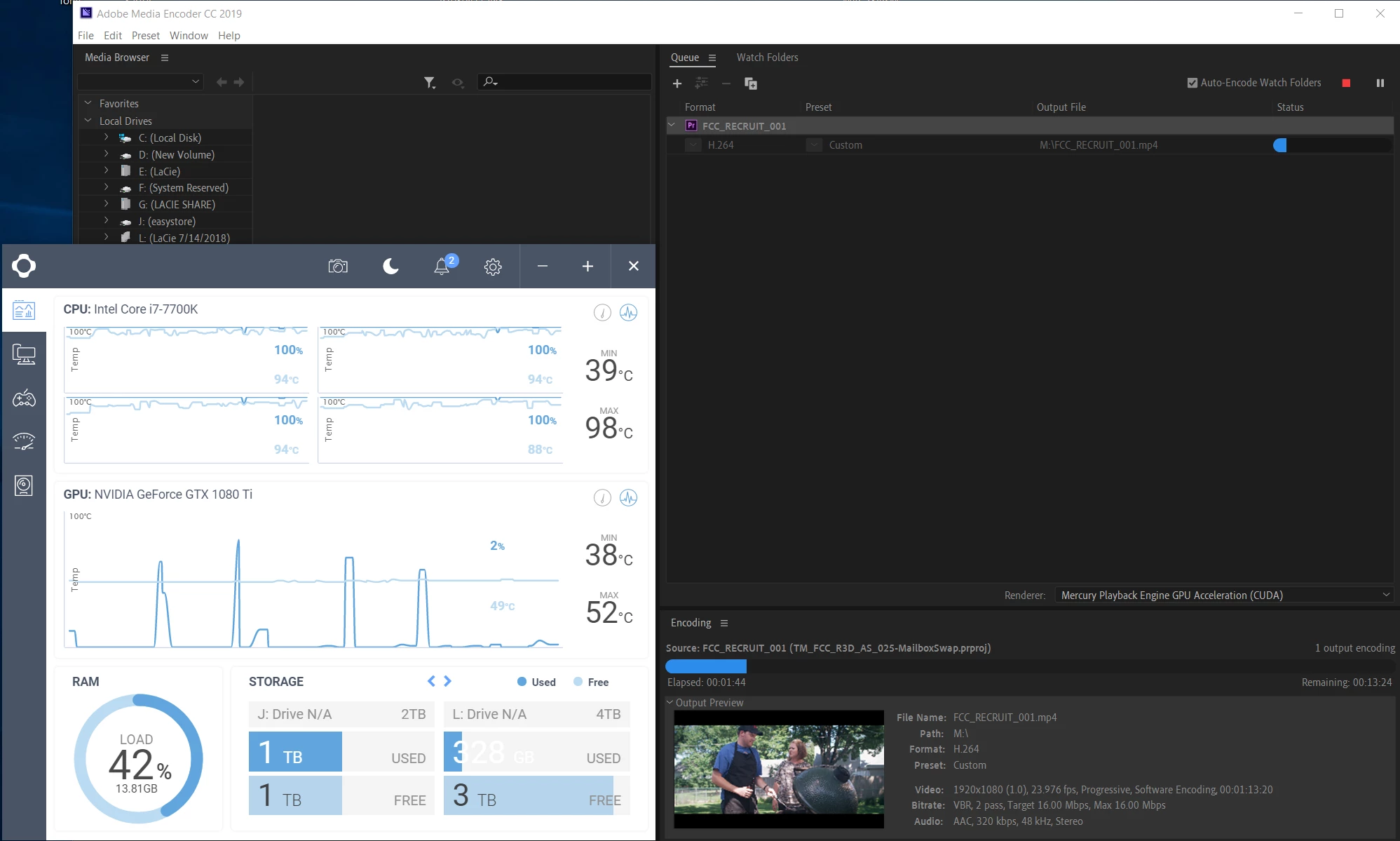
My issues are:
1. I'd like the 1080 ti to carry a bit more of the weight
2. I don't want to turn my CPU into a potato chip

Am I just misunderstanding the purpose of a high speed GPU? Things seemed a lot more balanced with the 1050 ti.

System specs:
Intel Core i7-7700K 4.2ghz

32gb DDR4-3000 Memory

Gigabyte Ultra Gaming Z270X ATX

Windows 10 (64)

Corsair RM850x power supply

Thanks so much!

Andrew

This topic has been closed for replies.
Correct answer RjL190365

Again, this has to do with component balance. If your GPU was running near 100% but your CPU wasn't quite running at that level, then the GPU is (like I said earlier) a tad underpowered. (Ideally, both the CPU and the GPU should have been running at relatively high levels for this GPU-accelerated render.) And like I said, there are unfortunately no cost-effective GPU upgrades for your particular situation right now.

On the other hand, if neither the CPU nor the GPU were running anywhere near their full utilization for that render, then the bottleneck would have been somewhere else in your system, such as a misconfiguration of the software and drivers.

3 replies

Mo Moolla
Legend
November 15, 2018

Hello Andrew

The 1st question is why did you upgrade to a 1080ti?

Yes it is one of the latest Pascal based cards and is very powerful but in day to day computing and rendering you won't see any spectacular results compared to the 1050ti. And look at that power draw. No wonder you are cooking. I hope your PSU can manage this card. 75watts compared to 250 watts is a MASSIVE jump up in power consumption.

The thermal design power (TDP), sometimes called thermal design point, is the maximum amount of heat generated by a computer chip or component (often a CPU, GPU or system on a chip) that the cooling system in a computer is designed to dissipate under any workload.

I would recommend better cooling in your rig asa start and that too will draw more power. Most people feel that bigger GPU will yield better results in PP and AE and whilst this is sometimes true the amount of differences are really minimal (I am talking seconds worth of difference). The power of full GPU rendering is a while off and until then CPU and RAM are key points to be addressed for better performance.

Trust this helps you

Mo

Known Participant
November 17, 2018

I originally purchased the 1080 ti to help speed up my time in PP, AE, and ME, but after this discussion I understand that those resources were misplaced and thusly returned the GPU and installed the 1050ti. And as you said, there was very little difference in system performance between the two cards.

Regarding power, I did upgrade to an 850w PSU before installing the 1080 ti, so that wasn't really an issue.

Again, I managed the heat issue through the bios setting and upgrading the case and fan system and things are working great. If I'm reading this (2014) article correctly, the cooler temps, especially while exporting (62C vs 99C), should definitely provide a performance boost: https://www.pugetsystems.com/labs/articles/Impact-of-Temperature-on-Intel-CPU-Performance-606/

As an aside, I built this computer in August/September of 2017. Rather than the 7700k, should I have gone with something in the same price point like the 5820k which has 6 cores?

Thanks
Andrew

Mo Moolla
Legend
November 17, 2018

Hi Andrew. My pc days are long over. I'm a Mac man. I can't comment on mobs without researching them first but as a general rule of my own thumb, "the more cores the merrier"...

The 1050 will serve you well until Nvidia drops a few new model next year.

Look for CUDA cores before purchasing. Once again that rule of thumb applies. The more Cuda cores the better.

Legend
October 25, 2018

Simple. You are asking too much of that GPU, especially when it's your CPU that's the limiting factor. In CUDA applications that demand a balanced configuration the i7-7700K, having only four cores and eight threads, cannot keep up with the GTX 1080 Ti. In fact, you really need a far more expensive CPU platform with an 8-core/16-thread CPU just to come anywhere close to fully utilizing that GTX 1080 Ti.

Granted, your previous GTX 1050 Ti was a bit underpowered relative to the i7-7700K. But a GTX 1060 or 1070, which would have been more apropos for that rig, would have cost you more money than is justified by the performance boost. Therefore, you just wasted your money right there.

R Neil Haugen
Legend
October 25, 2018

The problem is the 1080ti is overkill for that CPU. The CPU is a fast 4-core rig, but note it isn't even maxing your RAM? The CPU is the primary gatekeeper for all processing, and as the CPU's cores/threads/RAM have things to send to the GPU, it gets work to do.

That 1080 is so fast at what's being sent it's just idling, really. And you're right, the 1050 was more balanced for that CPU. To start pushing that CPU, you'll need at least 8 fast cores I would think. And then you'd first note your RAM was a lot heavier in use ... might even need to up the RAM a bit. Safeharbor11 and some of the others would handle those details better.

Neil

Everyone's mileage always varies ...
Known Participant
October 25, 2018

Thanks for the reply!

So that answers my first issue (and I'm certainly not opposed to upgrading the CPU and mobo in the future), but what about the second issue regarding the CPU overload? I'm not sure I follow as to why it's running at 100% now and wasn't previously with the 1050 ti.

Andrew

RjL190365Correct answer
Legend
October 25, 2018

Again, this has to do with component balance. If your GPU was running near 100% but your CPU wasn't quite running at that level, then the GPU is (like I said earlier) a tad underpowered. (Ideally, both the CPU and the GPU should have been running at relatively high levels for this GPU-accelerated render.) And like I said, there are unfortunately no cost-effective GPU upgrades for your particular situation right now.

On the other hand, if neither the CPU nor the GPU were running anywhere near their full utilization for that render, then the bottleneck would have been somewhere else in your system, such as a misconfiguration of the software and drivers.