Participating Frequently
December 23, 2019
Question

Premiere Driver update

  • December 23, 2019
  • 3 replies
  • 405 views

Adobe Premiere 2020. Driver update.
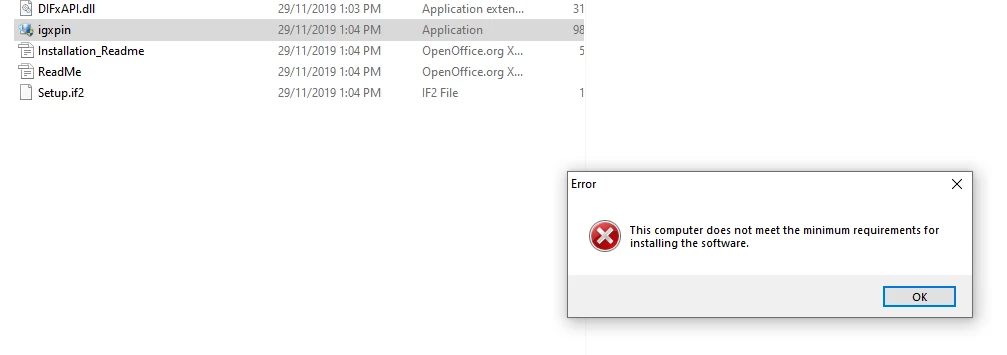
My computer says it doesn't meet the minimum requirements for installing this software.

What do I do?
 

This topic has been closed for replies.

3 replies

December 23, 2019

Just ignore it, leave the project set to Software Only acceleration, and move on

Legend
December 23, 2019

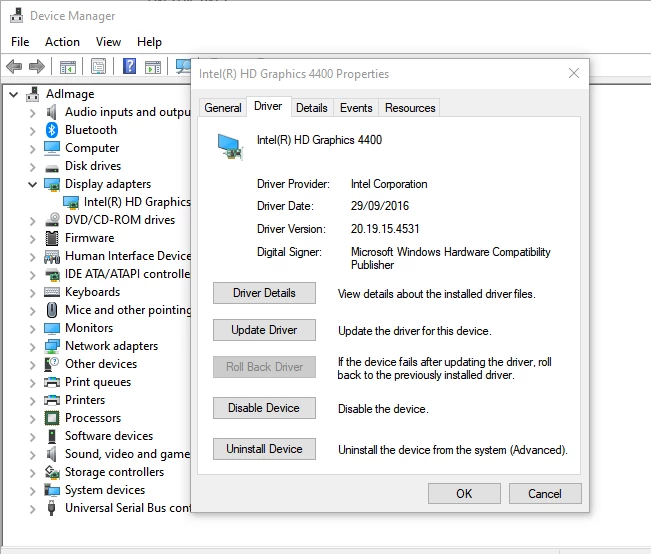
Unfortunately, your system may not be able to run Premiere Pro 2020 properly, if at all. You have only a 4th-Generation mobile CPU while Adobe now requires a 6th-Generation CPU or later. And Intel has EOL'd all new driver support for CPUs earlier than the 6th-Generation models. What's more, your system does not appear to have a discrete GPU (from NVIDIA or AMD). Worst of all, it is a laptop that does not permit any hardware upgrades whatsoever (outside of the memory and storage).


In other words, you're out of luck at this point.

Hobbit25Author
Participating Frequently
December 23, 2019

PR runs fine, just with an error message. And it's not a laptop.

Richard van den Boogaard
Community Expert
Community Expert
December 23, 2019

This Driver Update does not originate from Adobe. You should be talking to Intel, I guess. Or buy a different GPU.