


managerab06
Participant
May 27, 2018
Question

Premiere Pro . . . gives up?

  • May 27, 2018
  • 1 reply
  • 1015 views

Currently attempting to test the differences in performance between my main rendering rig, and a new rig I've built as a test bench to see how much better PP works on an Intel platform.  I work in a retail computer shop, so I have access to additional components, and all items were tested for stability before the test bench was put together.

Main rig:

AMD 1800X

MSI x370 Gaming Pro Carbon

32GB Corsair LPX 3200Mhz

MSI GTX 1070 Gaming X

Samsung 960 Evo 500GB M.2 (primary)

Samsung 950 Evo 250GB Sata SSD x 2

This rig has consistently given weird performance problems, and refuses to play back anything 4K smoothly unless my playback is run at 1/8.  I've done the proxy thing, would really rather not have to do it ever, but I understand why it's there.  Just seems weird that this machine *cannot* play back even 1/4 res without dropping chunks of video during playback.  Easily 10-20 frames dropped at a time while viewing 4K .MOV files from a Panasonic GH4.

Anyway, typical project files are around 2.5-3.5 mins long, and export times (when the software doesn't crash on me every time I click a new tab - dang you color tab!) usually sit around the 7 minute mark (project settings in attached picture are what I always use), up to around 14 mins depending on layers and effects added on.

I built a new test bench running the following:

i7 8700K

Gigabyte Aorus Z370 Gaming 7

32GB Corsair LPX 3200Mhz

ASUS GTX 1080Ti Strix (tested in the AMD system first, this made 0 appreciable difference to playback quality or render times, so used it because I'd already opened)

Same SSD setup

The problem I'm running in to now, is that every single time I try to render out using Hardware Acceleration (these are work computers, have successfully used HA many times at home since the update on my 7700K, which exports the same file size in 3 mins vs 7 on the 1800x) the export "freezes" at either 1 minute 4 Seconds remaining, or 1 minute remaining.  I say freezes in quotes because the system is completely responsive, the software is still mostly responsive as well.  It just gives up.  Usage across the board drops to zero, and never continues.  I then have to close premiere before I can even resume playback on the timeline, however any other features are completely accessible.  This is my third OS re-load as well.
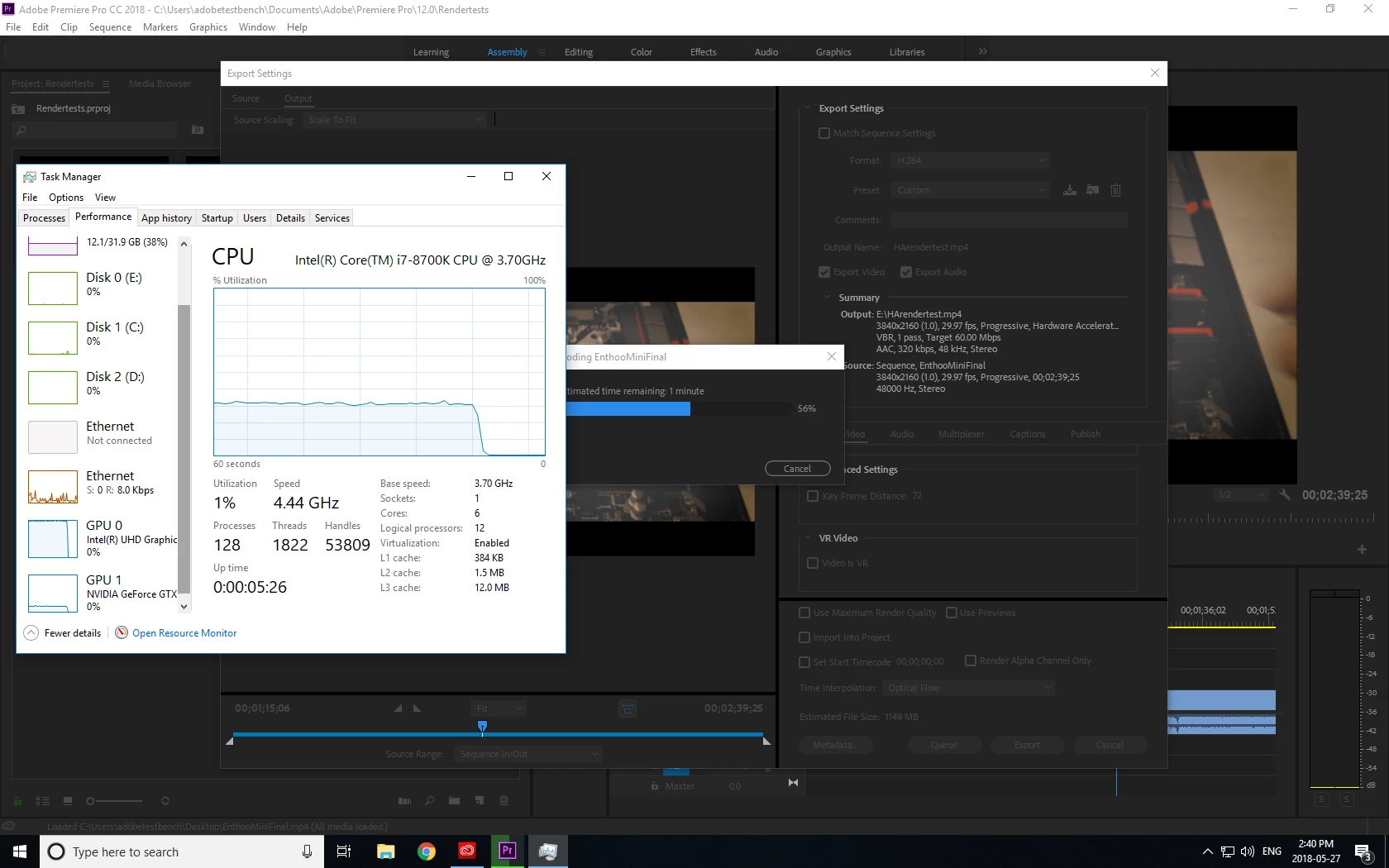
My thought process was to speed up my workflow by utilizing the HA for renders - but this is something I can't make work at all.  Hard to justify upgrade costs to the higher ups if it can't export anything.

[Moderator note: moved to best forum.]

    This topic has been closed for replies.

    1 reply

    R Neil Haugen
    Legend
    May 27, 2018

    The media you're using NEEDS cores/threads/RAM and high-speed cores at that. DSLR/drone 4k media is the nastiest stuff for playback in an NLE made. I know colorists who run 6k/8k RED & Arri stuff without blinking, but have any H.264 long-GOP media t-coded prior to use in Resolve for grading. On their rather hunky rigs.

    For most general playback & rendering, if you're not doing significant resizing, Lumetri/color correction, Warp Stabilizer, other effects on the GPU Accelerated list, the GPU isn't used much at all. Encoding/de-encoding & compression work is CPU stuff in PrPro.

    Bill Gehrke's amazing database on his ppbm page of performance with a standardized carefully crafted sequence on a ton of different hardware is something you should look at. What many people assume they need and what PrPro really likes aren't often the same.

    Such as your use of the m.2 drive for OS. Bill's testing shows that you should use a 'standard' modern SSD (like your other two) for the OS, as the m.2 drive gains you nothing for OS/program in real-world tests. Putting your projects/media on the m.2 after putting the OS on an EVO SSD would work better.

    If Bill or Jeff (safeharbor11), ECBowen (ADK) pop on here, or several others, they can give you some excellent advice.

    Neil

    Tweaker's Page ... http://ppbm8.com/index.html

    Everyone's mileage always varies ...
    gigeli82367597
    Inspiring
    May 28, 2018

    https://forums.adobe.com/people/R+Neil+Haugen  wrote

    The media you're using NEEDS cores/threads/RAM and high-speed cores at that. DSLR/drone 4k media is the nastiest stuff for playback in an NLE made.

    Should be specified, only in Adobe premiere pro you need those hardware requirements, almost any other NLE can work with a quad core and a good GPU.

    I have a similar AMD system and have no problem with 4k until i add heavy lumetri effects, at that point the gpu maxes at 100% and cpu power can't do much to help.

    I seriously doubt you even have/had the AMD system, you just made up some story, post proof of testing or we can call this fanboy bull....

    R Neil Haugen
    Legend
    May 28, 2018

    Really, that's your response?

    When you're asking about a specific app, what other apps do is mostly interesting but irrelevant.

    And "mostly similar" can be useful or can also be irrelevant depending on the other aps, even the order apps were added to the machine. As in it's been posted by quite a few here that wiping their machine, reinstalling the OS and then installing  the Adobe video apps first gets far better performance even when it's still the exact same apps total installed.

    Why? No clue.

    Bill & the other really knowledgeable folks on here have suggestions for tuning, removing as many apps from "startup status" as possible, and killing background processes. The hard data of sequence exports on even the same machine pre/post tuning are wildly different.

    So again, "similar" may be very relevant or useless.

    And if you've no clue about long-GOP media, the specific way PrPro uses a GPU,and why you can mostly handle the 4k on yours until you throw on Lumetri, well ...it means you've plenty to learn yet. Like most any other human.

    If you're going to throw pejorative terms at people you might at least use the fancy forms ... "fan-boi" has more of a cool look, you know.

    Also, you might actually do some checking first. I've plenty of posts here here and on the SpeedGrade forum highly critical of decisions by the (especially past) PrPro management and on releases with some of the more infamous bugs.

    I naturally have Resolve installed and have some experience with that app, and for some users here with certain camera media and project needs, have suggested PrPro ain't their best option.

    Neil

    Everyone's mileage always varies ...