



Peru Bob
Community Expert
Community Expert
February 8, 2017
Question

Replacing HDDs with SSDs

  • February 8, 2017
  • 1 reply
  • 622 views

Here is a summary of my current system (Yes, I know it's old, but it suites my usage right now):
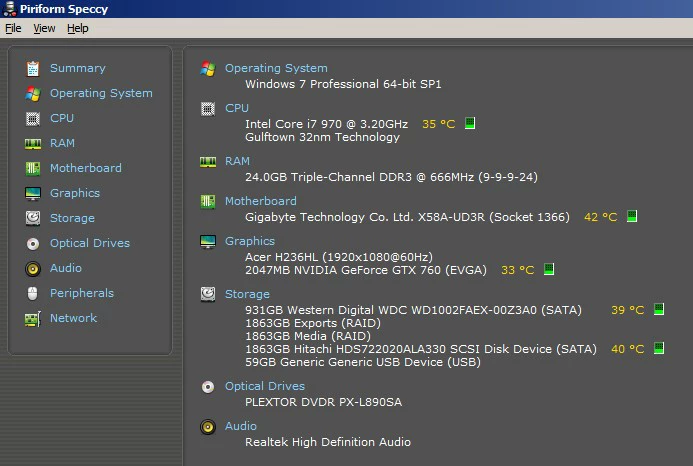
I know that I need to update the BIOS to be able to use SSDs and to be able to use a GTX1060 (I already have the GTX1060).

I only put media that I am currently using on the Media drive.  I keep all media on separate external drives and copy them to the internal drive as needed and delete them from the internal drives once the project is archived and backed up.

I do not edit 4K.

I use Premiere Pro CC, After Effects CC, Photoshop CC, and occasionally other applications.

I was planning on getting two or three Samsung 850 SATA III Evos:

SAMSUNG 850 EVO-SERIES - 500GB Solid State Drive - Internal, 2.5 in Form Factor, SATA III - MZ-75E500B/AM at TigerDirect…

I have two SATA III connectors and eight SATA II connectors.

Should I do this for two SSDs:

SATA II : OS

SATA III: Media, Project files, Cache

SATA III: Exports

or this:

SATA III: OS

SATA III: Media, Project files, Cache, Exports.

I will keep the Hitachi HDD for backups of projects in progress.

    This topic has been closed for replies.

    1 reply

    RoninEdits
    Inspiring
    February 8, 2017

    if two:

    SATA III: OS/apps (cache if needing the space)

    SATA III: Cache, Media, Project files.

    if three:

    SATA II: OS/apps

    SATA III: (2xSSD raid-0) Cache, Media, Project files.

    (with raid you will want your machine on a UPS. its a good idea even without raid)

    if three, with no raid:

    SATA II: OS/apps

    SATA III: Cache

    SATA III: Media, Project files.

    exports are usually cpu bound and often can be sent to any drive, even a hdd. if you find the drive speed is limiting the export speed you can set it to the cache ssd or raid ssd's.

    Peru Bob
    Community Expert
    Peru BobCommunity ExpertAuthor
    Community Expert
    February 8, 2017

    Would I expect to see much difference in performance with two vs. three drives?

    RoninEdits
    Inspiring
    February 8, 2017

    it would depend on the media bitrate and how many layers of media there are on the timeline. if your hdd's have been doing ok then perhaps just one ssd will be plenty. you could also start with two and add more if needed for speed and/or capacity.