


Solid PC (Weddings) - Updating Components for 2017 (4k60p)
Hi!
My Question: Which components should I upgrade to make way for the new workflow?
I was fortunate enough to have a computer built by ADK a couple years back (see specs below in attached pic). It's been a solid performer for the most part editing hundreds of weddings. A few hiccups here and there but pretty solid and I think a lot of that might have been software related/bugs in Premiere. Anyway, I'll list my workflow below along with my current specs and I'd love advice on which components might need to be updated if any as I prepare to begin shooting 4k60p and editing on a 24p timeline (we pull a lot of footage for slow-mo). Drivers are updated. Premiere is latest version as of today.
2014-2017 Workflow:
Sony a7s ***XAVC-s Footage shot at 1080p60
Very little 4k24p ProRes LT footage mixed in the multicam for 1/4 of it (recorded using Shogun).
Multicam (3 cameras)
***Everything edited on a 24p timeline
Lots of Warp Stabilizer Used (100's of clips)
Not many effects added or grading, etc. No After Effects.
I DON'T render anything except maybe a few shots on a
2017-? Workflow:
Whatever Sony's Next Mirrorless (a7 line) camera is
All shot 4k60p
Everything edited on a 24p timeline
Lots of Warp Stabilizer Used (100's of clips)
Multicam (3 cameras)
Not many effects BUT we'll possibly shoot flat and add a look in post with the new cameras
Here's my computer specs below...
NOTE #1: I already purchased 32gb more RAM yesterday so now I'll have 64gb total when it arrives tomorrow.
NOTE #2: ADK currently has my CPU overclocked a bit. However, someone has offered me an Intel 8 core 5960x CPU for $650. Should I get it?
PERFORMANCE:
From what I can tell (using Task Manager and GPU-z) my memory and CPU are being used the most while editing. Memory usually get's pushed above 85% within an hour or two of heavy editing the above workflow and I have to close Premiere and reopen because it gets choppy. Then it refreshes the memory and I'm good for another couple hours. I don't see my GPU being overloaded much at all except when it's exporting a section of the timeline that has 4k footage (again, it's exporting to 1080p currently we'll have an entirely 4k workflow this year).
**Dual Monitors Issue:
I have a 4k monitor and a 21:9 monitor setup. Premiere's timeline acts REALLY strange and is almost unworkable (you hover over the top left side of the video portion of the timeline in order to scroll the AUDIO tracks up and down because hovering over the audio and scrolling does nothing)... unless I do this crazy workaround that I found where I go into display settings and (bare with me here cuz its strange) change the 4k monitor to 1080p, then apply, then scale BOTH monitors down to their "recommended" size (which leaves everything really small). Then I sign out. Sign back in and change the big monitor back to 4k and scale both monitors up to 200% and 150% where they look good. Hit apply but DON'T sign out again - then Premiere's timeline works correctly until the computer is restarted or signed out. Not sure if this is at all GPU related but ADK suggested there might be issues with using a 21:9 monitor but I like the size for a timeline only display and the above workaround, albeit annoying, does work.
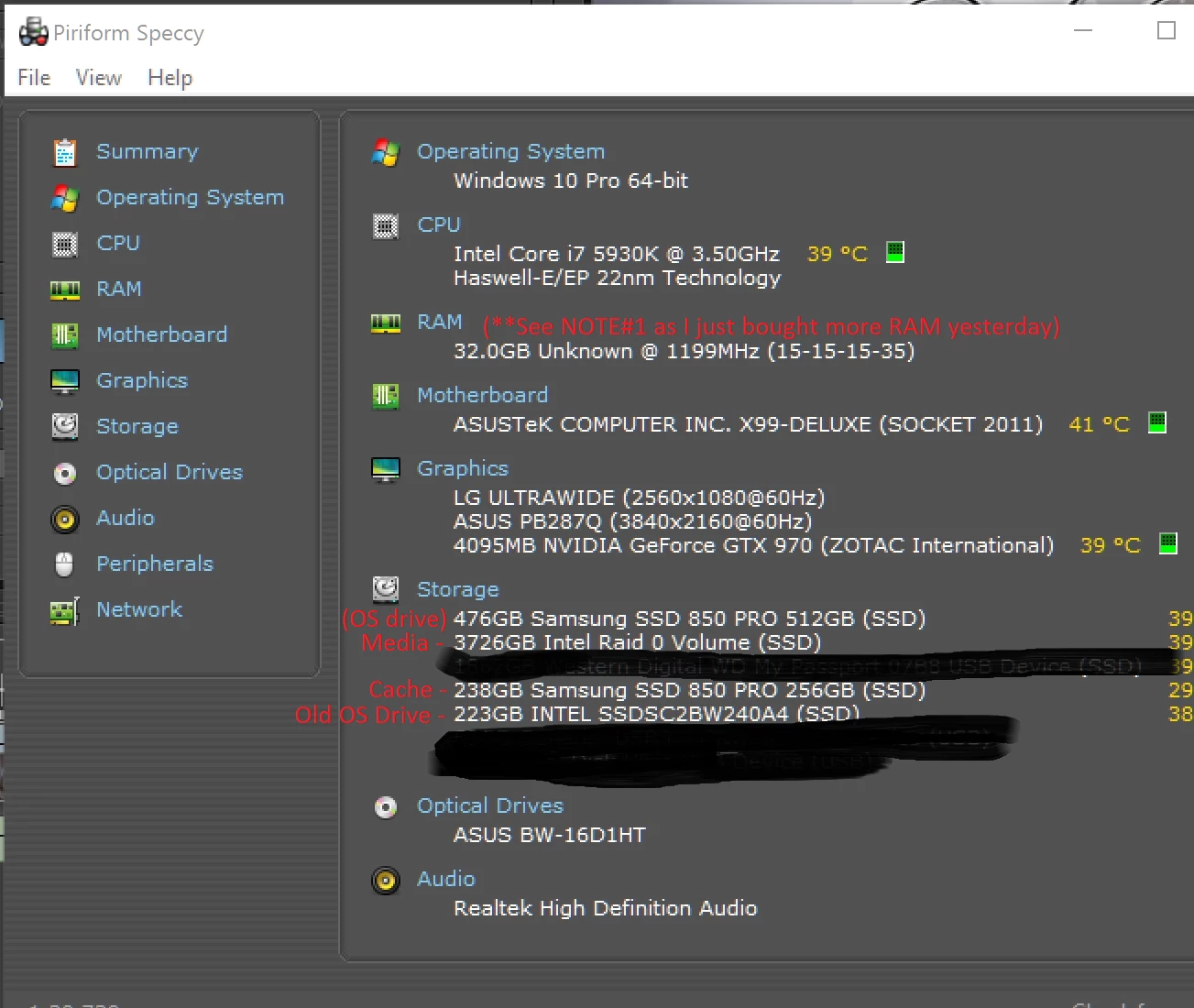
Would love to know everyone's thoughts on what might help my system the best given the workflow change (resolution only really) coming soon. As for budget...well, money matters, but I'm not stingy either when it comes to what I use day in and day out.
Thanks!
 AdChoices