


agnesb93211948
Participant
July 6, 2019
Question

stuttered source playback - is hardware decode of graphic card supported?

  • July 6, 2019
  • 3 replies
  • 917 views

Dows premiere uses the hardware video decode functio of modern videao cards?

system: Windows 10, latest.

CUDA on

hardware accelerated in setting: on

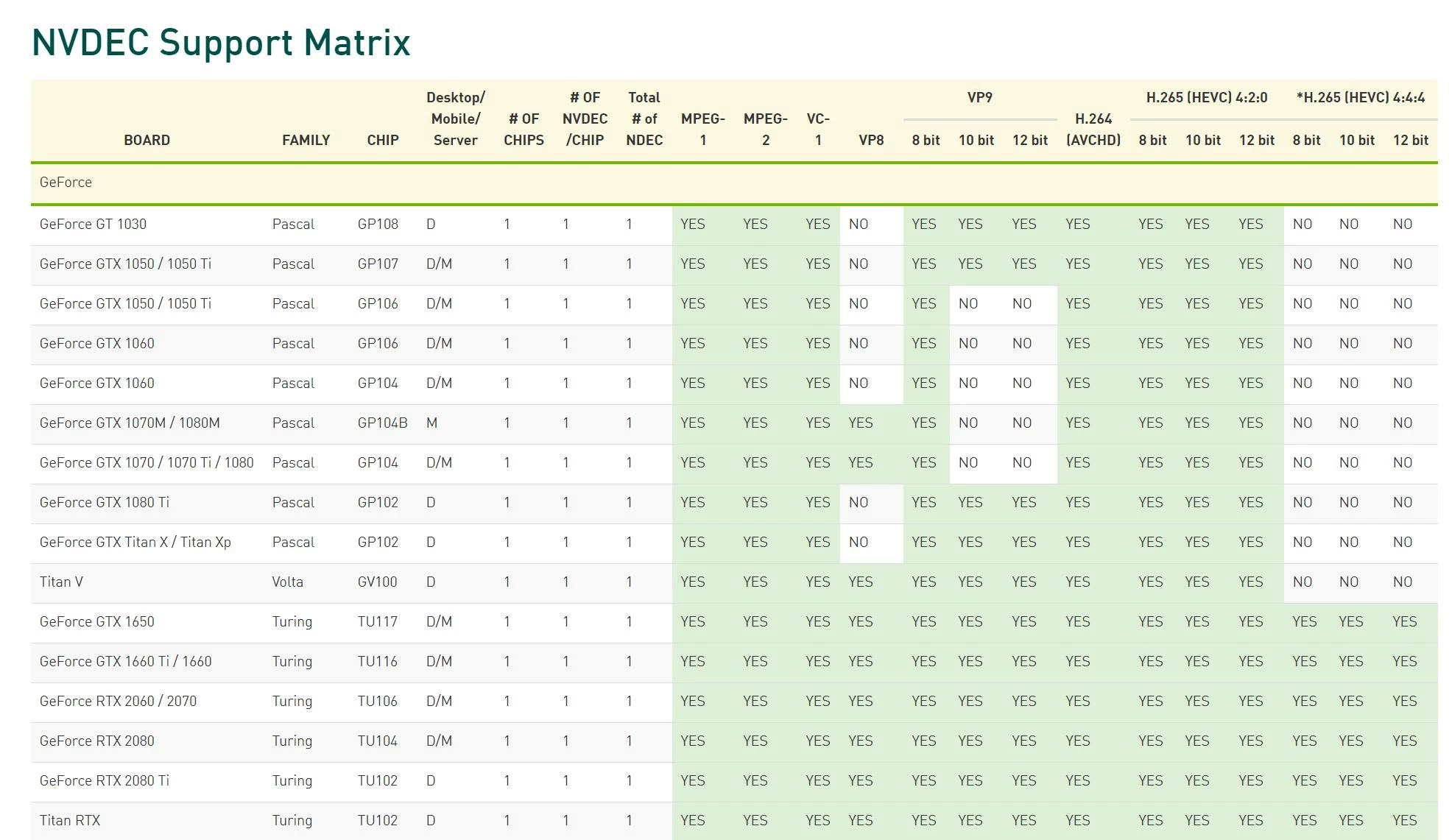
My graphic card (GTX970) or any modern card offers hardware decode for h.264 file format. (8 bit only).  (The new RTX 2060/70/80 even better, offer videodecode for h.264 /h.265 /vp9 in 8 or 10 bit.)

https://developer.nvidia.com/video-encode-decode-gpu-support-matrix

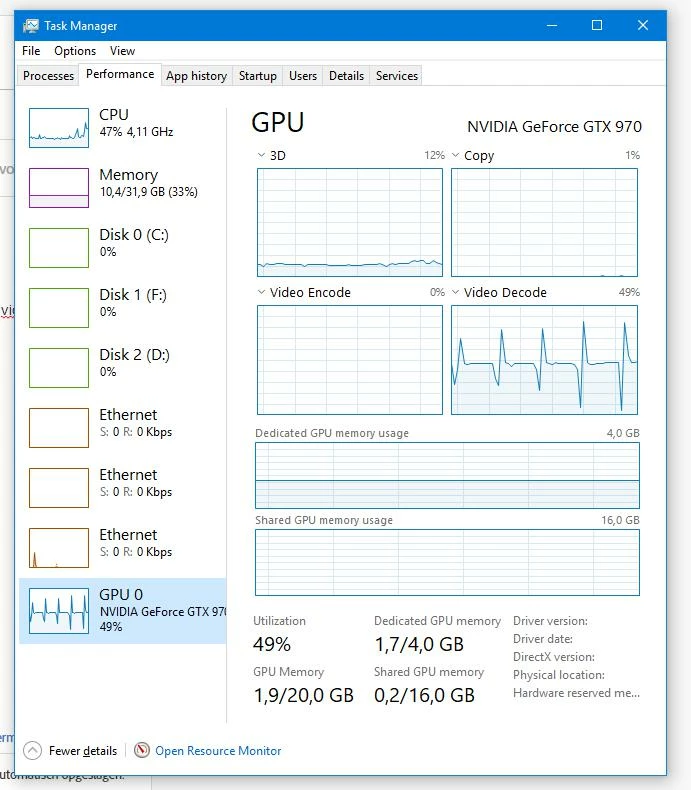
- VLC player. When i play back a h.264 video with external program like VLC player, Windows taskmanager show30-50%  activity for video decode. CPU is 25%. 4K source is played bask smooth.

- Premiere pro, same 4K video. In task manager no videodecode activity. I tested 8bit source: 1920 /3840 /4096 and 8K. All the same. No video  hardware decode support. Playback is missing frames. 100% cpu.

Question.
Premiere is NOT using hardware video decode form my videocard. Is this as intended? ()

Why is PP not using video hardware decode for the source monitor. Playback videos in source monitor is of course without effects and now missing frames for 4K source. Faster cpu will help but CPU utilization will alwaysd a lot less if videocard hardware decode is used. That is where it is for. And sources like h.264 and h.265 in 4K are normal now.
This topic has been closed for replies.

3 replies

R Neil Haugen
Legend
July 6, 2019

Designing the functions of the supported hardware for an NLE is a complicated set of trade-offs. And every design team chooses different ones as best seems to fit the aims they're going for. Premiere was built around the CPU/RAM subsytem being the primary 'base' encoder, with the GPU hauled in for assigned specific tasks. Some of the 'reserved' GPU tasks, like Lumetri processing and Warp Stabilizer, can dominate many GPU's capabilities.

Ergo, the way the engineers designed the system.

There's always room to look at modifications, of course. Feel free to suggest them here, and especially on the bug/features UserVoice page ... and if you do post there, reply back here with a link so others may "upvote" if they choose.

Adobe UserVoice Bug /Feature form: https://adobe-video.uservoice.com/forums/911233-premiere-pro

Neil

Everyone's mileage always varies ...
agnesb93211948
Participant
July 6, 2019

Thanks, i am not sure if there is some setting to force Premiere to use hardware decoding of source material.

the point is that the very fast hardware decode form a good videocard is there already for many years. It is used in many even free videoplayers. 2K ,4K even 8K is possible on relative slow CPU computer.

It doesnot seem too complicated if free videopayer can handle it.

Legend
July 6, 2019

Premiere Pro can use the QuickSyc feature of some Intel processors for hardware decode/encode, but not the GPU.

agnesb93211948
Participant
July 6, 2019

It seems strange to use a CPU-buildin relative slow video if there is a fast videocard. I suppose that a RTX1060/70 has more decoding possibilities than a buildin GPU.  Not all CPU's have a buildin GPU.


Maybe this was a choise from the design team years ago when videocards didnot have sophisticated harddecoding.?

R Neil Haugen
Legend
July 6, 2019

Playback is just one factor of editing. The engineers have to build a system designed to handle a ton of different effects on different media that's grabbed bit by bit from there and there and assembled into "a video" on the fly.

It's incredibly more complex than a simple video player.

And within this NLE are some effects that will rag that card out. Would you rather the card was used for basic playback instead of the heavier effects?

I wouldn't. We need *balanced* rigs designed with the app in mind. And that differs app to app.

Neil

Everyone's mileage always varies ...
John T Smith
Community Expert
Community Expert
July 6, 2019