



Harm_Millaard
Inspiring
March 12, 2011
Question

System requirements for Premiere Pro CS5

  • March 12, 2011
  • 11 replies
  • 154563 views

Adobe has on its website the Adobe Premiere Pro CS5: System Requirements

Unfortunately, this overview is severely lacking in realism and a lot of people were disappointed when their system met these minimum requirements, but still would not do what they expected, or at least not without jerkiness, hiccups and similar issues.

The problem with these requirements as stated is that they are really bare minimum requirements to install the software, but unfortunately it does not tell how well a certain system will perform with the myriad of codecs used and the different needs and expectations people may have about their editing rig. Since this issue is nearly a year old now and nothing tangible has changed, I decided to write this article to help people understand what is realistic to expect, what influences the hardware choices in order to use CS5 to full satisfaction.

CAVEAT: This is my personal opinion, in no way authorized or endorsed by Adobe, who have not seen anything I write here till the moment it has been published here.

Context:

The nature of one's editing projects can have a major impact on the hardware required to run projects effectively. Long form documentaries, delivered on BRD demand different hardware and priorities in hardware setup then music clips with lots of multicam work and color effects delivered to the web, or wedding video's delivered on DVD. And unfortunately, there is no simple rule saying that if you edit X, you need Y hardware.

The second thing that has a major impact is the source material, the codec used. Back in the old days things were very simple, you had DV material from a tape based camera and that was it. Nowadays, things have grown much more complex. The number of codecs used in source material has grown enormously, the number of formats and frame rates has grown in a similar fashion. We used to have 480, now we have added 720, 1080, 2K, 3K, 4K plus various DSLR and other formats, we had interlaced, now we have progressive as well, we used to have 25 or 29.97 FPS, now we have 24, 25, 29.97, 60 and even more frame rates. We had DV, now we have MPEG2, HDV, XDCAM, P2, AVCHD, RED, Cineform, Matrox, and numerous other codecs.

This makes it all the more confusing for people to know what they need when they start out with video editing to run CS5 successfully.

The codec issue:

Some codecs are easy to handle for a computer, others are difficult to handle. It is generally known that DV material is very easy to handle and AVCHD is pretty tough to handle. The general rule is that the more compressed the material is, the harder it is for the computer to edit this. GOP (Group of Pictures) structure is an extra burden. The higher the resolution, the harder it is on the computer.

To simplify matters one could differentiate codecs and source material in three categories, based on their properties:
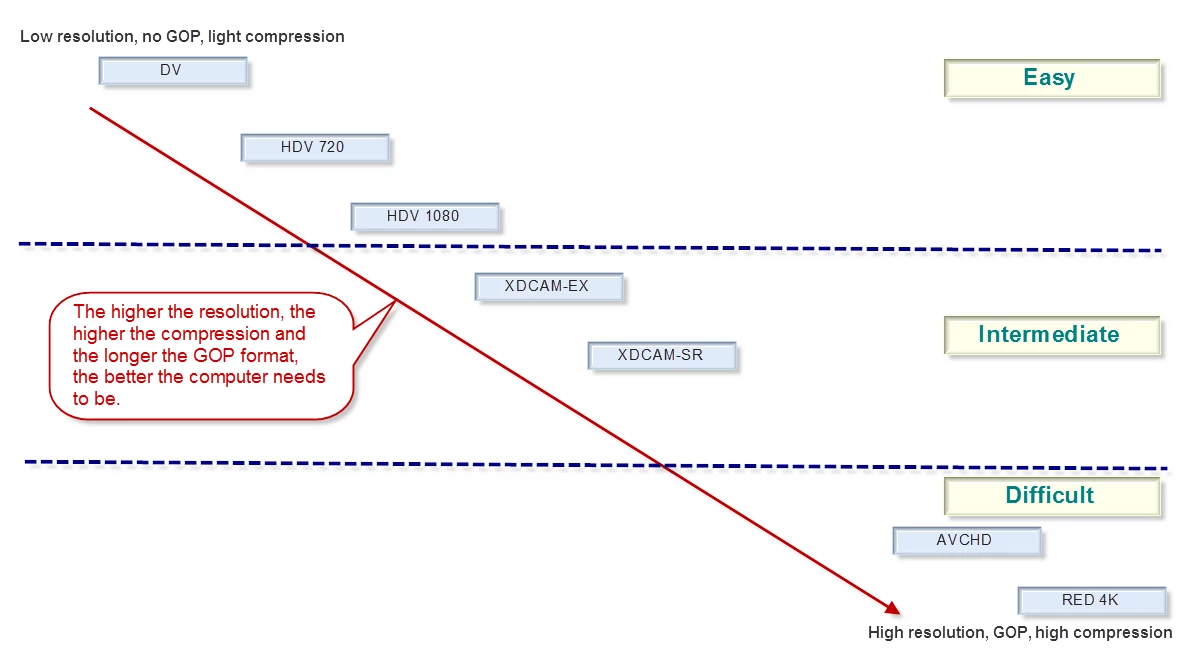
Of course boundaries when using three categories are not always very clear, but the tendency is rather clear. Easy codecs are in the upper left corner, difficult codecs are in the lower right corner. For that reason we have identified three categories, Easy, Intermediate and Difficult.

This is somewhat similar to the color coding PR uses with none, yellow and red in the time line. It is not complete in the overview of common codecs, but is intended to show what the impact can be of different codecs and the hardware requirements.

I realize this is a limited overview and generic in nature. It will not answer all questions, but may be helpful to avoid disappointments. It also has a number of limitations. For instance, uncompressed MS AVI SD material. No GOP structure, no compression, low resolution, that should be at the top left corner, right? Wrong. Uncompressed does not burden the CPU, but is a definite burden on the memory and disk I/O system.

What does that mean in terms of requirements?

System requirements:
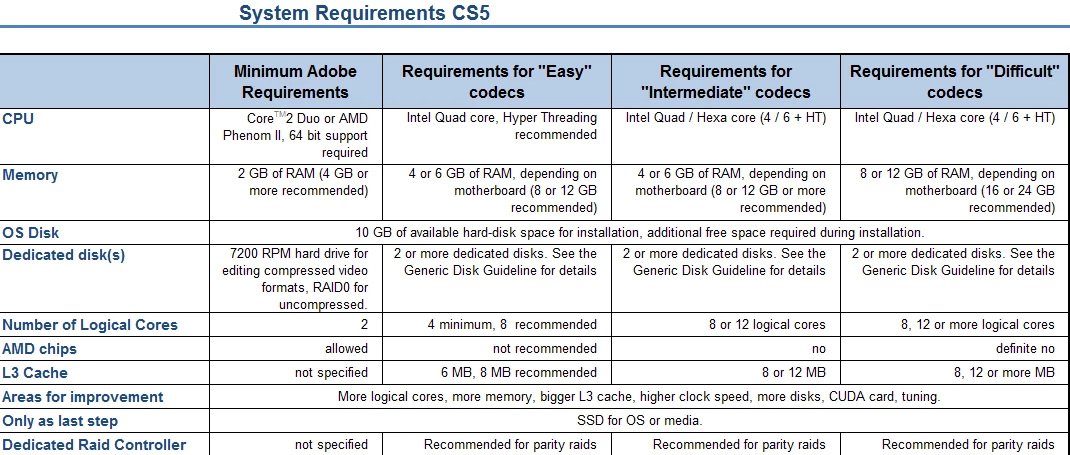
If the codecs you generally use are slightly more than just plain "easy", look at the improvemnts in the next column and repeat for the next column if applicable.

I hope this can benefit people to understand there is more to choosing a system than just following the Adobe site.

Additions or suggestions for improvements are welcome.

    This topic has been closed for replies.

    11 replies

    Participating Frequently
    October 20, 2013

    I have a Dell Optiplex 760 I got for $60.00 it has 4 gb ram 500gb hard drive intel quad 3.0ghz CPU. I want to run premiere pro cs5.0 do you see any problems I might have. I plan on running Vista business 64 bit. and I am going to upgrade to 8gb of ram.

    cc_merchant
    Inspiring
    October 20, 2013

    Great machine for your kids. Lousy for editing anything.

    Tweakers Page - What kind of PC to use?

    Participating Frequently
    August 12, 2011

    Hi,

    I just upgraded from CS5 to CS5.5 and am finishing a DV movie before making the movie to a AVCHD 1080P camera (probably a Sony or Canon camera).  That being said, one of my RAID arrays died and I wanted to get some feedback on the best setup.  I'm going to be replacing both arrays since I have had repeated issues with the Seagate models that I ahve now due to known firware issues. Here's what I am going to have in my setup.

    i980x 2.93 Ghz

    12 GB DDR3 RAM 1066

    GTX295 using CUDA hack to enbable Mercury Playback

    1 TB Western Digital Black drive partioned with Windows 7 Ultimate 64 bit and Vista Ultimate 32 bit (I'm currently only using Windows 7) - Storing my Premiere Pro project file

    (4) 1 TB Western Digital RE4 making (2) 2TB RAID 0 arrays - 1 array for capture and 1 array for media cache and render

    My capture array is currently an MBR partition with file allocation set at 32k.

    My render array that failed was set up as MBR with a 4k file allocation size.

    I noticed a definite difference in speed on my capture array set at 32k where my previous system was set at 4k.

    Since my render array died I moved my render files to the capture drive and found that render times are much quicker than when they were on the separate array set at 4k.

    Do you think it's because the render files are on the same drive as the captured clips or because of the 32k file size?

    I had left the render drive at 4k since the files tend to be very small whereas capture clips are larger and once I go to HD would be presumably even larger.

    Is there any reason to create the new arrays in GPT if it's just a single partition per array?  Should I make both arrays with 32k?  Is there any downside aside from eating up more space?

    A post in another forum said to put the project file on the capture RAID array.  I always though the ideal setup was to keep them separate.  What's the advantage/disadvantage to doing so?

    Why have the Windows swap file on one of the RAIDED drives?  Can Windows crash if the RAID array failed?

    Sorry to ask so many questions.

    I know that you have another RAID forum topic but since this system is geared towards CS5.5 I though it might be more approproate to post here.

    Thanks in advance.

    Legend
    August 12, 2011

    blackrosekiller,

    Don't get any of the WD RE series hard drives if you're going to use them in RAID 0. Their firmware has the TLER feature permanently enabled, with no way at all whatsoever to disable the feature. That feature is beneficial if you're using a parity RAID level such as RAID 3,5 or 6 - but actually hinders reliability in RAID 0. The TLER feature kicks in after seven seconds if it encounters a read error - but then the drive simply gives up reading in RAID 0 because there is absolutely no redundant data to recover from! That results in permanent loss of data.

    Participating Frequently
    August 12, 2011

    Wow!  Good to know.  My computer compnay just shipped them to me and I haven't put them in yet.  I have had really bad

    luck with Seagate and better luck with Western Digital.  I don't have the money to lay out for 4 1TB VelociRaptor drives.

    Does anyone know how the Western Digital Black drives would perform with RAID 0?  I have had 1 for my OS and 1 for a data drive that I just store images and documents on for about 6 months and they seem okay.  Or is there another comparable drive that you would recommend within that price range.

    Participating Frequently
    July 30, 2011

    So, here it is. After months of wrangling with two different procurement departments they have finally agreed to a purchase and will fax the (out of date) order to the company sourcing and building the rig on Monday or Tuesday.

    BUT IS IT GOOD TO GO?

    My fear now is that, due to the excruciating wait, the original spec for CS5 (with a great deal of help from Harm and other Forum friends) may be somewhat lacking for CS5.5.

    The agreed spend on this kit is around £2.5K (without monitor or software) and here are the main parts:

    i7-970 with Corsair A70 cooler, ASUS Sabertooth X58, ASUS GTX590, 24GB G.Skill DDR3 PC3 10666 1333 + cooling fan, Antec Quatro 850w, all in an Antec P183 case. (Windows 7 Ultimate).

    Without software, about £1900 so far.

    Your thoughts on this list welcomed and your recommendations gratefully received (before it’s too late and I end up with?????).

    As to drives, and here I AM LOST, do I go (c) 1 x SSD (make???) (d e) 2 x WD VelociRaptor 300GB (5 year warranty) OR:

    (c) 1 x WD VelociRaptor 300GB and 3 x WD Caviar Green (and RAID0 2 of them??)

    At this 11th hour any feedback would be welcomed and when this rig finally gets fired up I will report back as to how it's doing.

    Peter Baylis

    Inspiring
    July 30, 2011

    Peter,

    Regarding the GTX 590, don't do it! It has 2 GPUs inside, uses the NF200 chip, and was made to run in SLI (VERY incompatible w/ Adobe CS5 and CS5.5). Besides a GTX 560 or 570 both have plenty of GPU power for Premiere.

    Regarding drives, for your price point, best stick to 7200 rpm drives; order as many drives between 1TB and 2TB (all matched) as your case/budget can handle (up to 5) and set one up as the boot drive. You can come back here later to figure out how to best configure them for your needs, but that need not slow down ordering your hardware at this time.

    Jim

    Participating Frequently
    July 31, 2011

    Thanks Jim, very useful. ?as the price of the 560 is very reasonable would CS5.5 at the high end benefit from 2x560.

    I take on-board your rec' for 7200 (other than Green) and will plumb for:

    C SCSI, D page etc, E media, F final projects and G stills work.

    I have no working knowledge of RAID and if you think CS5.5 will perform on the rig and benefit from CUDA use, do I need RAID at all?

    Peter

    Date: Sat, 30 Jul 2011 15:29:37 -0600

    From: forums@adobe.com

    To: peterbaylis@live.co.uk

    Subject: System requirements for Premiere Pro CS5

    Peter,

    Regarding the GTX 590, don't do it! It has 2 GPUs inside, uses the NF200 chip, and was made to run in SLI (VERY incompatible w/ Adobe CS5 and CS5.5). Besides a GTX 560 is plenty of GPU for Premiere.

    Regarding drives, for your price point, best stick to 7200 rpm drives; order as many drives between 1TB and 2TB (all matched) as your case/budget can handle (up to 5) and set one up as the boot drive. You can come back here later to figure out how to best configure them for your needs, but that need not slow down ordering your hardware at this time.

    Jim

    >

    Participating Frequently
    July 17, 2011

    Thanks for the informative discussion. I'm just starting out with PPCS5.5. I would like to use a Mac Book Pro 13 with i5 8GB Ram to learn PP5.5. If I use a codec such as ProRes or Avid (can't remember the name dvi?) and a 3 hard drive set up with 7200 rpm FW800 would this be enough to work with HDV?

    I plan to get another desktop in about six months to a year but would like to use a MBP 13 in the meantime. I'd like to use this for instructional video in HD. What would editing say 30 minutes that would look like HD on a HDTV? Would rendering take the longest? Could I just let it render overnight? Or is this just not a good idea to use a 2 core? Would it be too jumpy and delay to learn how to edit? I suppose I could go straight for the desktop but would rather start off on the laptop and get the desktop later as I'll probably not be doing anything dynamic for a while. At the most 2 cameras and be able to edit sound overlays, etc.

    thanks for any advice..

    John C

    Legend
    July 17, 2011

    It's not a good idea to edit anything HD on any system (laptop or desktop) based on a dual-core CPU. In fact, HD video editing beyond simple HDV requires a CPU with at least four physical cores in order to work well (the mobile i5 CPUs are only dual-core with HyperThreading rather than true quad-core). Unfortunately, all of the MacBook Pros fall well short of Adobe's minimum practical requirements: None of them are available at all with Nvidia GPUs (all of them either use integrated Intel HD graphics or offer only AMD/ATi GPUs - all of which are not supported at all at present in MPE's GPU-accelerated mode, and thus would "permanently" lock Premiere Pro into MPE software-only mode).

    Participating Frequently
    July 17, 2011

    Agreed!!!! Only trouble results by not using enough computer power for an

    application. Money and time wasted along with lots of frustration that can

    be avoided by just saving a little more.

    Tom

    Participating Frequently
    July 12, 2011

    Harm,

    A while back you gave me some advice re a kit build for Production Premium, which I submitted for consideration, and for your thoughts I thank youl. Several months on, the powers that be (UK Civil Service) have decided to go a different purchase route. The request has ended up in the hands of a well known computer supplier 'chain' (a prefered supplier) and because they can't supply the Sabertooth board you recommended they have come back to my bosses with a their recommendation based on what they will supply. My question is, would you accept it, will it take advantage of CUDA and do you foresee any problems:

    I am shooting with a Panasonic AG-HMC151E AVCHD. H.264 MPEG-4 compression.

    The chain are quoting:

    Windows 7 64 Ultimate

    CS5.5 PP

    on:

    Intel DX58sO2 Extreme

    i7-970

    Trudata 12GB DDR3 PC3-8500 1066MHz Unbuffered 204-pin

    HP NVIDIA Quadro 4000 2.0GB

    1 x WD 450 velociraptor 10k

    3 x WD 1TB AV-GP Greenpower 64MB SATA-II (NO RAID)

    800W PSU

    The problem with preferred suppliers is you get what you are given. Do you think there any 'conflicts' in the above spec?

    Appreciate your opinion

    Regards

    Peter

    Legend
    July 12, 2011

    Sorry to say this, but the chain made a few wrong choices. The AV-GP hard drives are not compatible with PCs at all - but instead they are designed specifically for standalone HDD-based DVRs and PVRs. And their "800W" PSU could have been a generic one that could have handled or provided barely half that much before failing. And the Quadro 4000 costs way too much money given its hardware specs (it is based on the original power-hungry GF100 that the GTX 480, GTX 470 and GTX 465 were also based on, but cut to only 256 cores on the Quadro 4000 versus the 480, 448 and 352 cores on the GTX 480, 470 and 465, respectively). For so much money, there is zero practical performance improvement in CS5 over the cheaper GeForce GPUs. And as I have found out, 12GB of RAM is not quite enough RAM for CS5.

    Participating Frequently
    July 20, 2011

    Thanks RjL appreciate all the input from the experts. This leaves me at the starting blocks again and as many of you have experience of CS5.X would you be good enough to list a minimum build that will make use of the upper capabilities of the programme?

    I have taken the input about PCW but still have to go through this process of at least two quotes.

    So any kit spec advice would be appreciated.

    Peter

    Participating Frequently
    March 29, 2011

    Hi Everyone,

    I am new to this forum and have some questions before I purchase Adobe® Creative Suite® 5 Production Premium software.  I am planning on starting a business taking photos, and video from many sources, cameras for editing.  Primarily, I will be working on Weddings and similar events.  Below are the questions:

    1.    Is Adobe® Creative Suite® 5 Production Premium the Software of choice? (I welcome other choices)

    2.    Does my computer have the necessary requirements? (See below for my computer hardware)

    3.    Any other third party software recommended?

    4.    Hardware recommendations additions for the computer

    5.    Camera choices, video camera choices and accessories choices.  (keep cost concerns in mind)

    Computer:

    Windows 7-64 bit Professional

    Processor:     Intel(R) Core(TM) i7 x990 @3.47 overclocked to 3.91 (six core)

    Memory:         24 GB

    Disk Drives:   1) C300 True Solid State Hard Drive (256 GB) C: Drive

                            2) WD Caviar Black 2 TB SATA Hard Drives D: and E: Drives

    RAID:             None

    Video:            NVIDIA GeForce GTX 560 Ti

    Audio:            ASUS Xonar Essence STX Audio

    Motherboard:Asus Rampage III Extreme

    Participant
    April 12, 2011

    Adobe software tends to be the industry standard when it comes to multimedia.  Since you are looking at photography, video and multimedia I believe Adobe Creative Suite would be best as all the software is right there.

    Your computer should be fine when it comes to handeling file types.  You have a strong rig that is well built, I believe you should be able to handle almost anything you throw at it.

    As for third party software, I don't think it is necessary-unless you need it for something specific.

    I'd possibly suggest RAIDing the two caviars.  You will get redundancy, faster read writes and that.  I'd wait to see what the others around here say.

    As for video cameras, you can go prosumer or professional...your choice.  I have a Canon Vixia M31 (prosumer) and that seems to do a nice job.  As for a cameras, stick to DSLRs.  Canon makes a bunch of nice gear.  I'm not to much into that gig yet, but am expanding from web design and development to multimedia (video/audio).  Don't forget tripods, cables and that...it really depends on what you want to do.

    Participating Frequently
    April 13, 2011

    Thanks so much.  I feel better about spending the added price on CS5.5 Production Premium which includes Premiere Pro.

    March 28, 2011

    First off, Harm...I've been reading your responses all over the Adobe forums and I have to say thanks. You seem to be very knowledgeable and I'm hoping you can shed some light on issues I've been having related to system requirements.

    Basically, I'm barely a step above hardware illiterate -- an important step, but still. I saw the article Adobe posted on system requirements and was immediately concerned that I do not have the correct graphics card for my workflow to, well, flow.

    I've seen how this works, so let me get down to the meat and potatoes:

    (copied verbatim from the "about this mac" menu)

    Mac version 10.6.6

    Processor: 2 x 2.66 GHz Dual-Core Intel Xeon

    Memory: 10GB 667 MHz DDR2 FB-DIMM

    Running off a 1TB drive

    (copied verbatim from the "more info" tab)

    Model Name: Mac Pro

      Model Identifier: MacPro1,1

      Processor Name: Dual-Core Intel Xeon

      Processor Speed: 2.66 GHz

      Number Of Processors: 2

      Total Number Of Cores: 4

      L2 Cache (per processor): 4 MB

      Memory: 10 GB

      Bus Speed: 1.33 GHz

      Boot ROM Version: MP11.005C.B08

    Adobe CS5 Production Suite installed

    Drobo RAID via Firewire 400 (pretty sure it's 400, not 800)

    Here's what I am in dire need of: someone to tell me once and for all that my system is (a) just fine, or (b) needs work. I am on a borrowed system essentially. I started work at an ad agency and came onto a system that had been used for video by someone who did not do video by trade. The girl before me was a graphic artist who, unfortunately, got roped into video work because there was no one else to do it. Anyway, since I took over working on this machine, the system drive has failed once and it was just cloned again this morning because the disk utility said the disk was failing yet again.

    Aside from that misfortune, PPro has a ton of bugs, runs about as fast as cold molasses and frequently leaves artifacting and lines in exported video projects, none of which are longer than 10 minutes. My native format for video is .MXF from the Sony XDCAM HD -- beautiful stuff, comes in just fine, works wonderfully on the timeline until I start keyframing, then I grab a pillow and take a nap for 2 minutes at a time while it loads the frame I'm working on.

    I'm rambling a bit, so I will tie this up and allow you to respond...if you require more information I'm more than willing to provide it, assuming I know what you're talking about. You may need to dumb things down for me, sorry.

    Thanks!

    Kristin

    Harm_Millaard
    Inspiring
    March 28, 2011

    Kristin,

    I feel for you and especially with a system as fast as molasses in winter now that spring has begun, but basically the system is pretty slow. Possibly the unresponsive nature of the system makes you feel there are a lot of bugs, but I think it is more the capability of the system, than bugs. CS5 is not bug free, no program is, but by far the most stable and reliable version ever brought to market IMO.

    What you are facing is a system with rather dated and slow Xeon CPU's and an insufficient hard disk setup. The Drobo is good for backups, but nothing else. Whether you want to remain on a MAC platform or switch to a PC environment is your choice, but it seems very advisable to prepare for a complete overhaul with better CPU's and a better disk setup.

    March 28, 2011

    It didn't stand to reason that CS5 was quite that buggy. I know it's not perfect yet, but it will get darn close. Unfortunately, I don't have much control over switching from Mac to PC platforms. Can you offer any advice for a better build on the current platform? Honestly, any specifics you have, even if its directing me to a thread that could shed some light on the subject, that'd be amazing. The higher-ups here are rather dead-set. I will need to make a very compelling case to see any improvement. Assuming I don't tear all of my hair out and/or throw this thing out the window before then.

    Thanks for the speedy response by the way. Take care,

    Kristin

    Participating Frequently
    March 15, 2011

    Fantastic article. I really like how you differentiate the needed hardware based on the CODEC to be used. This is a great approach and one I think I will "borrow" for future articles on Videoguys

    Just a heads up, I've updated our DIY8 article to reflect the latest info and chipset pricing. Intel Hex core has fallen to $599. I'm still onthe fence about the new Sandy bridge chips. while I thinkt ehy are fantastic for laptops, not so sure I like them for workstations. When you add PCIe cards for I/O (eg Matrox MXO2 Mini or AJA Kona) and an exteral RAID controller, I'm concerend about throughput bottlenecks.

    Once agian, great job on the article.

    Gary

    Videoguys.com

    Participant
    March 13, 2011

    I'd move HDV into the "intermediate" category - XDCam EX is essentially the same codec.

    I'd put DVCPro50 and DVCPro HD into the "EASY" category, along with DV.

    March 13, 2011

    This is great information.  I had no idea my GOP's were choking my system so much, but it makes complete sense; those ginormous multi-mega-pixel images X hundreds

    Thanks for the info!