


Participating Frequently
February 14, 2018
Question

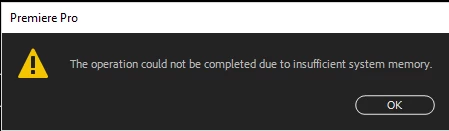
The operation could not be completed due to insufficient system memory

  • February 14, 2018
  • 7 replies
  • 10820 views

I'm receiving the error "The operation could not be completed due to insufficient system memory" when attempting to copy footage from an existing sequence, opened as a read only, into my current timeline. It's only occurring on a singular computer but all other identical computer are working fine. I ran task manager while attempting it and Premiere only used up 6% CPU & added 3% memory usage (22% increased to 25%). Does anyone have any suggestions or recommendations? Thanks!

Computer Specs:

32GB Ram (26gb are allotted to Premiere)

8GB DDR5 (NVIDIA Quadro P4000)

500GB Internal HDD

Premiere Pro 2018 v12.0.1
This topic has been closed for replies.

7 replies

Participant
September 15, 2023

i felt the same problem and i just turn off my auto save , it was solved well


Participant
April 20, 2023

I think you must close all other programs. Or creat your project in another drive.

sssdsa
Participant
February 6, 2021

Please check if your media folder is read-only. I had this same issue, and once I disabled read-only on my drive/media folder, it went away.

davidt64969498
Participant
April 18, 2018

I am experience the same issue. Nothing else is open and I restarted my computer. Only program pulling sufficient memory based on my activity monitor is Premier. I can't copy and paste sfx or clips from an old project that I opened via the media browser. I was able to do this just yesterday and I have made 0 update or changes to either my IOS or premier (auto update is not turned on either). This is happening in multiple project files as well so the files not corrupt.

Participating Frequently
March 17, 2018

This happened to me recently. (Premiere CC 2018 on Mac)

I figured out that it only happened if I was cutting & pasting clips that included media that had not been imported into the project, i.e., pulling a clip from finder directly onto the timeline without adding it to a bin. Cutting and trying to paste that clip reliably brought up the error message.

Adding the clip to a bin got rid of the problem. No relation to memory or CPU usage. Just yet another misleading error message.

Adobe have not resolved the errors surrounding drag-and-dropped media for several iterations now. For example, pulling a clip from finder into the source monitor and pressing "Reveal in Project" will crash Premiere every time.

Inspiring
February 22, 2018

I have been having the exact same problem since the update to CC 2018. Haven't been able to find a solution. :/

Only alternative I've been able to work out is to import the entire sequence using Media Browser into the project, which is way more than I often care to.

(How would it be able to copy ENTIRE sequences and not a clip in a sequence? Points to a software issue over hardware.)

Ann Bens
Community Expert
Community Expert
February 14, 2018

I have seen this when I have too many programs open at the same time.

natelT5Author
Participating Frequently
February 14, 2018

My initial thought was the same, but I closed every program other than Premiere and the problem still persisted.

Ann Bens
Community Expert
Community Expert
February 14, 2018

Did you reboot and just using Premiere?